

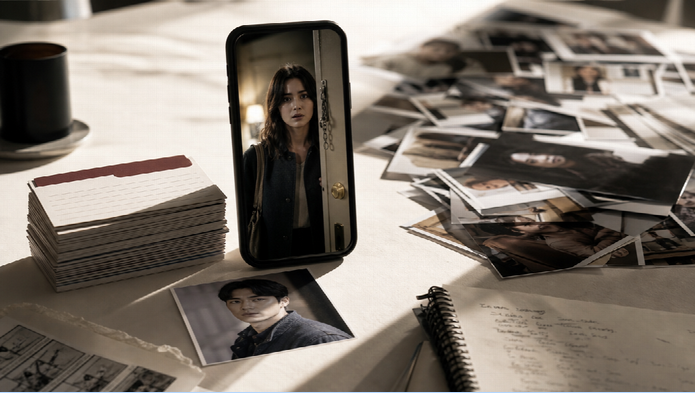
Vertical short dramas still hold attention because viewers binge for emotion, cliffhangers, and familiar faces — not for another disconnected AI clip. The hard part is no longer “can AI make a scene.” It is keeping cast, locations, dialogue, and episode pressure consistent while you ship on a phone-first schedule.
Drama Studio on Topview is built for that job. It combines AI planning, a structured workbench for story assets, storyboards, and beat-to-video production in one project — so short drama creators can move from idea or script to episodic scenes without juggling five apps. When it is time to generate a longer story beat, you can route the shot to a capable video model such as Wan 3.0 without abandoning the episode package you already approved.
Why Vertical Short Dramas Keep Winning Attention
Short dramas work because they borrow the trust mechanics of serialized fiction: recurring characters, quick emotional turns, and endings that force the next tap. Viewers stay when the lead looks like the same person episode after episode and when the conflict is easy to feel in under two minutes. Overly promotional jargon kills that spell. Clear motives, readable faces, and a cliffhanger that feels earned keep people watching.
AI helps when it supports that structure. It fails when every episode is a fresh prompt with a new wardrobe and a mute background.
Essential Elements That Make AI Short Dramas Convincing
Convincing AI short dramas lean on planning and continuity more than on flashy single shots:
- A clear episode question the audience can repeat
- Locked character, location, and prop records
- Natural dialogue and voiceover that match the scene
- Shot-by-shot boards before heavy generation
- Captions and vertical framing for mobile viewing
- One unfinished line or choice at the end
Product-style benefits can appear inside the story, but the scene should still feel like a relationship move — betrayal, reveal, refusal, deal — not a feature list.
Steps to Produce a Short Drama Episode in Drama Studio
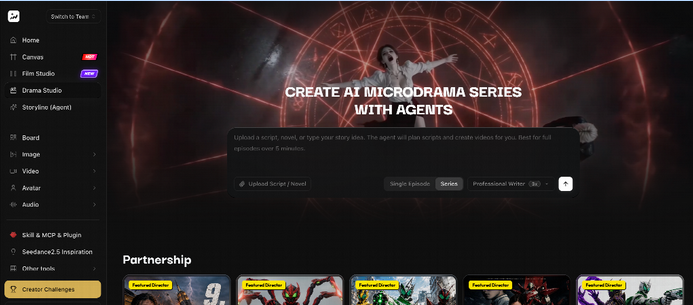
Step 1: Start a project and feed the story source
- Open Drama Studio and create a project.
- Start from a one-line idea, a short outline, a full script, a novel chapter, or a serialized concept.
- Let the planning agent help clarify direction, adaptation choices, and next production tasks.
- Review suggestions in the workbench instead of leaving decisions trapped in a chat transcript.
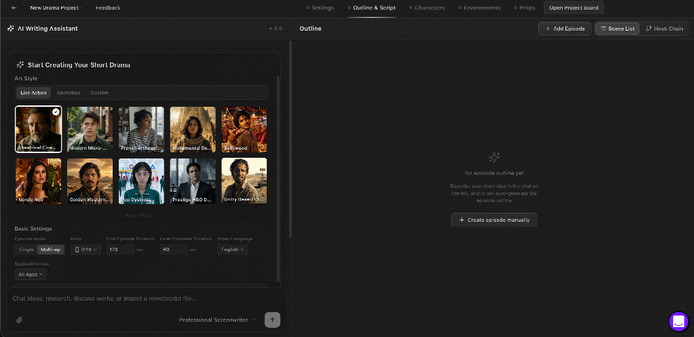
Step 2: Lock characters, locations, props, and the beat sheet
- Create editable character cards with visual references you will reuse.
- Add recurring locations and key props so the world does not reinvent itself.
- Build an episode outline with scene details, dialogue, emotional beats, and production-ready script cards.
- Approve a 6–8 beat sheet that ends on a cliffhanger before you burn generation credits.
Step 3: Storyboard the episode, then generate approved beats
- Turn approved scenes into multi-panel storyboards and check shot flow.
- Bring useful image, video, or audio results from the project board back into production.
- Open approved beats in the production workspace with prompt editing, references, versions, and export.
- For a longer narrative or omni-reference story beat, select a strong video model such as Wan 3.0 when you need roughly half a minute of multimodal continuity and native audiovisual impact — then return the take to the same Drama Studio project.
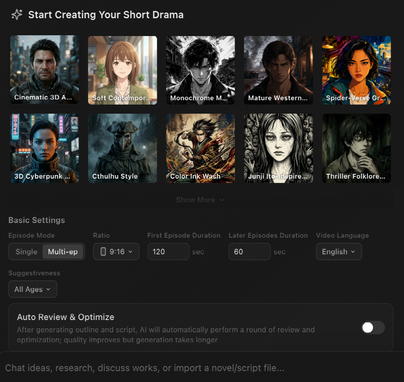
Step 4: Refine, caption, and save the episode cut
- Preview on a phone-sized frame, not only on a wide desktop window.
- Fix continuity first (face, wardrobe, room), then polish dialogue and captions.
- Keep versions organized in the project so episode two can inherit the same cast.
- Export the episode master before slicing vertical hooks from it.
Using Drama Studio Assets to Keep Episodes Believable
Reusable records are what separate a drama series from a folder of demos. Character sheets, location locks, and prop tokens give every generation a job. The agent can propose structure; you approve the package. Storyboards make pacing visible before video spend. That same continuity habit is why picking a model like Wan 3.0 for a heavy story beat still works — the references and episode cards already exist upstream.
Creative Techniques That Improve Short Drama Quality
Small choices raise quality without overproducing:
- Open on a face or conflict in the first seconds
- Keep one relationship move per episode
- Use B-roll or quieter frames between intense dialogue
- Burn in captions for silent autoplay feeds
- End on a choice, accusation, or arrival — not a logo sting
Music and effects should support the line delivery, not drown it.
Helpful Drama Studio Capabilities for Episode Teams
Drama Studio is useful because the stages stay connected:
- AI agent planning paired with a structured workbench
- Editable outlines, scripts, characters, locations, and props
- Storyboard and board asset workflow
- Beat-to-video production with references and versioning
- Room to use frontier video models (including Wan 3.0) for specific beats without leaving the series context
That is closer to a one-person drama desk than to a single “generate video” button.
Best Practices for Professional Vertical Drama Episodes
Keep messages short, emotional, and targeted. One cliffhanger per episode is enough. Reuse visual identity so the cast remains recognizable. Optimize for 9:16 consumption patterns on TikTok, Reels, and Shorts. Review pacing before publish so dead air disappears while conversational delivery stays intact. Balanced storytelling beats salesy detours every time.
Key Production Checklist
- Set one episode goal before writing beats
- Lock cast and location references before generation
- Use one core conflict per episode
- Avoid contradictory plot messages in the same cut
- Keep wardrobe and props consistent across takes
- Prefer clear voiceover / dialogue balance
- Add captions for mobile silent viewing
- Use natural pauses and listening faces
- Avoid mechanical narration and over-acting
- Hook in the first seconds; cliffhanger at the end
- Store approved takes in the Drama Studio project
- Route long story beats to a fit model such as Wan 3.0 when needed
Conclusion
Vertical short dramas still work because audiences trust serialized emotion more than disconnected spectacle. Drama Studio makes the production path practical by keeping planning, story assets, storyboards, and episode video in one creative environment. Structured workflows, reusable characters, and flexible beat generation — with models like Wan 3.0 available when a scene needs longer multimodal continuity — help teams ship episodes that feel intentional, consistent, and ready for mobile binge watching.
