

By Marco Villanueva | Last updated: October 2026
You pay for one hour of Piso WiFi. Then you have to leave for twenty minutes. The timer keeps running. When you come back, much of your time is gone.
Pause Time is made to stop that. This guide shows you how to pause and resume a session, what to do when the button is missing, and why your time sometimes disappears. There is also a short section for machine owners.
Quick answer: Connect to the Piso WiFi network and open the portal page in your browser. Check your remaining time and tap Pause. Wait for the “paused” message. When you return, open the same portal on the same device and tap Resume. This only works if the owner has turned Pause Time on.
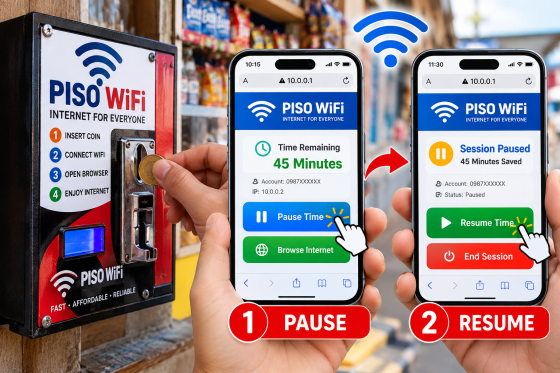
A Piso WiFi machine and the pause and resume buttons on the portal page. Image source: original illustration by the author.
Pause Time at a Glance
| What it does | Stops your timer and keeps your remaining minutes |
| Where you find it | On the portal page in your browser, often at 10.0.0.1 |
| Where it works | Only on machines where the owner turned it on |
| Who can use it | Usually the same phone or laptop that started the session |
| How long can you pause | The owner decides. Ask before you leave |
| Does turning off Wi-Fi pause it? | Not always. Tap the Pause button first |
How Piso WiFi Works
Piso WiFi is a coin-operated internet service. A local owner shares an internet connection and sells it by the minute. You pay with coins. Some newer machines also accept vouchers or e-wallets.
The machine has a coin slot, a small control computer, and a router. After you pay, it adds time to your device. A timer counts down while you browse. When it reaches zero, the internet stops.
Most machines do not ask for your name. They know your device by its network ID, called a MAC address. This is why you do not need an account. It is also why your time is usually tied to one device.
What Is Piso WiFi Pause Time?
On machines that support it, Piso WiFi Pause Time stops your countdown and saves your remaining minutes. The timer starts again only when you tap Resume.
Without it, the timer runs whether you are browsing or not. A ten-minute break costs you ten minutes of paid time.
The pause is saved on the machine, not on your phone. So you can close your browser or lock your screen, and your saved time is still there. Not every machine has the feature. The owner or the software decides.
How to Pause and Resume Your Session
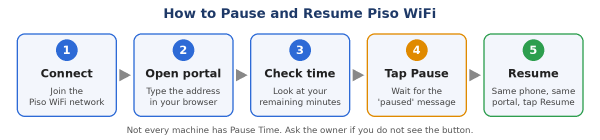
The five basic steps. Buttons look different on each machine.
- Connect. Join the Piso WiFi network. Most do not need a password.
- Open the portal page. It may open by itself. If not, type the address from the machine sign into your browser. Many machines use 10.0.0.1.
- Check your remaining time. Take a screenshot so you have proof later.
- Tap Pause or Pause Time. The button is on the portal page during an active session.
- Wait for confirmation. The page should say your session is paused. Do not leave before you see it.
- Resume later. Reconnect to the same network, open the portal, and tap Resume or Continue.
Tips for Android, iPhone, and Laptop
- Android: Turn off mobile data before opening the portal. Your phone may prefer mobile data and block the portal page.
- iPhone: The portal often pops up after you connect. If it does not, open Safari and type the address by hand.
- Laptop: Use one browser for the whole session. Type the address in the address bar, not the search box.
Why Is There No Pause Button?
This is the most common problem. Here are the usual reasons and what to do:
| Possible reason | What to do |
| The owner turned the feature off | Ask the owner to turn it on |
| The machine software does not support it | Use one of the workarounds below |
| You have no active session yet | Add time first. The button may appear only during a session |
| The page is loading from old saved data | Refresh the page or open it in a private tab |
| You reached the pause limit | Ask the owner how many pauses are allowed |
No Pause Button? Three Smart Workarounds
- Hold a voucher. On some systems, the timer starts only when you redeem the code, not when you buy it. Ask the owner first. If this is true, a voucher works almost like a pause.
- Pay in small amounts. Add a little time at once instead of a full hour. You will not have much unused time left.
- Ask the owner to pause it. Many admin panels let the owner pause a user from their side. It is the owner’s choice, so ask politely.
Questions to Ask the Owner Before You Pay
Pause rules are not the same on every machine. Five quick questions can save you money:
- Does this machine have Pause Time?
- How long can a session stay paused?
- How many times can I pause?
- What happens to my paused time if the power goes out?
- Can I use my saved time on another device?
Do Different Piso WiFi Systems Handle Pause Time Differently?
Yes. Popular systems include LPB Piso WiFi, AdoPiSoft, PisoFi, and custom builds such as JuanFi. They are not all the same. Menu names and rules change with each version.
Some systems let owners limit how long a pause can last. Some limit how many times you can pause. Some keep sessions on the machine, so a power cut may clear them. Others may save sessions online.
That is why you should not trust any guide that gives exact limits for every machine. The owner’s settings decide. When in doubt, ask.
How to Find the Right Portal Address
Many machines use 10.0.0.1. But not all of them do. If the page does not open, check your gateway address:
- Android: Settings, then Wi-Fi. Tap the network name and look for Gateway.
- iPhone: Settings, then Wi-Fi. Tap the (i) icon and look for Router.
- Windows: Open Command Prompt, type ipconfig, and look for Default Gateway.
- Mac: System Settings, then Network, then Wi-Fi, then Details. Open the TCP/IP tab.
That address is usually your portal. Type it into the address bar. If the machine sign shows a different address, use that one instead.
Troubleshooting Common Problems
The portal page will not open
- Make sure you are connected to the right network.
- Turn off mobile data.
- Turn off any VPN.
- On Android, set Private DNS to Off or Automatic.
- Type the address yourself in the address bar.
- Try a different browser.
You paid but there is no internet
Wait a few seconds and refresh the portal. If it still fails, tell the owner. Do not add more coins until you check your time.
Your session ended even though you paused
The pause may have passed the owner’s limit. Some machines also clear old paused sessions after a set time. Do not leave a paused session for days.
Your time is gone after a power cut or restart
Some systems store sessions only on the machine. A restart can clear them. Ask the owner if your system keeps paused time after a restart.
You cannot resume on a different phone
This is normal. Time is usually tied to the first device. It also stops others from using your paid session.
The Pause button vanished in the middle of a session
You may have reached the pause limit. Your phone may also have dropped the Wi-Fi when the screen locked. Reconnect and open the portal again.
What Pause Time Does Not Do
- It does not give you extra minutes. It only saves what you paid for.
- It does not keep apps online in the background.
- It does not stop mobile data. Apps can still use it if it is on.
- It does not move your time to another device.
- It cannot be turned on by a customer if the owner has disabled it.
Pause, Voucher, or Small Top-Up: Which Is Best?
| Method | Best for | Watch out for |
| Pause Time | Short breaks and moving around | Only works if the machine has it on |
| Voucher | Saving time for later | Check the code’s expiry date and rules |
| Small top-up | Quick tasks while you wait | You pay more often |
Stay Safe on Piso WiFi
Piso WiFi is a shared public network. It is fine for simple tasks. Take a few steps to protect yourself.
- Do not log in to banking apps on Piso WiFi. Use your own mobile data.
- Look for “https” before you type a password.
- Never enter your e-wallet PIN or one-time code on a portal page you do not trust.
- Do not follow links that send you to another site before the portal opens.
- Log out of your accounts when you finish.
- Turn off file sharing on your laptop.
For Machine Owners: How to Offer Pause Time
If customers keep asking for a Pause button, the feature may just be switched off. Menu names change between systems, but the steps are usually like this:
- Log in to your admin panel from your own device. Use the address from your system’s manual.
- Open the portal or session settings.
- Look for Pause Time, Session Pause, or a similar option.
- Switch it on.
- Set limits if your system allows it, such as pause length or number of pauses.
- Save your changes and restart the machine if needed.
- Test it as a customer on a different phone.
Owner checklist
- Change the default admin password. Default logins are easy to find online.
- Keep your admin panel away from public customer access when you can.
- Post your rates and pause rules near the machine.
- Test after every software update.
- Tell customers the feature exists. A small sign works well.
Frequently Asked Questions
What is Piso WiFi Pause Time?
It is a feature that stops your session timer and saves your remaining minutes. It works only on machines where the owner has turned it on.
How do I pause Piso WiFi time?
Connect to the network and open the portal page. Tap Pause or Pause Time during an active session. Wait until the page says your session is paused.
How do I resume my session?
Reconnect to the same network. Open the portal on the same device. Tap Resume or Continue.
Why can’t I see the Pause button?
The owner may have turned it off, or the machine may not support it. Refresh the page or try a private tab. Then ask the owner.
Does turning off Wi-Fi pause my time?
Not on every machine. On many systems the timer keeps running. Tap Pause first, then disconnect.
Can I pause on my phone and resume on my laptop?
Usually no. Most systems tie your time to the device that started the session.
How long can I stay paused?
The owner sets the limit. Some allow a short break. Others allow longer. Ask before you leave.
Does pausing use my data?
No. While paused, your Piso WiFi connection is stopped. Your phone’s own mobile data is separate.
Can I pause on an iPhone?
Yes, if the machine supports it. Open Safari, go to the portal address, and tap Pause.
Is 10.0.0.1 the portal address on every machine?
No. It is common, but not universal. Check the machine sign or your gateway address.
Is Piso WiFi safe?
It is fine for simple tasks. Avoid banking and other private logins on any public network.
What does “piso” mean in Piso WiFi?
“Piso” is the Filipino word for one peso. The name comes from the idea that one peso buys a short block of internet time.
Final Thoughts
Pause Time is a small feature that can save real money. Check for the button before you pay. Take a screenshot of your time. Pause before you leave, and resume on the same device.
If the machine has no Pause button, use a voucher or small top-ups. And always ask the owner. Rules change from machine to machine, and a quick question is the fastest way to protect your minutes.
About the author
Marco Villanueva writes practical, easy-to-follow technology guides for everyday internet users in the Philippines.
Note: Piso WiFi systems differ by owner, software, and version. Always confirm settings and rules with your machine’s operator.
