

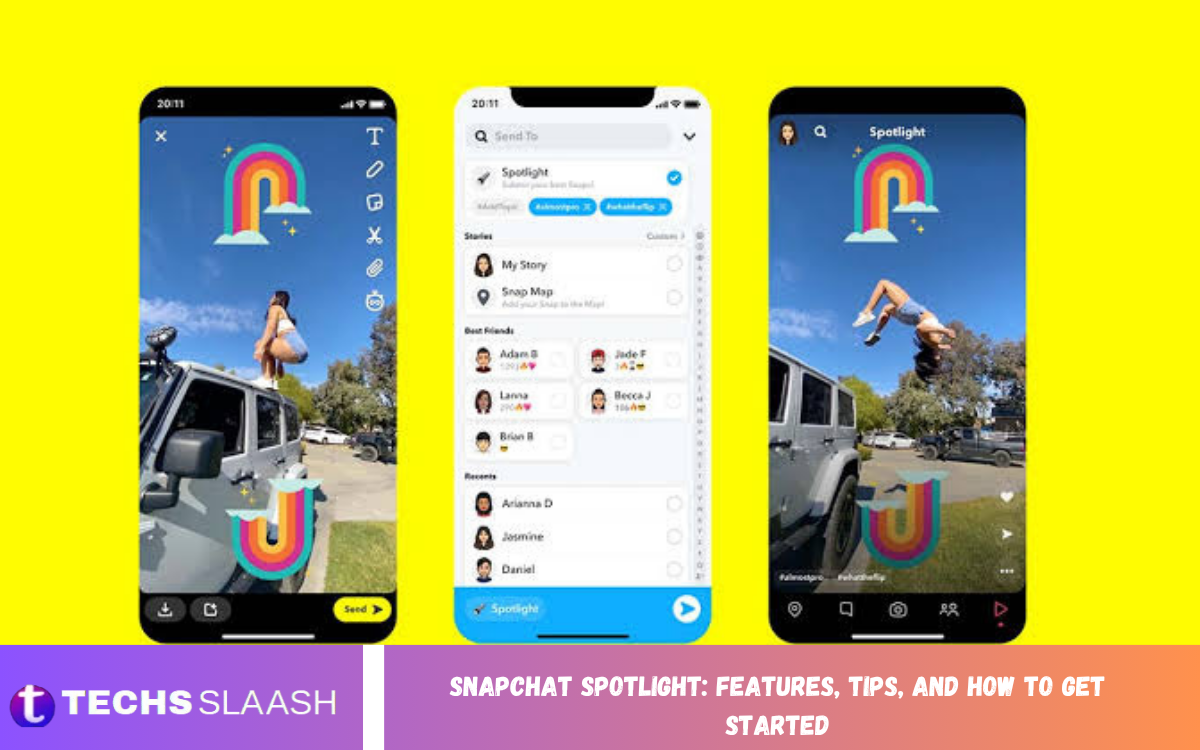
Snapchat Spotlight is a popular feature that allows users to discover and share short-form videos with a wider audience. Similar to other short-video platforms, Spotlight highlights entertaining, creative, and engaging content based on viewers’ interests and interactions. It gives creators a chance to showcase their talents, share experiences, and reach people beyond their existing friends list.
Whether you are a beginner or an experienced content creator, understanding Snapchat Spotlight can help you make better videos and improve your content strategy. From exploring trending videos to learning editing techniques, this guide explains Snapchat Spotlight features, practical tips, and how to get started.
What Is Snapchat Spotlight?
Snapchat Spotlight is a dedicated section within Snapchat where users can watch short videos submitted by creators worldwide. The content includes comedy clips, dance videos, lifestyle moments, tutorials, challenges, and other entertaining material. Its personalized recommendation system helps users discover videos that match their viewing interests.
Unlike traditional Snapchat Stories, which are generally shared with friends or selected audiences, Spotlight content can reach a broader community. This makes it useful for creators who want to increase their visibility, experiment with different video styles, and build an audience through original content.
Key Features of Snapchat Spotlight
Snapchat Spotlight offers several features designed to make short-form video discovery and creation convenient. Users can watch a continuous feed of videos, interact with content, and explore different creative styles. These features make Spotlight an appealing option for people who enjoy quick, visually engaging entertainment.
The platform also supports creative tools available through Snapchat’s camera and editing experience. Depending on the features available to an account and region, creators can use lenses, filters, music, captions, and other effects to improve their videos. Understanding these options can help you produce content that looks polished without requiring professional equipment.
Personalized Video Recommendations
One of the main features of Snapchat Spotlight is its personalized recommendation experience. The videos users see may be influenced by their viewing behavior, interactions, interests, and other signals. This helps viewers discover content that is relevant to them rather than relying exclusively on videos from people they already know.
For creators, this recommendation system offers an opportunity to reach new viewers. A well-made video may attract attention from people who have never visited the creator’s profile. However, visibility is not guaranteed, and performance can vary depending on audience response, content quality, and platform recommendations.
Creative Tools and Video Editing
Snapchat provides creative tools that can help users make their Spotlight videos more interesting. Depending on the available options, creators can add lenses, visual effects, filters, music, text, stickers, and captions. These elements can make a video easier to understand and more enjoyable to watch.
Good editing does not require using every available effect. Instead, choose tools that support the purpose of your video and keep the main subject clear. For example, a tutorial may benefit from readable text and simple transitions, while a comedy clip may work better with expressive visuals and carefully timed captions.
How to Get Started With Snapchat Spotlight
Getting started with Snapchat Spotlight is straightforward for anyone who already has a Snapchat account. First, install the official Snapchat app, sign in or create an account, and familiarize yourself with the camera, editing tools, and Spotlight feed. Make sure your app is updated so you can access the latest features available to your account.
Next, explore the Spotlight section to understand the types of videos people are sharing. Pay attention to video length, presentation, opening moments, and editing styles. Once you have some ideas, record an original video, review it carefully, and follow the submission instructions displayed in the app.
How to Create and Submit a Spotlight Video
To create a Spotlight video, open Snapchat and use the camera to record a new clip or select suitable content from your memories when the app permits it. Add relevant creative effects, text, captions, or music, then preview the result. Make sure the video is clear, appropriate for the intended audience, and consistent with Snapchat’s content rules.
When your video is ready, use the available sharing or submission options and select Spotlight if it is offered. Add a relevant description or topic information when prompted, review the audience and visibility settings, and submit the video. The interface may change as Snapchat updates its app, so follow the on-screen instructions.
Tips for Creating Engaging Spotlight Videos
Engaging videos start with a clear idea. Choose a topic that viewers can understand quickly, such as a useful tip, a funny situation, a creative transformation, or an interesting daily experience. Keep the main message focused so people can recognize the value of watching your video without unnecessary introductions.
Also, use good lighting, stable framing, and clear audio. When possible, record in a clean environment, remove distracting background noise, and use captions if speech is important to the message. Small presentation improvements can make your content easier to watch and more professional.
Use Strong Opening Moments
The beginning of a short video plays an important role in capturing attention. Start with an interesting visual, a question, a surprising moment, or a brief explanation of what viewers will learn. Avoid long introductions that delay the main point, particularly when creating tutorials, comedy clips, or quick demonstrations.
A strong opening should accurately represent the rest of the video. Misleading hooks may attract initial attention but can disappoint viewers and reduce their willingness to engage with future content. Focus on creating curiosity while delivering the experience your opening promises.
Follow Trends While Maintaining Originality
Trending sounds, popular challenges, and familiar video formats can inspire Spotlight content. Explore videos in your niche and identify ideas that could work for your audience. Adapt a popular format by adding your own perspective, humor, experience, or creative approach.
However, copying another creator’s video won’t build a distinctive identity. Original ideas can help your content stand out and give viewers a reason to return. If you use music, clips, or other third-party material, make sure you have the necessary rights and follow Snapchat’s applicable rules.
Post Consistently and Review Performance
A consistent posting schedule can help you practice your creative skills and discover which types of videos suit your audience. Choose a realistic frequency that allows you to maintain quality rather than uploading large amounts of rushed content. Experiment with different topics, formats, and presentation styles over time.
Where analytics or performance information is available, review metrics such as views, watch time, shares, and other engagement indicators. Look for patterns across multiple videos instead of judging your entire strategy from one result. Use these observations to improve future content, but remember that platform distribution can fluctuate.
How to Grow Your Audience on Snapchat Spotlight
Growing an audience takes patience, creativity, and an understanding of what viewers want. Start by choosing a few content themes you can explore regularly, such as tech tips, lifestyle advice, comedy, food, travel, or educational videos. A clear subject helps viewers understand what your content offers.
Encourage meaningful engagement by creating videos that people may want to share or discuss. Answer common questions, demonstrate useful skills, and present ideas in an accessible way. Avoid purchasing fake engagement or using misleading tactics, as these practices can damage credibility and may violate platform policies.
Common Snapchat Spotlight Mistakes to Avoid
One common mistake is posting videos without reviewing their quality. Blurry footage, unclear audio, unreadable captions, and distracting effects can make otherwise useful content difficult to enjoy. Before submitting a video, watch it from beginning to end and correct any obvious problems.
Another mistake is expecting every upload to become popular immediately. Content performance depends on several factors, and even experienced creators can have videos that receive limited attention. Avoid repeatedly deleting and reposting content simply because it starts slowly. Instead, study your results, improve your next video, and follow the platform’s current guidelines.
Read Also: How to Change Your Snapchat Username: A Complete Step-by-Step Guide
Snapchat Spotlight Safety and Privacy
Before posting, consider whether your video reveals personal information, private conversations, home addresses, school details, or other sensitive information. Review the background of your recording and obtain permission before featuring other people when appropriate. Be especially careful when creating content involving children or people who may not understand how widely a video could be shared.
Remember that submitting content to Spotlight may make it visible to people outside your friends list. Publicly shared videos can be viewed, saved, or redistributed in ways that are difficult to control. Review Snapchat’s privacy settings, community guidelines, and reporting tools to understand your options and help maintain a safer experience.
Can You Earn Money From Snapchat Spotlight?
Snapchat has offered creator monetization opportunities, but eligibility, program names, and payment arrangements can change over time. Creators should not assume that every Spotlight submission qualifies for payment or that a particular number of views guarantees earnings. Availability may depend on factors such as location, account eligibility, content compliance, and current program requirements.
If monetization is your goal, consult Snapchat’s official creator resources and the information displayed in your account. First, focus on producing original, engaging videos and building a consistent audience. Never pay someone who promises guaranteed Spotlight earnings or account approval without reliable verification.
Snapchat Spotlight vs. Snapchat Stories
Snapchat Spotlight and Snapchat Stories serve different purposes. People commonly use Stories to share moments with friends, followers, or selected audiences for a limited time. Spotlight, on the other hand, is designed primarily for discovering short videos and potentially reaching viewers beyond an established social circle.
The right option depends on your objective. Use Stories to share personal updates or maintain relationships with people you know, and consider Spotlight when you want to publish entertaining or informative short-form content for broader discovery. You can use both features to support different aspects of your Snapchat experience.
Frequently Asked Questions
What Is Snapchat Spotlight Used For?
Snapchat Spotlight lets you watch and share short-form videos in a broad discovery feed. Users can explore entertainment, tutorials, comedy, lifestyle content, and other creative videos based on their interests.
Is Snapchat Spotlight Free to Use?
Yes, Spotlight is generally available as part of Snapchat and doesn’t require a separate subscription fee. Some features or creator opportunities may have additional eligibility requirements, but ordinary viewing and video submission do not require a dedicated Spotlight subscription.
How Do I Upload a Video to Snapchat Spotlight?
Open Snapchat, create or select a suitable video, edit it, and choose the Spotlight submission option when available. Review the instructions and settings displayed in the app before submitting your content.
Can Anyone See My Spotlight Videos?
Spotlight videos are intended for broader discovery and may be shown to people who are not on your friends list. Before posting, review the visibility information and Snapchat’s current policies to understand how your submission may be distributed.
How Long Should a Snapchat Spotlight Video Be?
The ideal length depends on the content and the platform’s current technical limits. Aim to communicate your main idea efficiently, removing unnecessary pauses and introductions while giving viewers enough time to understand the video.
How Can I Get More Views on Snapchat Spotlight?
Create original videos with strong openings, clear visuals, useful information, and engaging storytelling. Experiment with topics and formats, publish consistently, and use available performance insights to identify what resonates with viewers.
Does Snapchat Spotlight Pay Creators?
Some eligible creators may have access to Snapchat monetization programs, subject to current requirements and availability. Payment is not guaranteed for every video, and views alone do not automatically establish eligibility for earnings.
Why Is My Spotlight Video Not Getting Views?
A video may receive limited views because of audience interest, content quality, recommendation distribution, or other factors. Review your presentation and available analytics, keep experimenting, and make sure your content complies with Snapchat’s guidelines.
Can I Delete a Video From Snapchat Spotlight?
Depending on the current app interface and the video’s status, you may be able to manage or remove your submission through the relevant content controls. Follow Snapchat’s instructions and remember that copies shared by other people may remain outside your control.
Is Snapchat Spotlight Safe for Beginners?
Spotlight can be used by beginners who follow sensible privacy practices and the platform’s community guidelines. Avoid sharing sensitive information, respect other people’s privacy, and review your video before making it available to a wider audience.
Conclusion
Snapchat Spotlight offers a convenient way to discover short videos, express creativity, and reach a wider audience. Its recommendation engine and creative tools make it useful for beginners and experienced creators looking to experiment with short-form video.
For the best results, focus on originality, strong openings, clear presentation, consistent practice, and responsible sharing.

1 Comment
Pingback: Essential Snapchat Tips and Tricks to Enhance Your Experience - Techsslaash.com