

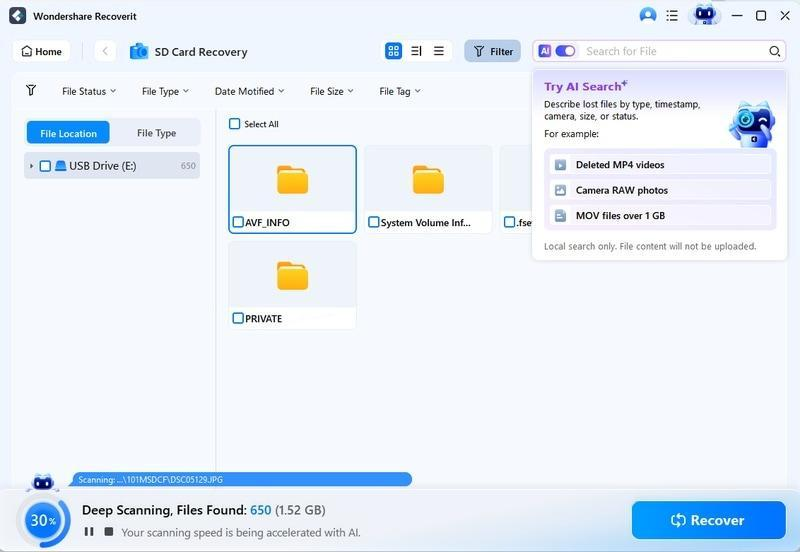
AI search has already changed how we find files – and the change is just beginning. What started as smarter keyword matching is evolving into systems that understand files by their content, context, and timing, then filter and surface what you need in an instant.
This is especially visible in data recovery, where AI search and smart filtering turned a tedious hunt into a quick operation. Here is where AI search is heading, and what it means for recovery and file management.
Where AI Search Stands Today
Today’s AI search in tools like Wondershare Recoverit already does what traditional search cannot:
- Search by partial names and fuzzy matches – no exact filename needed.
- Filter by file type, time, and size – narrow thousands of results to a handful.
- Classify files by content – a photo is recognized as a photo even with a generic name.
- Preview before recovery – confirm what you found before committing.
These capabilities already separate modern recovery software from the simple tools of the past. But they are foundations, not ceilings.

The Trends Shaping the Future of AI Search
1. Understanding Content, Not Just Names
The next generation of AI search will understand what files contain, not just what they are called. Instead of searching “report”, you will search “the quarterly sales report from March” and the engine will find it by reading document content. For recovered files, this means finding a document by its subject matter, even when its name is a meaningless string.
2. Semantic and Natural-Language Search
Typing a natural question – “where are my vacation photos from last summer?” – will replace keyword fragments. The engine will parse the question, infer the type and time range, and filter accordingly. This makes search accessible to everyone, not just users who know file extensions and naming conventions.
3. Context-Aware Filtering
Filters will become smarter about context. Instead of asking you to choose a date range, the engine will suggest it – “you have 47 photos from a trip in June” – and offer one-click narrowing. The system will do the reasoning; you just confirm.
4. Real-Time Adaptation
Search will learn from how you use it. If you always recover video files in the evening, the interface will surface video filters first. If you consistently search by date, time filters will lead the panel. Personalization makes search faster with every use.
5. Cross-Platform Continuity
AI search will follow you across devices. A search habit, a filter preference, or a recovery workflow learned on Windows will carry over to Mac, and the results view will look and behave identically. The Windows version and Mac version already share the same search experience; the future closes the gap further.
6. AI Search for Business Data
For organizations, AI search will scale to enterprise storage: finding a contract among millions of files, isolating a specific invoice from a fiscal year, or surfacing the video evidence a team needs without waiting on manual review. Search becomes a business tool, not a personal convenience.
What This Means for Data Recovery
Data recovery is where these trends matter most, because recovery produces the messiest data sets of all. A scan returns everything a device ever held – decades of files in every type and size. AI search is the only realistic way to navigate that volume, and the future makes it faster:
- Recover by description, not by name. “The presentation I lost before the meeting” will find the file without you knowing its name.
- Automatic filter suggestions. The engine proposes the type, time, and size filters that match your loss, cutting setup time to zero.
- Smarter preview. Beyond thumbnails, the engine will verify file integrity before recovery, flagging corrupted candidates so you recover only what is usable.
How to Prepare for the Future
The good news: the skills you build today carry forward. Learn to search by what you remember, combine search with filters, and preview before recovery. These habits work with today’s AI search and will work with tomorrow’s more capable versions.
Recoverit is a good place to build those habits – its AI search and filter tools are already built into the recovery workflow on both platforms, and the future of AI search will keep evolving within the same familiar interface.
What Users Should Watch For
As AI search advances, three signals will tell you a tool is on the leading edge: natural-language input that understands full questions, filter suggestions that appear before you ask, and content-level understanding that finds files by what they contain. Each of these will feel like a small upgrade at first – and each will quietly save you minutes of searching every time you use it. The tools that deliver them first are the ones worth adopting.
Conclusion
The future of AI search is smarter filtering: understanding content, responding to natural language, adapting to your habits, and scaling to business data. For data recovery, that future means finding lost files by description instead of name, with filters that do the reasoning for you. Today, Wondershare Recoverit already delivers the search-and-filter foundation on Windows and Mac, so you can see where this is heading by using it now. The way we find files is changing – and recovery is leading the way.
