Imagine finding an exciting job opportunity on LinkedIn, opening another listing on a company’s careers page, and discovering a third role on a different job board.
Before long, you’re juggling multiple browser tabs, comparing job descriptions, saving links, and trying to figure out which opportunities are worth pursuing.
But finding a relevant job is only half the challenge. You still need to understand how well your experience matches the role, identify the right people to contact, and prepare a thoughtful application or outreach message.
That’s where AI-powered Chrome extensions can make a difference. By bringing useful job-search tools directly into the browser, they help candidates move from discovering opportunities to taking meaningful action—without constantly switching between platforms.
How AI Chrome Extensions Simplify Job Searching
Traditional job searching often involves moving between job boards, company websites, spreadsheets, and professional networking platforms.
AI-powered Chrome extensions can simplify parts of this process by providing useful features directly within the browser.
Depending on the extension, job seekers may be able to:
- Capture relevant job information without manually copying details between tabs.
- Save or organize interesting opportunities for later review.
- Compare job requirements against their professional experience.
- Launch job-related workflows directly from supported websites.
- Identify potential next steps after discovering an opportunity.
The advantage isn’t simply saving a few clicks. It’s reducing repetitive work so candidates can spend more time evaluating opportunities, preparing applications, and building professional connections.
However, not every extension supports every job website or feature. Always verify the original job listing and check which capabilities are available on the page you’re visiting.
Why Saving a Job Isn’t the Whole Search
Saving a job listing is useful, but it doesn’t necessarily move you closer to getting hired.
A saved opportunity still needs to be evaluated. Does the role match your experience? Is the location suitable? Are the responsibilities aligned with your career goals? And who might be the right person to contact?
Before moving forward, consider three important actions:
- Check your job fit. Compare the role’s key requirements with your skills and experience. Identify relevant achievements you can highlight and any important gaps you should understand.
- Identify relevant hiring contacts. Look for recruiters, hiring managers, or professional connections associated with the company or opportunity.
- Plan your next step. Decide whether to apply, tailor your resume, prepare outreach, or follow up on an existing application.
AI can help organize information and prepare drafts, but candidates should verify important details and remain in control of their decisions.
Meet Zendoo: Turn Job Listings Into Meaningful Connections
Most Chrome extensions focus on saving job listings or simplifying applications. But what happens after you find a job you genuinely want?
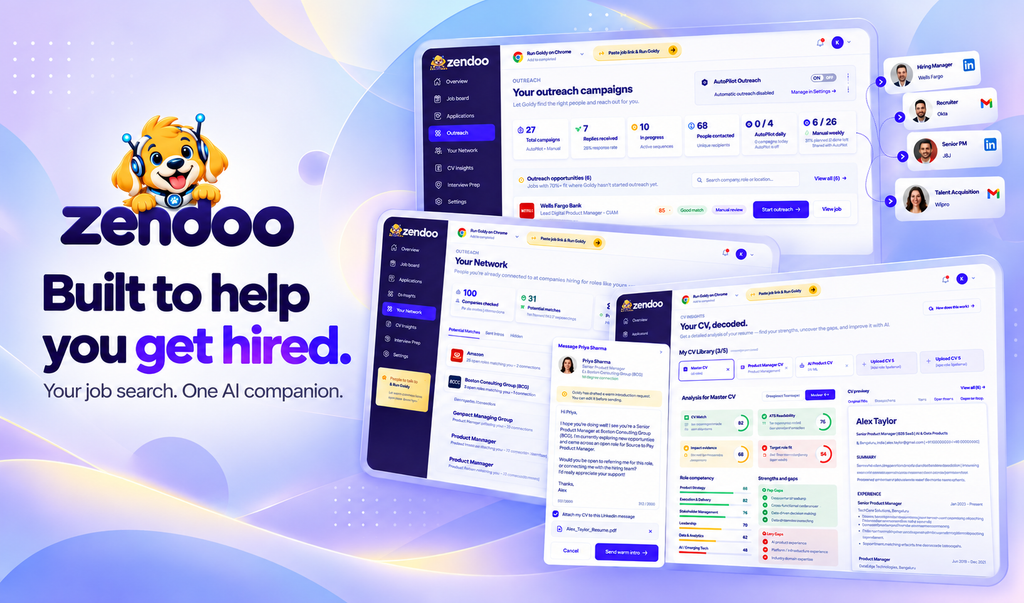
Zendoo, an AI-powered career companion, helps job seekers go beyond the application process by identifying relevant hiring contacts and preparing personalized professional outreach.
Its AI assistant, Agent Goldy, helps candidates discover recruiters, hiring managers, and potential referral contacts connected to an opportunity.
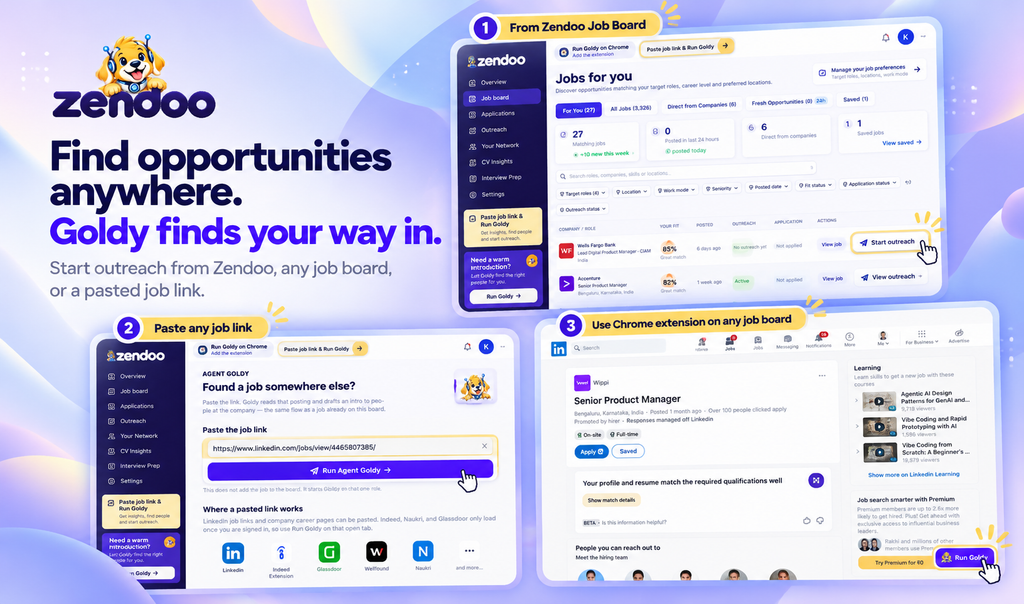
There are three ways to start Goldy’s outreach workflow:
- Start from the Zendoo Job Board
Browse relevant opportunities inside Zendoo and launch Goldy directly from a job listing. - Paste a Job URL
Found an interesting opportunity on another website? Copy the job link, paste it into Zendoo, and start Goldy’s outreach workflow. - Use the Zendoo Chrome Extension
While browsing a supported external job website, use the Zendoo Chrome extension to launch Goldy directly from the job page.
Once the workflow starts, Goldy helps identify relevant contacts and prepares personalized LinkedIn or Gmail outreach messages based on the opportunity and your professional background.
You remain in control. Review the suggested contacts and messages, make any necessary changes, and approve the outreach before sending.
Zendoo also helps manage follow-up communication and stops outreach sequences when a reply is detected.
Instead of spending hours researching hiring contacts and drafting repetitive messages, candidates can focus on opportunities that genuinely match their experience.
Explore Zendoo at https://zendoo.app and discover how Agent Goldy can help you connect with the people behind your next opportunity.
A Real-World Example: From Job Discovery to Personalized Outreach
Imagine Maya, a customer success professional, discovers an interesting role at Brightpath, a fictional SaaS company.
Instead of simply saving the job and moving on, she decides to take a more proactive approach.
Here’s how her workflow could look:
- Review the opportunity. Maya reads the job description and confirms that her customer success experience aligns with the role.
- Launch Agent Goldy. She opens the Zendoo Chrome extension on a supported job page and starts the outreach workflow.
- Discover relevant contacts. Goldy suggests potential recruiters, hiring managers, or other relevant professionals associated with the opportunity.
- Review personalized outreach. Goldy prepares a LinkedIn or Gmail message. Maya checks the suggested recipient, edits the wording if necessary, and approves the message.
- Manage follow-ups. Zendoo helps organize subsequent outreach and stops follow-up sequences when a reply is detected.
For example, Maya’s message might read:
‘Hi Lina,
I recently came across the Customer Success opening at Brightpath and found it closely aligned with my experience managing SaaS customer relationships and onboarding.
I’ve applied for the position and would appreciate any insights you could share about the team’s priorities.
Thanks for your time!’
The goal isn’t to send more messages indiscriminately. It’s to make each interaction relevant, professional, and purposeful.
What to Check Before Installing an Extension
Before installing any Chrome extension, it’s important to understand what it does and how it handles your information.
Consider the following:
- Permissions: Review which websites and browser information the extension can access.
- Privacy: Read the provider’s privacy policy and understand how personal information is handled.
- Website compatibility: Confirm that the extension supports the job websites you regularly use.
- User control: Look for tools that allow you to review important information and approve actions before they happen.
- Practical value: Choose an extension that solves a genuine problem in your job-search workflow rather than simply adding another tool.
AI-powered browser extensions cannot guarantee interviews, referrals, or job offers. Their value lies in reducing repetitive work and helping job seekers take more informed action.
Job searching is no longer limited to browsing listings and submitting applications. AI-powered Chrome extensions can help professionals organize opportunities, understand job requirements, and take meaningful next steps.
With Zendoo and Agent Goldy, job seekers can discover relevant opportunities, identify hiring contacts, prepare personalized LinkedIn and Gmail outreach, and manage follow-ups—all while retaining control over their communication.
Ready to go beyond simply applying? Explore Zendoo and discover a smarter way to connect with the people behind your next job opportunity.