

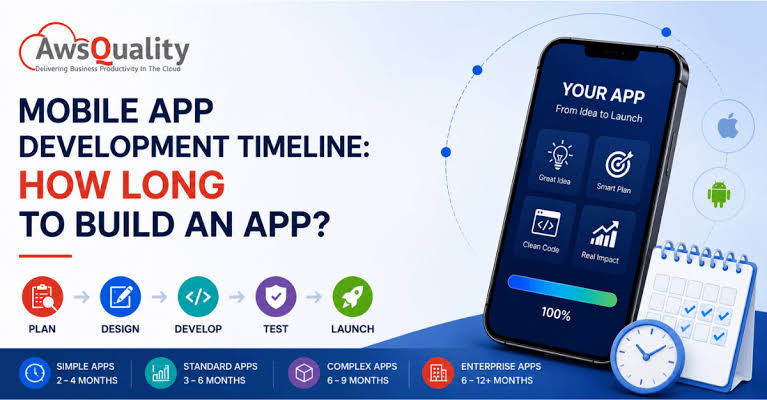
A small mobile app can take a few months to build, while a product with several user roles, complex integrations, or extensive testing may take six months or longer. The timeline depends on what users need to accomplish and what your team means by “ready.” A prototype that demonstrates a booking flow can be ready well before a public release that handles payments, sends reminders, and gives staff a dashboard to manage appointments.
When comparing mobile app development services in India, ask every team to estimate the same release scope. A schedule is easier to evaluate when it explains which tasks can run in parallel, when you need to approve decisions, and what the developers need from your team. You should also know whether the quoted date refers to a working build, a pilot with real users, or a release in the app stores. The sections below explain how each stage affects delivery, where delays tend to arise, and how to plan a first release around the features users actually need.
1. Estimate the Timeline Based on App Complexity
For early planning, allow roughly two to four months for a focused MVP, four to six months for an app with several workflows and integrations, and six months or more for a complex product. Treat these as illustrative ranges. A simple interface can hide significant work when the app depends on unfamiliar systems, multiple approval steps, or an existing data migration.
Define what the first release must support
List the user roles, main workflows, platforms, and external systems needed at launch. Ask the development team which of those requirements has the greatest effect on its proposed delivery date.
- A focused MVP might support bookings, confirmations, and one admin role.
- A marketplace may need seller onboarding, payments, order tracking, and dispute handling.
- An enterprise app may require migration, access controls, and several approval rounds.
2. Allow Time for Discovery and Scope Decisions
Discovery turns an app idea into work the team can estimate. It covers the main user journeys, business rules, technical dependencies, and questions that could change the project. For example, a booking app needs a clear rule for what happens when two customers choose the same slot. Resolving that question early saves time across design, development, and testing later on.
Confirm the decisions that affect the estimate
Agree on what customers and staff must be able to do at launch. Record open questions, name the person responsible for each decision, and set a date to resolve it.
- Prioritize the features users need to complete their main task.
- Review existing systems and identify who can grant access.
- Agree on what staff can handle manually during the pilot.
- Give one person responsibility for consolidating stakeholder feedback.
3. Plan UX Design Around Real User Tasks
Design time depends on the number of workflows, the decisions they involve, and how quickly the team receives feedback. A single checkout journey may need screens for failed payments, expired discounts, and interrupted sessions. Reviewing those situations in a prototype helps the team settle important details before developers build them. Include staff and administrators in design reviews when their workflows matter.
Review a clickable prototype before development
Walk through the prototype as a customer or staff member would. Check whether people can complete the main task, recover from common mistakes, and understand what happens after taking action.
- Share existing brand assets, screen designs, and approved copy.
- Include empty screens, error messages, and confirmation states in reviews.
- Set a deadline for feedback on each design round.
- Agree which screens are ready for developers to build.
4. Schedule Development Around Technical Dependencies
Development may cover the mobile app, backend, admin dashboard, and connections to external services. Some work can proceed in parallel once teams agree on how these systems exchange information. Other tasks depend on vendor accounts, test data, or access to an existing system. Verify those dependencies early so the team can schedule independent work while access or approvals are being arranged.
Test the hardest integration early
Use a small technical test to check the integration most likely to delay delivery. If a payment provider is central to the app, test the full transaction flow and refunds.
- Confirm when third-party credentials and test environments will be available.
- Ask for a working demo at each major development milestone.
- For game projects, ask a studio such as SM Gaming Services to estimate gameplay, asset production, and multiplayer separately.
- Track which work can continue if an external dependency slips.
5. Build Testing Into the Delivery Schedule
Testing takes longer when the app must support different devices, network conditions, user permissions, or payment outcomes. Test each workflow as it becomes available so the team can fix issues while related work is still fresh. Reserve time for business users to try the completed app with realistic data. Their feedback can reveal practical problems that a technical test would miss.
Use real scenarios to define acceptance
Give testers a task with a clear expected result. For a canceled booking, verify that the customer gets a confirmation, the slot becomes available, and staff can see the change.
- Choose test devices based on the people who will use the app.
- Check what happens when a connection drops mid-task.
- Schedule time to fix defects and retest affected workflows.
- Identify who can approve the app for release.
6. Include App Store Submission and Launch Preparation
A working build is one milestone on the way to launch. A public release also needs store listings, screenshots, production settings, and a plan for supporting users. Some of this work can begin while development is underway. Build room into the schedule for store review and possible revisions, especially when the release is tied to a campaign, event, or client commitment.
Assign someone to manage release preparation
Decide who owns the store accounts, prepares the listing, submits the build, and responds to reviewer requests. Start those tasks early enough to address missing details before the target release date.
- Prepare store descriptions, screenshots, and support contact information.
- Confirm that production accounts and configurations are ready.
- Plan a pilot or staged rollout if the project allows it.
- Agree who monitors errors and handles support after launch.
7. Keep the Timeline Realistic as Scope Changes
The schedule should make it easy to see what moves when a requirement changes. For example, adding self-service refunds could affect the payment integration, customer screens, admin permissions, and testing. Ask the team to explain the impact before approving the addition. If the launch date is fixed, decide which lower-priority feature can move to a later release to make room.
Plan backward from the launch date
Start with the date users need access, then schedule store submission, acceptance testing, and feature completion. Give each milestone an owner and leave room for fixes after the first review.
- Agree on what a usable first release looks like.
- Review progress against working features and upcoming dependencies.
- Set aside time for feedback, fixes, and release preparation.
- Keep a backlog of improvements for the next release.
Final Thoughts
A mobile app timeline becomes easier to trust when it shows what will be ready at each milestone and who needs to act to keep work moving. Start with the smallest release that solves a real problem for users, then account for integrations, feedback, testing, and app store preparation. Ask the development team to identify the assumptions behind its estimate and explain what happens if a dependency slips. If you have a fixed launch date, agree early on which features can move to the next release while preserving the core experience.
