

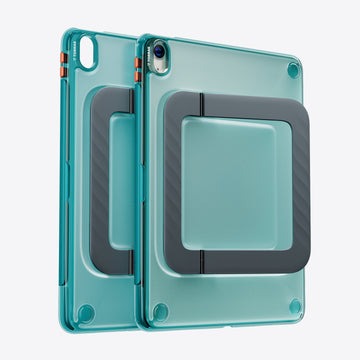
The iPad Air has become an indispensable tool for professionals sketching designs in client meetings and students annotating lecture slides between classes. Its blend of power and portability makes it the go-to device for anyone who needs to create, learn, or collaborate on the move. But here’s the frustrating reality most iPad Air owners face: finding a case that securely holds your Apple Pencil, shields your device from real-world hazards, and still slips effortlessly into a bag without adding unnecessary bulk.
Too often, cases force you to compromise—sacrificing pencil accessibility for rugged protection, or trading durability for a sleeker silhouette. The best iPad Air cases solve this tension by integrating thoughtful features like built-in pencil holders, magnetic stands for hands-free viewing, and ergonomic designs that feel comfortable during hours of use. Whether you’re a graphic designer who relies on instant pencil access or a graduate student juggling textbooks and transit, the right case transforms how you interact with your iPad Air daily. This guide walks you through every consideration—from protection standards to stand functionality—so you can confidently choose a case that fits your workflow and lifestyle.
Why Your iPad Air Case Needs a Pencil Holder and More
The iPad Air has evolved far beyond a media consumption device. Architects draft floor plans on job sites, marketing teams brainstorm campaign visuals during strategy sessions, and medical students annotate anatomy diagrams between rotations. With Apple Pencil integration now central to so many workflows, losing or fumbling for your stylus mid-task isn’t just annoying—it disrupts your creative momentum and wastes valuable time. A dedicated pencil holder built into your case eliminates that friction entirely, keeping your stylus docked and ready the instant inspiration strikes or a meeting demands quick sketches.
But pencil storage alone doesn’t make a case worth buying. Professionals who commute through crowded transit systems and students who toss their iPads into overstuffed backpacks need protection that can absorb real impacts without turning the device into a brick. Military-grade drop protection has become a meaningful benchmark here, offering tested reassurance that your investment survives the chaos of daily life. At the same time, a case that doubles your iPad’s thickness defeats the purpose of owning such a portable device in the first place. The ideal iPad Air case threads a careful needle—pairing robust structural reinforcement with a slim, pocket-friendly profile that preserves the iPad Air’s signature portability. When you add features like adjustable magnetic stands for hands-free video calls and ergonomic contours that reduce hand strain during marathon note-taking sessions, you move from simply protecting your iPad to genuinely enhancing how you use it every day.
Key Features to Evaluate in iPad Air Cases
Not all iPad Air cases are created equal, and understanding the features that separate a mediocre option from an exceptional one saves you from buyer’s remorse. The pencil holder is your starting point. Integrated pencil holders—those built directly into the case’s spine or front cover—tend to offer the most reliable retention because they’re engineered as part of the overall structure. They keep your Apple Pencil flush against the device, preventing snags when sliding the iPad in and out of bags. Detachable or elastic-loop holders, while more flexible in placement, can stretch over time and may not secure the pencil tightly enough for active commuters or field workers. If pencil access is central to your workflow, prioritize cases where the holder supports magnetic charging passthrough, so your stylus stays powered without ever leaving its dock.
Beyond pencil storage, protection and usability features determine whether a case truly earns its place in your daily routine. Here’s what to scrutinize closely.
Prioritizing Military-Grade Protection Without Bulk
The term “military-grade protection” refers most commonly to the MIL-STD-810G standard, a U.S. Department of Defense testing protocol that subjects equipment to repeated drops from specific heights onto hard surfaces. A case carrying this certification has been independently verified to absorb and distribute impact forces that would otherwise crack your screen or damage internal components. This matters enormously if your iPad travels with you to construction sites, hospital floors, or busy lecture halls where accidental drops are inevitable rather than hypothetical.
The engineering challenge lies in delivering that level of protection without turning your sleek iPad Air into something that feels like a textbook. Modern case manufacturers solve this by combining rigid polycarbonate outer shells—which resist punctures and structural deformation—with flexible TPU (thermoplastic polyurethane) inner liners that absorb shock energy on impact. Brands like TORRAS, known for their expertise in slim protective case design, have demonstrated that reinforced corner bumpers can concentrate additional material precisely where drop damage occurs most frequently, rather than adding uniform thickness everywhere. When evaluating cases, look for raised bezels around the screen and camera cutouts, as these small ridges prevent direct surface contact during face-down drops. The best designs achieve all of this while adding only a few millimeters to the iPad’s overall dimensions, preserving the thin profile that makes the device so portable in the first place.
Magnetic Stand and Ergonomic Design Benefits
A magnetic stand transforms your iPad Air from a handheld device into a versatile workstation. Strong embedded magnets allow you to snap the cover into multiple stable viewing angles—upright for video conferences and presentations, or tilted lower for comfortable typing and sketching. Unlike friction-hinge stands that wear out and lose their grip, magnetic configurations maintain consistent holding strength over years of daily use. For professionals who frequently switch between showing a client a design mockup and jotting down feedback with the Pencil, this quick-adjust capability eliminates the awkward fumbling that interrupts productive conversations.
Ergonomic design elements are equally important but often overlooked. Textured grip zones along the case’s edges prevent the iPad from slipping during one-handed use, while thoughtful weight distribution ensures the device doesn’t feel front-heavy when held in portrait mode for extended reading. Some cases incorporate slightly contoured back panels that nestle naturally into your palm, reducing the micro-adjustments your hand makes to maintain a secure hold. Over a two-hour study session or a full afternoon of digital illustration, these subtle design choices dramatically reduce hand and wrist fatigue, letting you stay focused on your work rather than on how uncomfortable your device has become.
Step-by-Step Guide to Choosing the Right iPad Air Case
Selecting the perfect iPad Air case becomes far less overwhelming when you approach it systematically rather than scrolling through hundreds of options hoping something catches your eye. Following a structured decision-making process ensures you end up with a case that genuinely matches your daily habits instead of one that looks great in product photos but frustrates you within a week.
Step 1: Identify your primary use cases. Before browsing any product listings, write down the three to five activities you perform most frequently with your iPad Air. A freelance illustrator who works from coffee shops has fundamentally different needs than a nursing student reviewing patient charts during clinical rotations. Your dominant use cases—whether they involve travel, fieldwork, classroom settings, or studio sessions—establish the foundation for every feature decision that follows.
Step 2: List your must-have features based on those needs. Rank the features that directly support your workflow. If you sketch or annotate constantly, a secure integrated pencil holder with magnetic charging passthrough belongs at the top of your list. If you present to clients regularly, a versatile magnetic stand takes priority. Separating non-negotiable features from nice-to-have extras prevents you from overpaying for capabilities you’ll rarely use or settling for a case that lacks the one thing you actually needed.
Step 3: Assess protection levels against your real lifestyle risks. Be honest about the environments your iPad encounters. Someone who works primarily at a desk may not need full military-grade certification, while a field engineer or a parent juggling kids and devices absolutely does. Match the case’s drop-test ratings and edge reinforcement to the actual hazards you face daily rather than defaulting to either the thinnest or the most rugged option available.
Step 4: Verify compatibility with your specific iPad Air model and accessories. iPad Air generations differ in dimensions, button placement, and Pencil compatibility. A case designed for the iPad Air 4th generation won’t necessarily fit the 5th generation perfectly, and misaligned cutouts can block speakers, cameras, or charging ports. Confirm that the case explicitly supports your exact model number and works seamlessly with your generation of Apple Pencil, including wireless charging functionality through the case itself.
Step 5: Compare additional features across your shortlisted options. Once you’ve narrowed the field to cases that meet your core requirements, evaluate the differentiating extras. Does one offer stronger magnetic stand angles for both landscape and portrait orientations? Does another include textured grip zones that would help during your commute? These secondary features often determine long-term satisfaction, turning a good case into one you genuinely enjoy using every day.
Step 6: Validate your choice through user reviews and expert recommendations. Product descriptions tell you what a case is designed to do; real-world reviews tell you whether it actually delivers. Look specifically for feedback from users whose workflows mirror yours—a five-star review from a casual media consumer carries different weight than one from a design professional who uses the Pencil eight hours a day. Expert reviews that test drop protection, stand stability, and pencil holder durability over extended periods offer the most reliable confirmation that your chosen case will perform as promised.
Practical Solutions for Professionals and Students
The gap between knowing what features matter and solving the specific frustrations you face daily is where practical thinking makes all the difference. If you commute by subway, bus, or bicycle, secure pencil storage isn’t a luxury—it’s the only thing standing between you and a lost sixty-dollar stylus. Look for cases with recessed pencil channels that sit flush with the case edge, creating a snag-free profile that slides cleanly in and out of messenger bags and backpacks. Cases that combine a magnetic pencil dock with a protective flap over the stylus add a second layer of retention for anyone navigating crowded spaces where bumps and jostles are constant.
For professionals who need to project confidence during client presentations, a case with a strong magnetic stand eliminates the awkward lean-it-against-a-coffee-cup improvisation. Choose a stand that locks into at least two distinct angles—one steep enough for screen sharing across a conference table and one shallow enough for comfortable on-screen typing when capturing action items immediately after. Students facing back-to-back lectures and study marathons should prioritize ergonomic grip textures and balanced weight distribution, then pair those with military-grade corner reinforcement since tired hands are clumsy hands. Rotating between portrait mode for reading dense journal articles and landscape mode for split-screen note-taking puts real stress on a case’s structural integrity, so dual-orientation stand support becomes especially valuable in academic settings. By matching each solution directly to the scenario where you’ll use it most, you avoid overspending on features that sound impressive but sit unused.
Finding the iPad Air Case That Fits Your Workflow
Choosing the right iPad Air case with a pencil holder isn’t about finding the most expensive option or the one with the longest feature list—it’s about aligning your case with the way you actually work and live. A secure, integrated pencil holder keeps your Apple Pencil accessible and charged so creative momentum never stalls. Military-grade protection ensures that the inevitable drops and bumps of daily commutes, busy classrooms, and active job sites don’t turn into costly repair bills. Ergonomic design and a reliable magnetic stand round out the experience, transforming your iPad Air from a device you carry into a workstation you can deploy anywhere with confidence.
Use the step-by-step guide in this article as your decision-making framework. Start by defining your real-world needs, rank the features that directly support those needs, and then validate your shortlisted options through reviews from people whose routines resemble yours. When you resist the temptation to chase every possible feature and instead focus on the ones that genuinely serve your workflow, you’ll end up with a case that protects your investment, enhances your productivity, and feels like a natural extension of the device itself. That’s the difference between a case you tolerate and one you rely on every single day.
