

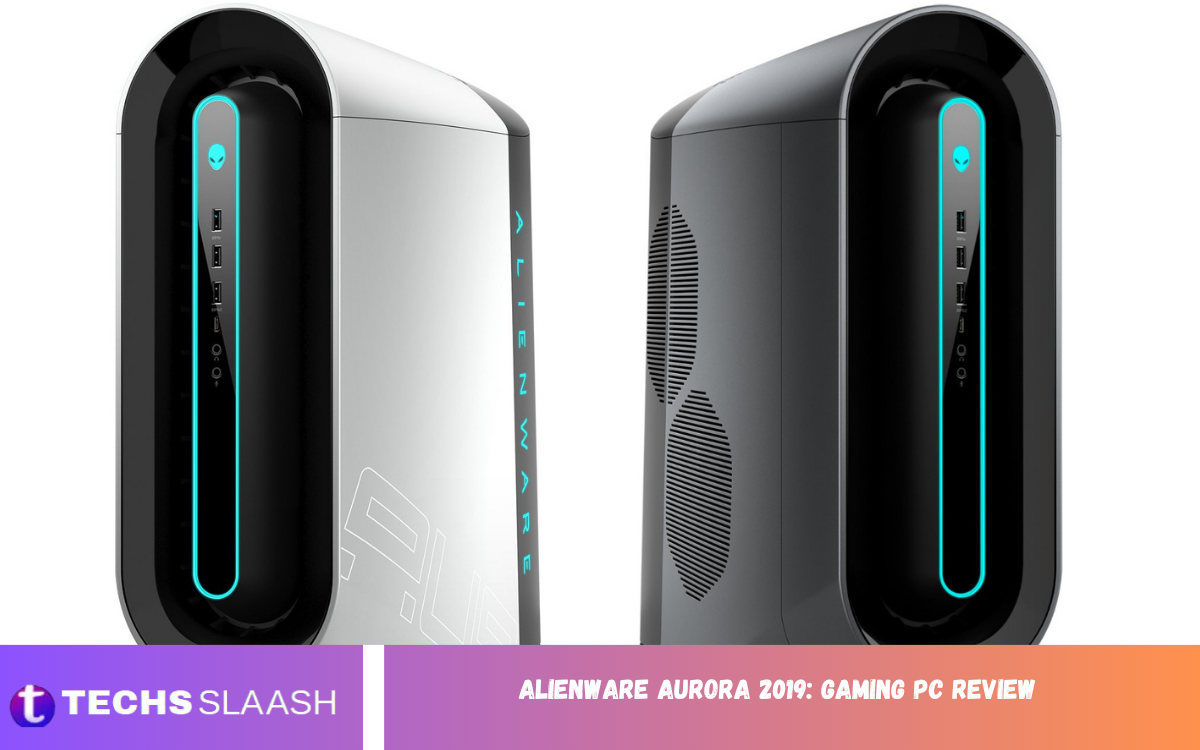
The Alienware Aurora 2019: Gaming PC Review remains relevant for gamers looking for a powerful prebuilt desktop with a distinctive design and strong hardware. The 2019 Aurora R8 was offered with Intel 8th- and 9th-generation processors and NVIDIA RTX graphics, making it a serious gaming machine for its generation.
Although newer gaming computers now offer significantly faster processors, graphics cards, and storage standards, the Aurora R8 can still be interesting on the used market. Its tool-free chassis, upgrade potential, liquid-cooling options, and powerful CPU and GPU combinations give it a solid foundation for gaming and everyday performance.
Alienware Aurora 2019 Design
The Alienware Aurora R8 has a recognizable futuristic appearance without relying on an excessively large tower. Its curved front, angular details, illuminated Alienware branding, and customizable lighting give the system a distinctive gaming identity that still looks premium.
The chassis is relatively compact compared with many enthusiast gaming towers, although it is certainly not lightweight. Review configurations measured around 18.6 inches in height, 14.2 inches in depth, and 8.4 inches in width, making it substantial but manageable for a desktop gaming setup.
Build Quality and Accessibility
One of the strongest features of the Aurora R8 is its practical internal design. Alienware included a tool-free access system that makes it easier to reach important components, while the power-supply assembly can swing outward to expose more of the internal hardware.
This approach is especially useful for owners who plan to add storage, replace memory, clean the system, or upgrade selected components. PC Gamer and Tom’s Hardware both highlighted the machine’s easy internal access and upgrade-friendly construction as major strengths.
Processor Performance
The 2019 Aurora could be configured with several processors, including 9th-generation Intel Core i5K, i7K, and i9K models. The Core i7-9700K was one of the more attractive options because it offered eight physical cores and turbo speeds reaching up to 4.9 GHz depending on configuration.
For gaming, the i7-9700K provides strong single-core and multi-core performance for its generation. It can handle demanding games while also supporting streaming, productivity applications, and other background workloads, although modern CPUs have a substantial advantage in efficiency and thread count.
Graphics Performance
Graphics performance is where a higher-end Aurora R8 configuration becomes particularly impressive. Review systems were available with NVIDIA GeForce RTX 2080 graphics featuring 8GB of GDDR6 memory, providing strong performance for demanding 1440p gaming and capable 4K gaming.
The RTX 2080 also introduced hardware support for real-time ray tracing and NVIDIA’s early RTX feature set. For its era, this made the Aurora R8 an attractive choice for gamers who wanted advanced visual effects without immediately moving to the most expensive flagship hardware.
Gaming Performance
In practical gaming, an Aurora R8 equipped with an i7-9700K and RTX 2080 can deliver a strong experience at 1080p and 1440p. High refresh-rate gaming is particularly well suited to this type of configuration when paired with sensible graphics settings and a suitable monitor.
At 4K resolution, performance depends heavily on the game and graphics settings. The system can handle many titles effectively, but demanding modern games may require reduced settings or upscaling technologies compared with today’s high-end hardware. Contemporary reviews described the RTX 2080 configuration as capable of respectable 4K performance.
Storage Options
Storage configurations varied depending on the model, but reviewed Aurora systems commonly combined a fast SSD with a larger mechanical hard drive. One tested configuration included a 512GB SSD and a 2TB 7,200 RPM hard drive, providing a useful combination of operating-system responsiveness and large-capacity storage.
For a modern owner, upgrading storage is one of the easiest ways to improve the overall experience. Installing a larger NVMe SSD can provide more room for games and applications while reducing loading times compared with an older mechanical drive.
Memory and Connectivity
The Aurora R8 supported DDR4 memory, with reviewed configurations using 32GB DDR4-2933. This amount of RAM was more than sufficient for gaming and general productivity at the time and remains comfortable for many everyday workloads today.
Connectivity is another strong point. The system offered numerous USB ports, Ethernet, audio connections, USB-C options, and wireless connectivity depending on configuration. This makes the Aurora convenient for users with multiple gaming peripherals, external drives, headsets, controllers, and other accessories.
Cooling and Noise
Cooling is an important consideration with a high-performance prebuilt gaming PC. Certain Aurora R8 configurations used liquid CPU cooling, while the system also relied on dedicated airflow and component cooling to manage heat from powerful processors and graphics cards.
The main weakness is that noise can become noticeable when the system is working hard. PC Gamer specifically identified loud operation under load as a drawback, meaning users who prioritize a very quiet gaming environment may want to pay particular attention to fan condition, thermal paste, airflow, and cooling configuration.
Read Also: Razer Blade 15 2018: Features & Specs
Upgrade Potential
The Aurora R8 is more upgrade-friendly than its unusual exterior might suggest. Its accessible chassis allows users to replace or expand components such as RAM, storage, graphics cards, and cooling hardware, although compatibility and physical dimensions should always be checked before purchasing replacement parts.
The platform is based around Intel’s Z370 chipset and PCIe Gen 3 connectivity, so it has limitations compared with modern platforms. Nevertheless, a well-maintained Aurora can remain useful for years when upgrades are selected carefully.
Everyday Use and Productivity
Although designed primarily as a gaming computer, the Aurora is also well suited to everyday productivity. A capable Core i7 processor, dedicated RTX graphics, sufficient memory, and SSD storage provide enough performance for office work, browsing, photo editing, video editing, programming, and content creation.
Its large number of ports also makes it practical as a central desktop workstation. Users can connect multiple displays, external storage, gaming accessories, audio equipment, and other peripherals without constantly relying on adapters or hubs.
Software and User Experience
The Aurora R8 shipped with Windows 10 configurations and Alienware software designed to manage lighting, performance settings, and other system features. The overall experience is straightforward for users who want a ready-to-use gaming desktop rather than building a computer from individual components.
Alienware’s software ecosystem adds some convenience, but enthusiasts may prefer to control certain settings themselves. Keeping drivers, Windows, firmware, and essential utilities updated is particularly important when using an older gaming PC with modern games and applications.
Value for Money
The biggest concern with the Aurora R8 was its original price. High-end configurations could become considerably more expensive than comparable custom-built computers using similar hardware, and contemporary reviews repeatedly identified the premium price as one of the system’s weaknesses.
The situation is different on the used market. A properly priced Aurora with an RTX-class graphics card, a capable Intel processor, adequate RAM, and healthy storage can represent reasonable value. However, buyers should inspect the power supply, cooling system, SSD health, GPU condition, and overall cleanliness before purchasing.
Pros and Cons
The major advantage of the Aurora R8 is its combination of performance and convenience. Strong processor options, RTX graphics, accessible internals, extensive connectivity, and a distinctive Alienware design make it appealing to gamers who want a prebuilt system.
Its disadvantages include the bulky chassis, potentially noticeable fan noise, proprietary elements, older platform technology, and the high original purchase price. These weaknesses become more important when comparing it with newer gaming PCs that provide better efficiency and substantially newer hardware.
Is Alienware Aurora 2019 Still Worth It?
The answer depends heavily on price and configuration. An Aurora R8 with an i7-9700K and RTX 2080 can still provide a capable gaming experience, especially at 1080p and 1440p, but buyers should not evaluate it as though it were a current-generation machine.
For someone purchasing a used system, condition is just as important as specifications. A clean machine with healthy cooling, reliable storage, sufficient RAM, and a strong GPU can be a good choice, while an overpriced or poorly maintained unit may not make financial sense.
Who Should Buy the Aurora R8?
The Aurora R8 is best suited to gamers who want a recognizable Alienware desktop and are comfortable buying older hardware at an appropriate price. It can also appeal to users who prefer a prebuilt system but still want reasonable access to internal components for future maintenance.
It is less attractive for buyers seeking the newest technologies, maximum efficiency, or extensive long-term platform upgrades. Modern systems offer newer CPUs, faster memory, newer PCIe standards, and significantly more advanced graphics hardware.
Frequently Asked Questions
Is the Alienware Aurora 2019 good for gaming?
Yes, particularly when equipped with an i7-9700K and an RTX 2070 or RTX 2080-class GPU. It remains capable of strong 1080p and 1440p gaming, although newer computers are considerably faster.
What is the Alienware Aurora 2019 model?
The 2019 desktop commonly referred to in reviews is the Alienware Aurora R8. It supported several Intel processors and NVIDIA graphics configurations and was positioned as a high-performance gaming desktop.
Can the Alienware Aurora R8 run modern games?
Yes, provided the configuration is suitable. Systems with dedicated RTX graphics can still run many modern games, although demanding titles may require adjusted graphical settings.
Can the Aurora R8 be upgraded?
Yes. The chassis provides relatively convenient access to internal components, and users can upgrade compatible memory, storage, graphics hardware, and other components.
Does the Aurora R8 support liquid cooling?
Yes. Certain configurations included liquid CPU cooling, and liquid cooling was one of the options used to manage higher-performance processors.
Is the Alienware Aurora R8 noisy?
It can become noticeably loud under heavy workloads. Fan noise was identified as a drawback in contemporary reviews, particularly when the system was under significant gaming load.
How much RAM does the Aurora R8 support?
The exact supported configuration depends on the specific model and installed hardware. Review units were available with 32GB of DDR4 memory, which is still sufficient for many gaming and productivity workloads.
Is the RTX 2080 Aurora R8 good for 4K gaming?
It can handle 4K gaming, but results vary significantly between games. Lowering demanding settings or using supported upscaling features can help maintain smoother performance.
Is the Alienware Aurora R8 good for video editing?
Yes. A strong CPU, dedicated NVIDIA graphics, adequate RAM, and SSD storage can make it suitable for many video-editing workloads, although newer platforms offer better performance and efficiency.
Should you buy an Alienware Aurora R8 today?
It can be worth considering if the used price is attractive and the system is in good condition. Buyers should compare its cost and performance against newer gaming PCs before making a final decision.
Conclusion
The Alienware Aurora 2019: Gaming PC Review shows why the Aurora R8 earned attention as a powerful prebuilt gaming desktop. Its combination of Intel processors, NVIDIA RTX graphics, accessible chassis design, strong connectivity, and distinctive Alienware styling made it a compelling premium system when it launched.
Today, its appeal depends primarily on configuration, condition, and price. An RTX-equipped Aurora R8 can still deliver enjoyable gaming performance, particularly at 1080p and 1440p, while its upgrade-friendly design adds practical value.
