

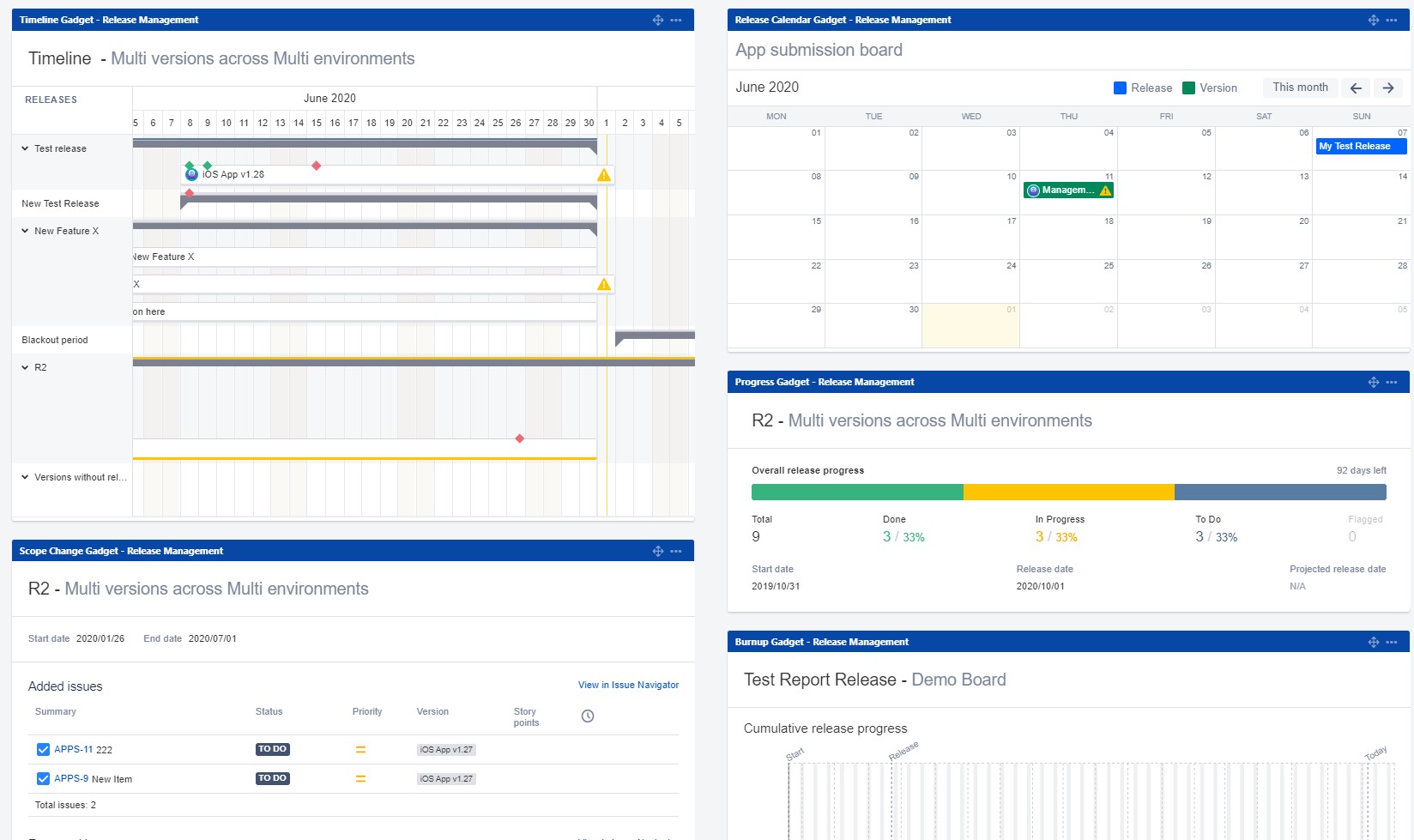
Managing live release statuses effectively is crucial for maintaining visibility and control over software deployments in any organization. Jira, a versatile project management tool by Atlassian, offers robust features for creating live release status dashboards. These dashboards provide real-time insights into the progress, status, and health of releases, enabling teams to make informed decisions and respond quickly to any issues that may arise. This article explores how to create a live release status dashboard on Jira, its benefits, key components, and tools like the Golive add-on by Apwide that enhance its functionality.
Understanding Live Release Status Dashboards
A live release status dashboard in Jira serves as a centralized hub where stakeholders can monitor the status of ongoing releases in real-time. It consolidates information from various sources, such as build servers, deployment tools, and issue trackers, into a single view. This visibility helps teams track progress, identify bottlenecks, and ensure that releases meet timelines and quality standards.
Benefits of a Release Dashboard in Jira
Deploying a release dashboard in Jira offers several advantages:
- Real-Time Monitoring: Provides up-to-date information on release statuses, allowing stakeholders to track progress and respond promptly to any delays or issues.
- Improved Visibility: Centralizes release-related data, including build statuses, deployment progress, and issue resolutions, in one accessible location for better transparency and collaboration.
- Enhanced Decision-Making: Enables informed decision-making by presenting critical metrics and insights, such as release velocity and quality metrics, to stakeholders and team members.
- Efficiency and Accountability: Facilitates efficient communication and accountability among team members by providing a clear overview of responsibilities and tasks related to releases.
Key Components of a Live Release Status Dashboard
To effectively monitor live release statuses in Jira, consider including these key components:
- Release Overview: A summary of all ongoing releases, including their current status, upcoming milestones, and any blockers or issues.
- Build and Deployment Status: Real-time updates on build progress and deployment statuses, indicating whether releases are on track or encountering delays.
- Quality Metrics: Metrics such as defect rates, test coverage, and customer feedback scores provide insights into the quality of each release.
- Risk and Issue Tracking: Identification and tracking of risks and issues associated with releases, along with mitigation strategies and responsible parties.
Steps to Implement a Release Dashboard in Jira
- Define Requirements: Determine the specific metrics, data sources, and stakeholders’ needs for the release dashboard.
- Configure Dashboards: Use Jira’s dashboard customization features to create widgets and gadgets that display relevant release information.
- Integrate Data Sources: Connect Jira with external tools and systems, such as CI/CD pipelines and issue trackers, to automate data collection and updates.
- Customize Views: Tailor dashboard views to display critical metrics and KPIs that are relevant to release management and monitoring.
- Test and Iterate: Continuously review and refine the dashboard based on feedback and evolving project requirements to ensure its effectiveness.
Enhancing Release Dashboards with Golive by Apwide
For organizations looking to enhance their release management capabilities in Jira, consider utilizing add-ons like Golive by Apwide. Golive offers advanced features for environment management and release planning, including:
- Automated Environment Updates: Ensure that release dashboards reflect the current status of environments seamlessly.
- Real-Time Notifications: Receive alerts and notifications regarding environment and release statuses directly within Jira.
- Comprehensive Reporting: Generate detailed reports on release performance and environment utilization, facilitating data-driven decision-making.
Conclusion
Creating a live release status dashboard in Jira empowers organizations to effectively monitor and manage software releases in real-time. By consolidating release-related data and metrics into a centralized view, teams can enhance collaboration, improve decision-making, and ensure the successful delivery of releases.
For teams looking to optimize their release management processes further, consider leveraging tools like Golive by Apwide. Golive enhances Jira’s capabilities by providing advanced features that streamline environment management and enhance release planning, ultimately leading to more efficient and successful software deployments.
