

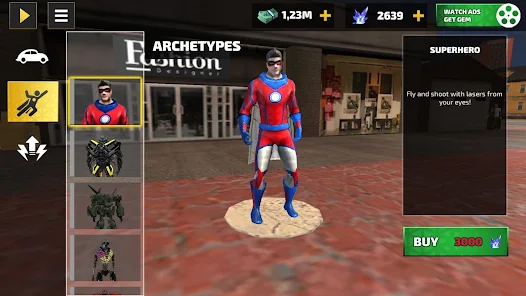
Rope Hero Vice Town is free to grab from the Google Play Store or the Apple App Store. If you are looking for a way to play it when a phone is not an option, you can run it on a PC through an Android emulator, or you can install it manually as an APK. Naxeex built the game as a sandbox superhero adventure, and getting it running takes only a few minutes. Here is the complete guide for you to download the game easily.
Downloading Rope Hero Vice Town on Android
Android users have the easiest path here, because the game was built with mobile touch controls in mind.
Getting It From the Google Play Store
Open the Play Store app, tap the search bar, and type in the name of the game. The official listing shows Naxeex as the publisher, so double-check that before you tap install. Once you hit install, Android handles the rest on its own; it pulls the package down and unpacks it automatically.
You will see a notification once it is ready to open. First launch usually asks for a couple of permissions, mostly storage and sometimes notifications, and accepting those lets missions load without hiccups later.
What to Check Before You Tap Install
Here, what matters the most is the Android version, because the game needs Android 6.0 or newer, which covers most phones sold in the last several years. Storage matters more than people expect.
The install file sits around 200 MB, so it helps to leave another few hundred megabytes free; otherwise, save data and cache start piling up and things slow down.
And if your data plan is limited, grabbing the file over Wi-Fi saves you from an unpleasant surprise on your next bill.
How to Download Rope Hero Vice Town on PC
There is no native Windows or Mac version, but that has not stopped players from running the whole game on a desktop screen. The workaround is an Android emulator, and it is more reliable than it sounds.
Setting Up an Android Emulator
BlueStacks and NoxPlayer are the two names that come up constantly for this, and both work more or less the same way. Download the installer from the emulator’s own website, not from a random mirror, then run through the setup like any other Windows program. Once it is open, you sign into a Google account inside the emulator, same as setting up a new phone.
The Play Store then appears right inside the emulator window, and you search for the game exactly like you would on a real Android device. All you need to do is install it and wait for it to finish, and there you go; it launches in its own resizable window.
Minimum PC Requirements to Run It Smoothly
BlueStacks asks for at least 4 GB of RAM, though 8 GB makes everything noticeably smoother with other apps open in the background. Windows 7 or newer covers the operating system side. You will also want roughly 5 GB of free disk space for the emulator itself, separate from whatever the game needs.
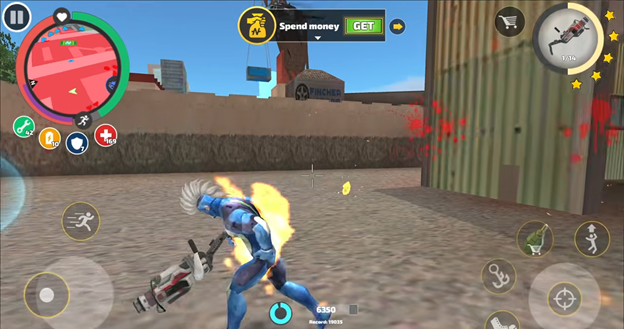
A basic dual-core processor gets the job done here, and a dedicated graphics card is not required since this is not a demanding 3D title by today’s standards.
Can You Download Rope Hero Vice Town on iPhone?
Yes, the game has an official listing on the Apple App Store under the same Naxeex developer name, and installation follows the standard iOS process with no extra steps or workarounds needed.
Installing via the App Store
Search for the game by name in the App Store app, confirm Naxeex is listed as the developer, then tap Get. iPhones with Face ID will prompt a quick face scan to authorise the download, while older models use Touch ID or a passcode instead. There is not a strict minimum iOS version publicly listed for this particular title, so if the App Store shows the install button on your device, that itself is your confirmation it will run.
How to Download Rope Hero Vice Town in Jio Phone
This one comes up a lot, and the honest answer disappoints some people. It simply is not built for that hardware.
Why Native Installation Isn’t Supported on Jio Phone
Jio Phones run on KaiOS, which is a completely different operating system from Android or iOS. KaiOS was designed for lightweight feature phones with physical keypads, not touchscreen 3D games, and it does not have access to the Google Play Store at all. Without Play Store access, there is no official channel to install Rope Hero Vice Town, and the game’s engine was not built to run on KaiOS hardware anyway.
Workarounds Jio Phone Users Actually Use
A handful of people get creative here. There is a chance that cloud gaming apps, which stream Android games from a remote server, can work through a KaiOS browser, though performance depends heavily on internet speed and it tends to feel laggy on a small keypad screen. Screen mirroring from a separate Android phone is another route some try, casting gameplay rather than running it locally.
Realistically, neither option replaces a proper Android device.
Installing From an APK File Instead of the Play Store
Some players prefer downloading the raw installation file directly rather than going through Google’s store, often because of region restrictions or wanting an older version.
Enabling Unknown Sources Safely
Android blocks APK installs from outside the Play Store by default, and for good reason. To get around that, head into Settings, then Security, and look for an option called Install Unknown Apps, or something similarly worded depending on your Android version. You will pick the specific app, usually your browser or file manager, and permit it just for that one install.
Turning this off again afterwards is a smart habit, so leaving it permanently enabled just widens the door for anything else that tries to slip in later.
How to Verify You’re Downloading a Safe File
Before tapping install, check who actually published the file. Legitimate mirrors will still credit Naxeex as the original developer even when hosting the APK themselves. Reviews and comment sections on the download page are worth skimming too, because users tend to flag broken or suspicious files fairly quickly.
Steer clear of anything advertised as modded or cracked. You know what? Those are the exact files most commonly wrapped around hidden malware.
What About Rope Hero Mod APK Versions?
Search results for this game are full of mod APK offers promising unlimited money or unlocked weapons, so it is worth understanding what those actually are. A mod APK is a version of the game file that has been altered by someone outside the original development team, not by Naxeex.
These files typically remove ads, unlock in-game currency, or strip out purchase requirements. They then get repackaged and distributed through third-party sites, separate from the official stores.
Play Store vs Third-Party APK: Which Should You Use?
For most people, the Play Store or the App Store is the right call, and it is not even close. Official stores run automatic malware scanning on every submitted app. They push updates the moment Naxeex releases them, and they give you a direct line for support if something goes wrong. Installation is also faster in practice, since there is no separate file download step or unknown sources toggle to fuss with.
Third-party APKs also earn their place. Recently, a Rope Hero mod APK version from this source worked extremely well on my device. So, if you’re looking only for the modified version, give this one a try.
Get the Smoothest Rope Hero Vice Town Experience on PC
Playing through an emulator opens up an option phones simply cannot offer, and that is real keyboard and mouse control. Aiming with a mouse is far more precise than dragging a thumb across a touchscreen reticle, especially once the Zombie Arena starts throwing tougher waves at you. Movement feels tighter too, since WASD-style controls let you dodge and reposition faster than swiping ever could.
Most emulators let you remap keys rather than sticking with the defaults, so it is worth spending a few minutes customising the layout before you dive in. And there you go; if you already followed the PC setup steps above, this is the natural next move for anyone chasing a competitive edge in combat.
