

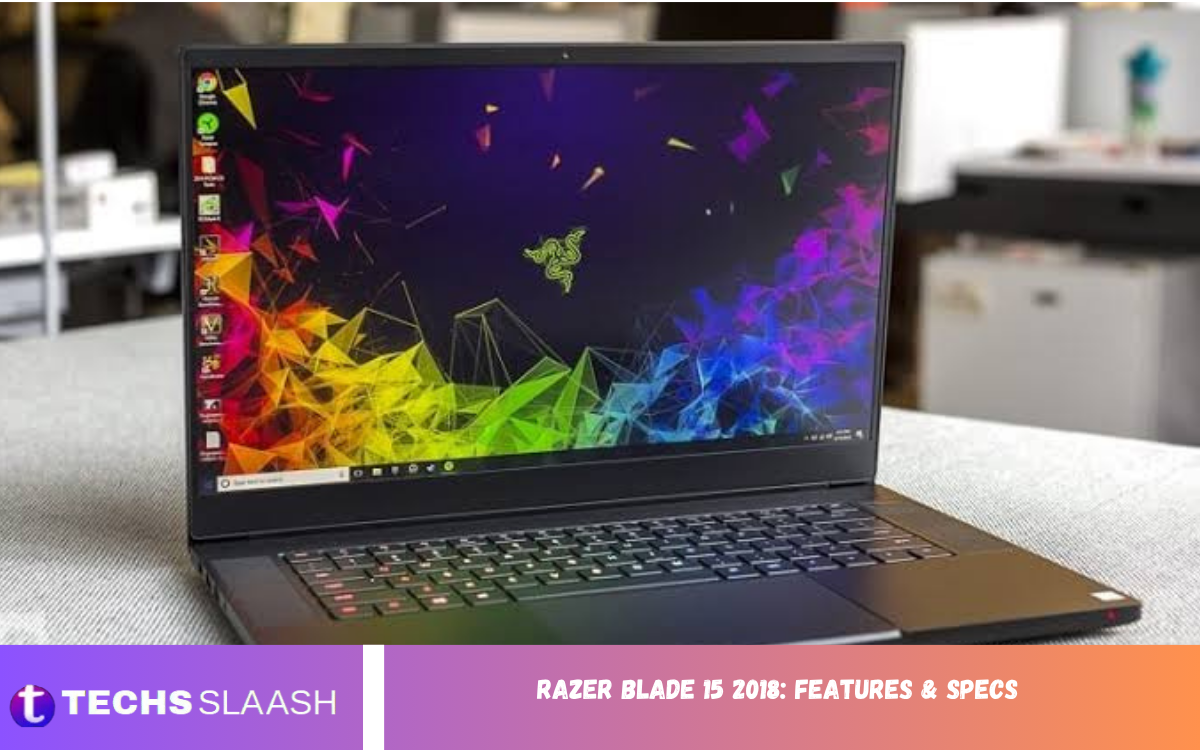
The Razer Blade 15 2018 features and specs remain impressive for a gaming laptop from its generation. It combined a slim CNC aluminum chassis with an 8th-generation Intel Core i7 processor and NVIDIA GeForce GTX Max-Q graphics, offering strong performance without the bulky design common among gaming notebooks.
The laptop was designed for users who wanted gaming power, portability, and a professional appearance in one machine. Depending on the configuration, it offered Full HD displays up to 144Hz or a 4K touchscreen, along with upgradeable memory and storage options.
Design and Build Quality
The Razer Blade 15 2018 introduced a refined 15.6-inch form factor while maintaining the premium aluminum construction associated with the Blade family. Its thin profile, narrow bezels, and understated black finish made it look more like a professional workstation than a traditional gaming laptop.
The chassis measured around 355 × 235 mm, while the Advanced configuration was approximately 16.8 mm thick and weighed about 2.07 kg. The Base model was slightly thicker at 19.9 mm and weighed approximately 2.03 kg, depending on configuration.
Processor and Performance
At the heart of the Razer Blade 15 2018 was the 8th-generation Intel Core i7-8750H. This six-core, twelve-thread processor operated at 2.2GHz with Turbo Boost speeds reaching up to 4.1GHz, providing enough processing power for gaming, productivity, content creation, and demanding multitasking.
The six-core processor was a major advantage over many older gaming notebooks. It handled demanding applications such as video editing, photo processing, software development, and CPU-intensive workloads particularly well for its era. Its performance also complemented the dedicated NVIDIA graphics hardware.
Graphics Performance
Graphics performance depended on the specific Razer Blade 15 2018 configuration. The GTX 1060 Max-Q with 6GB of GDDR5 VRAM was a common option, while higher-end models were available with the GTX 1070 Max-Q and 8GB of GDDR5 VRAM.
The GTX 1060 Max-Q configuration was particularly suitable for Full HD gaming. Many demanding games could be played at high settings, while less demanding competitive titles could take advantage of the higher refresh-rate display. The GTX 1070 Max-Q offered additional performance for users seeking higher graphics settings or more demanding workloads.
Display Options
One of the strongest features of the Razer Blade 15 2018 was its display selection. The Full HD models used a 15.6-inch IPS panel with 1920 × 1080 resolution, while selected configurations offered a 144Hz refresh rate and 100% sRGB coverage.
The 144Hz panel was especially useful for fast-paced games because it provided smoother motion than a conventional 60Hz display. Higher-end configurations also offered a 4K touchscreen, making the laptop attractive to creative professionals who valued resolution and color quality as well as gaming performance.
Memory and Storage
The Razer Blade 15 2018 generally came with 16GB of dual-channel DDR4 memory. Official specifications for the lineup indicated support for up to 32GB, giving users useful upgrade potential compared with laptops that had permanently soldered memory.
Storage configurations varied between models. Some Base configurations combined a 128GB or 256GB SSD with a larger 1TB or 2TB hard drive, while higher-end versions used PCIe SSD storage. The ability to upgrade RAM and storage was one of the practical advantages highlighted in contemporary reviews.
Keyboard and Touchpad
Razer equipped the Blade 15 with a backlit keyboard featuring Razer Chroma technology. Depending on the model, lighting could provide customizable effects, while anti-ghosting helped improve input reliability during gaming sessions.
The large glass touchpad was another notable improvement over earlier Blade designs. It supported Microsoft’s Precision Touchpad technology and provided a spacious surface for navigation and everyday productivity. However, contemporary testing noted that the touchpad could sometimes feel overly sensitive during normal typing.
Ports and Connectivity
The Razer Blade 15 2018 offered a practical selection of modern ports. These included Thunderbolt 3 through USB-C, three USB 3.1 ports, HDMI 2.0, Mini DisplayPort 1.4, a 3.5mm audio combination jack, and, on the Base model, Gigabit Ethernet.
Wireless connectivity included Intel Wireless-AC technology and Bluetooth 5. Thunderbolt 3 was particularly useful because it supported high-speed peripherals and external display configurations, while also opening the possibility of using compatible external graphics solutions.
Cooling and Thermal Management
Packing powerful hardware into a thin chassis creates significant thermal challenges, so Razer redesigned the cooling system for the 2018 Blade. The laptop incorporated a vapor-chamber-based thermal solution intended to distribute and remove heat more effectively than conventional cooling designs.
During demanding workloads, the system could become warm and the fans could become noticeable. This was a reasonable trade-off for a thin gaming notebook with a high-performance processor and dedicated GPU. The cooling system allowed the Blade 15 to maintain strong performance while keeping the keyboard area more comfortable during many gaming sessions.
Battery Life
Battery capacity depended on the configuration. The Base model used a 65Wh rechargeable lithium-ion polymer battery, while certain higher-end configurations featured an 80Wh battery. Razer advertised battery life of up to approximately six hours under suitable conditions with Optimus technology.
Real-world battery life naturally depended on screen brightness, refresh rate, applications, wireless activity, and workload. Gaming on battery power reduced endurance considerably because the dedicated GPU and processor consume substantially more energy under load. For demanding use, carrying the power adapter was generally advisable.
Gaming Experience
For its generation, the Razer Blade 15 2018 delivered a strong gaming experience in a relatively portable package. The GTX 1060 Max-Q was well matched to 1080p gaming, while the GTX 1070 Max-Q provided additional headroom for demanding titles and higher graphics settings.
The 144Hz Full HD screen was particularly appealing to competitive gamers. When a game could produce sufficiently high frame rates, the higher refresh rate made movement feel smoother and improved overall gameplay responsiveness. This combination of portability, graphics power, and display quality helped distinguish the Blade from larger gaming machines.
Productivity and Creative Work
The Razer Blade 15 2018 was not limited to gaming. Its six-core Intel processor, dedicated NVIDIA graphics, generous memory, and high-quality display made it suitable for productivity and creative applications. It could handle tasks such as photo editing, video editing, programming, multitasking, and other demanding workloads.
The combination of a professional-looking aluminum chassis and powerful internal hardware also made the laptop suitable for users who wanted one computer for both work and entertainment. Contemporary reviews found the system capable of handling video editing and other demanding productivity tasks effectively.
Audio and Webcam
The laptop included front-firing stereo speakers positioned to provide direct sound toward the user. While they were adequate for everyday videos, gaming, and casual media consumption, they were not considered a standout feature of the machine.
A built-in 1MP webcam capable of 720p video was also included, along with an array microphone. These features were sufficient for basic video calls and online communication, although modern laptops generally offer stronger webcam hardware.
Read Also: MacBook 12-inch M7 Review 2026
Software and Features
The Razer Blade 15 2018 was designed to work with Razer Synapse software, allowing users to manage supported system and keyboard features. Chroma lighting controls provided additional customization for users who wanted a more personalized gaming setup.
Windows 10 was the operating system supplied with the models discussed here. The laptop also incorporated security features such as Intel Platform Trust Technology, while selected hardware configurations provided the connectivity and expansion features expected from a premium gaming notebook.
Razer Blade 15 2018 Specifications
The main specifications of the Razer Blade 15 2018 can vary by model, but the core configuration included an Intel Core i7-8750H processor, NVIDIA GTX Max-Q graphics, 16GB DDR4 memory, and a 15.6-inch display. Higher-end versions offered stronger graphics and premium display options.
The Base model featured a 60Hz Full HD screen, GTX 1060 Max-Q graphics, 65Wh battery, and storage combinations involving SSD and HDD drives. Advanced versions could offer 144Hz Full HD displays, GTX 1060 or GTX 1070 Max-Q graphics, larger batteries, and faster SSD storage.
Pros and Cons
The biggest strengths of the Razer Blade 15 2018 were its premium construction, compact design, powerful six-core processor, dedicated NVIDIA graphics, excellent display choices, and useful selection of ports. It successfully combined gaming capabilities with a design that could fit comfortably into professional environments.
Its disadvantages included heat under demanding workloads, noticeable fan activity, relatively limited battery endurance during heavy use, and a premium price compared with larger gaming laptops offering similar hardware. Contemporary reviews also criticized the speakers and found the power adapter relatively bulky.
Is the Razer Blade 15 2018 Still Worth It?
Whether the Razer Blade 15 2018 is worthwhile today depends heavily on its condition and price. The hardware is old by current standards, but a well-maintained unit can still be useful for everyday computing, older games, esports titles, schoolwork, programming, and moderate creative workloads.
Buyers considering a used model should pay close attention to battery health, SSD condition, keyboard functionality, display quality, cooling performance, and the condition of the aluminum chassis. A clean example with upgraded RAM and storage can remain a capable secondary or budget gaming machine.
Frequently Asked Questions
What processor does the Razer Blade 15 2018 use?
The Razer Blade 15 2018 uses an 8th-generation Intel Core i7-8750H processor with six cores and twelve threads. Its base clock is 2.2GHz and Turbo Boost can reach up to 4.1GHz.
What GPU is available in the Razer Blade 15 2018?
The laptop was available with NVIDIA GeForce GTX 1060 Max-Q graphics with 6GB GDDR5 memory, while higher-end configurations offered the GTX 1070 Max-Q with 8GB GDDR5 memory.
Does the Razer Blade 15 2018 have a 144Hz display?
Yes. Selected configurations feature a 15.6-inch Full HD IPS display with a 144Hz refresh rate and 100% sRGB coverage. Other configurations used a 60Hz Full HD panel or offered a 4K touchscreen.
How much RAM does the Razer Blade 15 2018 have?
Many configurations shipped with 16GB of dual-channel DDR4 RAM. Official specifications indicate support for up to 32GB, depending on the model.
Can the Razer Blade 15 2018 storage be upgraded?
Yes. Storage upgradeability is one of the useful characteristics of this generation. Configuration and available drive bays vary by model, so buyers should verify the exact version before purchasing replacement storage.
Does the Razer Blade 15 2018 support Thunderbolt 3?
Yes. The laptop includes a USB-C port with Thunderbolt 3 support, alongside USB 3.1, HDMI 2.0, and Mini DisplayPort 1.4 connectivity.
Is the Razer Blade 15 2018 good for gaming?
For its generation, yes. The GTX 1060 Max-Q is particularly suitable for Full HD gaming, while the GTX 1070 Max-Q configuration provides greater performance for demanding games.
How long does the Razer Blade 15 2018 battery last?
Razer advertised up to around six hours under suitable conditions, but actual battery life depends heavily on the configuration and workload. Gaming and other intensive tasks can reduce battery life significantly.
Does the Razer Blade 15 2018 get hot?
Like many thin gaming laptops, it can become warm during demanding workloads. Its vapor-chamber cooling system was designed to manage the heat generated by the powerful processor and dedicated graphics hardware.
Is the Razer Blade 15 2018 worth buying used?
It can be worthwhile when priced appropriately and in good condition. Before buying, check the battery, display, keyboard, storage, cooling system, charger, and overall physical condition because these components can be significant concerns on an older gaming laptop.
Conclusion
The Razer Blade 15 2018: Features & Specs demonstrate why this laptop became an important model in the thin gaming laptop category. Its combination of a six-core Intel processor, NVIDIA Max-Q graphics, high-quality displays, premium aluminum construction, upgradeable components, and extensive connectivity made it a versatile machine for gaming and professional workloads.
Although newer laptops now provide substantially faster processors and graphics, the Razer Blade 15 2018 can still offer value as a used machine when its condition and price are right.
