

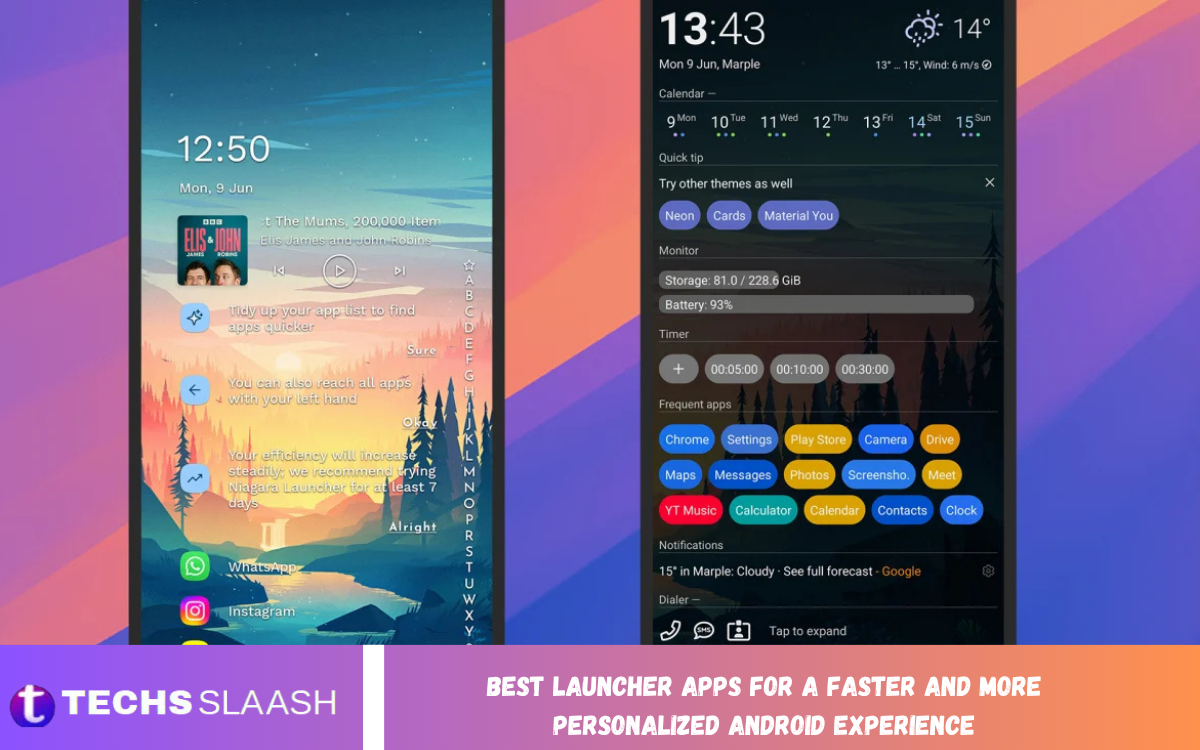
Android gives users plenty of freedom to customize their phones, but the default home screen does not always provide the speed, organization, or visual style everyone wants. A launcher can completely change the way you interact with apps, widgets, folders, notifications, and settings without changing the Android operating system itself.
The Best Launcher Apps for a Faster and More Personalized Android Experience can make your phone feel cleaner, more responsive, and easier to use. Whether you prefer a minimal interface, Pixel-style design, advanced customization, one-handed navigation, or productivity-focused controls, there is a launcher designed around your needs.
What Is an Android Launcher?
An Android launcher is the software responsible for displaying and managing your phone’s home screen, app drawer, icons, folders, widgets, and navigation experience. Every Android smartphone comes with a default launcher, but users can replace it with a third-party option that provides additional features and customization.
A good launcher can change much more than the appearance of your phone. It can help you reach applications faster, organize a large collection of apps, reduce visual clutter, customize gestures, and create a home screen that matches your daily habits.
Why Use a Third-Party Android Launcher?
The biggest reason to install a third-party launcher is flexibility. Instead of accepting the layout provided by your phone manufacturer, you can choose how many icons appear on the screen, how apps are arranged, which gestures perform specific actions, and what information is displayed.
Launchers can also provide a cleaner experience on devices where the default interface feels crowded. Some focus on minimalism and speed, while others provide extensive controls for people who enjoy designing every part of their home screen.
Lawnchair Launcher
Lawnchair is an excellent choice for Android users who want a clean, Pixel-inspired interface without giving up customization. It offers a familiar home-screen experience while providing additional options for icons, layouts, gestures, colors, and other visual elements.
Another advantage is its open-source approach, which makes it particularly attractive to users who prefer greater transparency and a community-driven Android experience. It is a strong option for anyone looking for a simple interface that still provides meaningful customization.
Niagara Launcher
Niagara Launcher takes a different approach from traditional Android launchers. Instead of filling the home screen with multiple rows of icons, it focuses on a streamlined app list that makes navigation especially convenient on larger phones.
Its minimalist design can also reduce distractions because you are not constantly looking at dozens of colorful application icons. Users who value one-handed operation, simplicity, and quick access may find Niagara especially comfortable for everyday use.
Smart Launcher
Smart Launcher is designed for users who want organization without spending a lot of time manually arranging applications. Its automatic app categorization can help keep games, communication apps, productivity tools, media applications, and other software organized.
It also offers customization options for layouts, icons, themes, widgets, and gestures. This balance between automatic organization and personalization makes it a useful choice for people who want their phone to look attractive while remaining practical.
Nova Launcher
Nova Launcher has historically been one of the most recognized names in Android customization. Its appeal comes from the enormous number of options available for changing grids, icons, folders, gestures, app drawers, and home-screen layouts.
For experienced Android users, the level of control can be impressive. However, users should consider the launcher’s current development status, privacy practices, and feature availability before choosing it as their long-term launcher, particularly given the significant changes in the launcher landscape in recent years.
Microsoft Launcher
Microsoft Launcher is a strong option for people who regularly use Windows and Microsoft services. It combines a familiar Android home screen with features connected to Microsoft applications and productivity tools.
The launcher can be useful for users who want calendars, tasks, news, search, contacts, and other information accessible from their home screen. It may be especially appealing to people who already rely heavily on Microsoft’s ecosystem for work or study.
Kvaesitso Launcher
Kvaesitso focuses heavily on search and quick access rather than traditional home-screen organization. Instead of requiring users to browse through multiple pages and folders, it encourages finding applications and information through search.
This approach can make the phone feel considerably simpler for people who have many installed applications. It is particularly interesting for users who prefer open-source software and a search-first workflow rather than a conventional icon-heavy home screen.
AIO Launcher
AIO Launcher is designed for users who want information rather than decorative home-screen layouts. Instead of concentrating primarily on icons and folders, it can turn the home screen into an information dashboard containing useful details.
This approach can be helpful for productivity-focused users who want important information available immediately after unlocking their phone. It is less conventional than standard launchers, so it may take some time to become comfortable with its interface.
Read Also: Best Camera Apps for Professional Photography
KISS Launcher
KISS Launcher is built around simplicity and fast searching. Its design removes many of the visual elements found in traditional launchers and places greater emphasis on quickly finding applications.
For older smartphones or users who prefer extremely lightweight interfaces, this type of launcher can be appealing. Rather than spending time arranging icons, users can search for what they need and launch it with minimal interaction.
What Makes a Launcher Fast?
A fast launcher should respond quickly when opening the home screen, launching applications, switching between pages, opening the app drawer, and performing gestures. However, perceived speed is not determined solely by the launcher, as device hardware, Android version, animations, widgets, and background processes also influence performance.
A simpler home screen can often feel faster because it contains fewer visual elements and widgets that need to be refreshed. Choosing a lightweight design and avoiding unnecessary animations can therefore improve the overall experience, particularly on older or budget Android devices.
How Launchers Improve Personalization
Personalization is one of the biggest strengths of Android launchers. Depending on the application, users can modify icon sizes, grid spacing, wallpapers, fonts, themes, folders, widgets, app drawer layouts, and gesture controls.
Some launchers allow you to create completely different layouts for different preferences. You can build a productivity-focused home screen with calendars and notes, a minimalist setup with only essential applications, or a colorful design using custom icon packs and wallpapers.
Best Launcher Features to Look For
When choosing a launcher, start with the features you actually need rather than selecting one simply because it offers the most settings. Customizable grids, gesture support, icon packs, widgets, app organization, search, backups, and notification controls are among the most useful features.
Privacy and reliability should also be considered. A launcher is one of the most frequently used apps on your phone, so it is worth checking its permissions, update history, developer reputation, and compatibility with your Android version before making it your default.
Best Launcher for Customization
For users who want to change almost every part of their home screen, a highly configurable launcher is the better choice. Traditional customization-focused launchers generally provide controls for grids, icons, folders, gestures, docks, app drawers, and screen transitions.
However, more customization can also mean more setup time. If you enjoy experimenting with layouts and themes, that flexibility is a benefit, but users who simply want a clean and fast phone may prefer a launcher with fewer controls.
Best Launcher for Minimalism
Minimalist launchers remove unnecessary visual elements and help users concentrate on the applications they actually use. Niagara, KISS, and other minimal interfaces are designed around quick access rather than decorative home screens.
This style can also be useful for people who feel overwhelmed by crowded screens. With fewer icons and distractions, your phone can become easier to navigate and may encourage more intentional use.
Best Launcher for Productivity
Productivity-focused users should look for launchers that provide quick access to calendars, reminders, notes, contacts, tasks, and frequently used applications. A good productivity launcher can turn the home screen into a useful dashboard instead of simply displaying app icons.
Microsoft Launcher and AIO Launcher are worth considering for this type of setup. The right choice depends on whether you prefer an ecosystem-focused interface or an information-dense dashboard that puts more data directly on the home screen.
How to Choose the Right Android Launcher
Start by deciding what you want to improve. If your current phone feels cluttered, choose a minimalist launcher. If you want complete control over appearance, choose a customization-focused option. If you have hundreds of applications, automatic organization and powerful search can save time.
It is also important to consider your device. A feature-heavy launcher may be unnecessary on a powerful flagship, while a lightweight launcher can be more suitable for an older smartphone. Try a launcher for several days before deciding whether it genuinely improves your daily experience.
Tips for Making Your Launcher Faster
Keep the home screen relatively simple and avoid filling every page with animated widgets. Remove applications and shortcuts you rarely use, reduce unnecessary transitions when possible, and use folders or search instead of creating many home screen pages.
It is also a good idea to keep your launcher updated through a trusted source and make regular backups when the application supports them. If you experience unusual lag after installing a launcher, test the phone with fewer widgets and visual effects before assuming the launcher itself is responsible.
Frequently Asked Questions
What is the best launcher app for Android?
There is no single launcher that is perfect for everyone. Lawnchair is a strong choice for a clean Pixel-style experience, Niagara is excellent for minimalism, and Smart Launcher is useful for automatic organization and personalization.
Do Android launchers make phones faster?
A launcher cannot upgrade your phone’s hardware, but a lightweight launcher can make navigation feel faster. Reducing animations, widgets, and visual clutter may also improve the perceived responsiveness of the home screen.
Are Android launchers safe to use?
Reputable launchers can be safe to use, but users should check the developer, permissions, update history, and privacy information before installing one. Avoid downloading modified launcher APK files from unknown websites.
Can I change my launcher back to the default one?
Yes. Android normally allows you to select another installed launcher as the default home application. You can switch back to the manufacturer’s launcher whenever you want.
Which launcher is best for a minimalist phone?
Niagara Launcher is a strong option for users who want a simple and distraction-free interface. Search-focused launchers such as KISS can also work well for people who prefer typing or searching rather than browsing icons.
Which launcher is best for customization?
A customization-focused launcher is best for users who want control over icons, grids, gestures, folders, widgets, and app drawers. Nova has traditionally been known for deep customization, while Smart Launcher and Lawnchair provide different approaches to personalization.
Can launchers change Android’s operating system?
No. A launcher changes the home-screen and navigation experience, but it does not replace Android itself. System settings, hardware functions, security updates, and the underlying operating system remain controlled by Android and the device manufacturer.
Do launchers support widgets?
Most modern Android launchers support widgets, although the way widgets are positioned and customized differs between applications. Some launchers also provide their own specialized widgets or dashboard components.
Can I use an Android launcher on Samsung phones?
Yes, many third-party launchers can be used on Samsung Galaxy devices. Compatibility can vary by Android and One UI versions, so users should check whether their preferred launcher supports their device.
Should I use a launcher on an older Android phone?
A lightweight launcher can be a useful option for an older phone, particularly if the default interface feels crowded or slow. Choosing a simple layout with fewer widgets and effects can provide a cleaner everyday experience.
Conclusion
The Best Launcher Apps for a Faster and More Personalized Android Experience depend on how you use your smartphone. Lawnchair is appealing for its clean Pixel-style interface; Niagara stands out for its minimalism; Smart Launcher focuses on organization; Microsoft Launcher works well for Microsoft users; and KISS offers an extremely simple, search-driven experience.
A launcher should make your phone easier, not more complicated. Choose an application that matches your habits, keep the home screen organized, and avoid unnecessary visual effects.

1 Comment
Pingback: Best Security Apps for Protecting Your Android Device - Techsslaash.com