

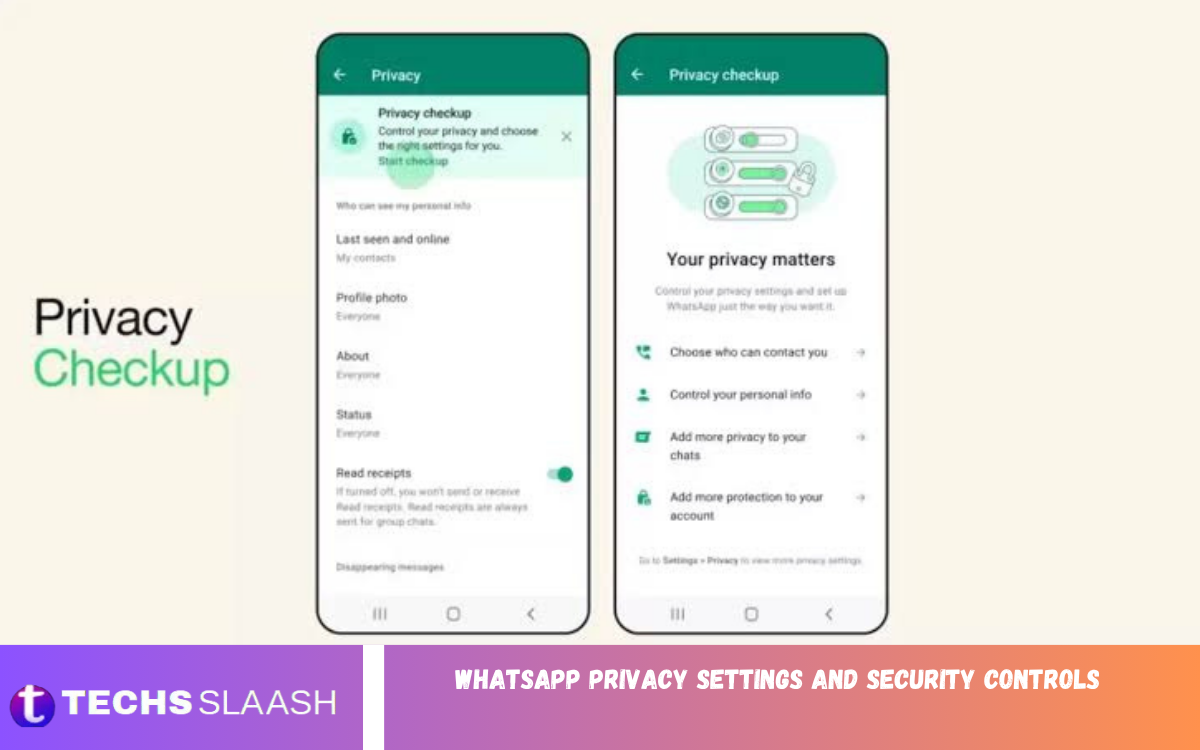
WhatsApp Privacy Settings and Security Controls help users manage who can view their personal information and interact with their accounts. These settings provide practical ways to control profile visibility, messages, calls, groups, and account security.
Understanding WhatsApp privacy features helps protect personal conversations and reduce unwanted contact. By reviewing the available controls regularly, users can create a safer and more private messaging experience.
Manage Your WhatsApp Privacy Settings
WhatsApp provides privacy controls that allow users to decide who can see information such as their profile photo, About section, status updates, and last seen activity. You can generally adjust these options to match your preferences.
Users can choose broader or more limited visibility depending on their needs. Reviewing these settings helps prevent unnecessary exposure of personal information while keeping WhatsApp convenient for everyday communication.
Control Last Seen and Online Status
The Last Seen and Online settings let users control when others can see their activity information. Users can choose options that limit visibility to selected contacts or prevent others from seeing this information.
Controlling online visibility adds an extra layer of privacy during daily conversations. It is particularly useful for users who prefer not to share their activity status with everyone who has their phone number.
Protect Your Profile Photo and About Information
Your WhatsApp profile photo and About information may reveal personal details that you do not want everyone to access. Privacy settings allow users to control which contacts can view these details.
Choosing a restricted audience can reduce unwanted exposure of personal information. Users should also avoid placing sensitive details in their profile photo or About section because contacts may save or share visible information.
Secure WhatsApp Status Updates
WhatsApp Status allows users to share photos, videos, text, and other updates with their contacts. Privacy controls determine which contacts can see individual status updates.
Before posting personal content, review the selected audience and consider whether you want all contacts to see the information. A smaller audience gives you more control over personal updates and temporary content.
Use Two-Step Verification
Two-step verification adds an extra layer of security to a WhatsApp account. When enabled, WhatsApp asks users to create a PIN that can help protect the account during certain verification processes.
Users should create a strong PIN and avoid sharing it with anyone. A recovery email can also be useful when supported because it may help recover access if the verification PIN is forgotten.
Enable Registration Lock Protection
Registration security helps protect an account from unauthorized attempts to register the WhatsApp number on another device. Two-step verification can strengthen this protection by requiring an additional PIN.
Users should treat verification codes and security PINs as private information. Legitimate contacts, companies, or support representatives should not need a user’s personal verification code to communicate through WhatsApp.
Review Linked Devices
WhatsApp allows users to connect their account with additional devices. The Linked Devices section can be used to review where the account is currently connected.
Regularly checking linked devices is an effective security habit. If an unfamiliar device appears, users should investigate it and remove access when necessary to prevent someone else from viewing messages through an unauthorized session.
Protect Your WhatsApp Account From Scams
Scammers may attempt to convince users to provide verification codes, PINs, or other account information. These attempts can appear as messages from friends, businesses, or unknown contacts.
Never share WhatsApp verification codes with another person. If someone asks for a code sent to your phone, treat the request as suspicious and verify the person’s identity through another trusted communication method.
Manage Group Privacy Controls
WhatsApp group privacy settings help users control who can add them to groups. Depending on the available settings, users can limit invitations from people outside their preferred contact circle.
Controlling group invitations can reduce unwanted messages and spam. If an unfamiliar group invitation appears, users can review the information before deciding whether to join or remain involved.
Control Calls From Unknown Accounts
WhatsApp includes features designed to help users manage calls from unknown numbers. The Silence Unknown Callers feature can reduce interruptions from people the user doesn’t know.
Silencing unknown calls does not necessarily prevent those callers from contacting the account through other methods. Users should stay cautious about unexpected messages, attachments, and requests for personal information.
Protect Chat Privacy
Private conversations may contain sensitive information, including personal discussions, documents, photographs, and financial details. Users should take advantage of available privacy and security features to protect access to their chats.
Device security also matters because WhatsApp privacy controls cannot fully protect conversations if someone has unrestricted access to an unlocked phone. A strong screen lock adds an important layer of protection.
Use Chat Lock for Sensitive Conversations
Chat Lock can provide additional privacy for selected conversations by placing them behind an extra authentication step. This can be useful when users have conversations that they want to keep separate from their regular chat list.
The feature can provide additional protection when someone temporarily uses the user’s phone. Users should still maintain strong device authentication because overall phone security remains an important part of account protection.
Enable End-to-End Encryption Features
WhatsApp uses end-to-end encryption for personal messages and calls, helping protect the content while it is being transmitted between participants. This means the conversation is designed to remain private between the intended participants.
Users should still understand that privacy depends on the security of their devices and accounts. A compromised device, shared credentials, screenshots, or voluntarily forwarded messages can create privacy risks outside encryption.
Read Also: WhatsApp AI Features and Smart Capabilities
Protect WhatsApp Backups
Chat backups can contain valuable personal information, so users should review their backup security options. WhatsApp provides an end-to-end encrypted backup option for users who want an additional layer of protection for stored chat backups.
Users should select a secure password or encryption key when using encrypted backups. Losing the required credentials can make recovery difficult, so users should store them securely and never share them publicly.
Manage Disappearing Messages
Disappearing Messages let users configure messages to disappear automatically after a selected period. This feature can reduce the amount of old conversation content retained in chats.
Disappearing messages should not be treated as a guarantee that information cannot be preserved. Recipients may still capture, forward, copy, or otherwise preserve information before it disappears.
Keep WhatsApp Updated
Keeping WhatsApp updated is an important part of maintaining account security. Updates can include security improvements, bug fixes, privacy enhancements, and changes to existing features.
Users should install WhatsApp updates from trusted app sources and avoid modified versions that claim to offer extra features. Unofficial applications can create additional privacy and security risks.
Recognize Suspicious WhatsApp Messages
Unexpected messages containing urgent requests, suspicious offers, unusual links, or requests for verification codes should be treated carefully. Scammers often use urgency to encourage users to act without checking the information.
Before responding to a suspicious message, verify who sent it and why they are contacting you. Avoid sharing passwords, payment information, verification codes, or other sensitive details through unexpected conversations.
Check Privacy Settings Regularly
Privacy settings should not be considered a one-time configuration. Users may change phones, add contacts, join groups, or install new versions of WhatsApp, making periodic privacy reviews useful.
A regular security check can include reviewing profile visibility, status privacy, group permissions, linked devices, two-step verification, blocked contacts, and backup protection. These simple checks can help keep your account more private.
Common WhatsApp Privacy Mistakes
One common mistake is leaving personal information visible to a broad audience without realizing it. Another is sharing verification codes or security PINs after receiving a convincing message from someone you don’t know.
Users may also forget to remove unfamiliar linked devices or continue using outdated applications. Avoiding these mistakes can significantly improve everyday WhatsApp privacy and security.
Best Practices for WhatsApp Security
Strong WhatsApp security begins with protecting the phone itself. Users should use a secure screen lock, keep their operating system updated, and avoid allowing unknown people to access an unlocked device.
Account protection should also include two-step verification, careful management of linked devices, secure backups, and awareness of suspicious messages. Combining these practices creates multiple layers of protection instead of relying on a single privacy setting.
Frequently Asked Questions
What are WhatsApp Privacy Settings and Security Controls?
WhatsApp Privacy Settings and Security Controls are features that help users manage account visibility, personal information, chats, calls, groups, and account protection. They allow users to customize how their WhatsApp account is used and accessed.
How can I make my WhatsApp account more private?
Review your Last Seen, Online, Profile Photo, About, and Status privacy settings. You can also use two-step verification, Chat Lock, secure backups, and device protection for additional privacy.
Can I hide my WhatsApp online status?
WhatsApp provides controls for managing online visibility. Users can adjust the relevant privacy settings to limit who can see when they are online.
Is WhatsApp end-to-end encrypted?
WhatsApp uses end-to-end encryption for personal messages and calls. However, users should also protect their devices, accounts, backups, and verification information.
How do I protect my WhatsApp account from hackers?
Enable two-step verification, protect your phone with a strong screen lock, review linked devices, and never share WhatsApp verification codes or security PINs with other people.
Should I enable WhatsApp two-step verification?
Two-step verification adds an extra layer of security to your WhatsApp account. Creating a private PIN and keeping recovery information secure can strengthen account protection.
How can I stop unknown people from adding me to WhatsApp groups?
WhatsApp provides group privacy controls that allow users to manage who can add them to groups. Review these settings and select the option that best matches your privacy preferences.
What should I do if I see an unknown linked device?
Review the Linked Devices section and identify devices you recognize. If a device is unfamiliar, remove its access and strengthen your account security by reviewing two-step verification and other security settings.
Are disappearing messages completely private?
Disappearing messages reduce how long messages remain visible in a chat, but they do not guarantee that the information cannot be saved. Recipients can potentially preserve content before it disappears.
How often should I check WhatsApp privacy settings?
Review your privacy and security settings periodically, especially after changing phones, adding new contacts, joining groups, or noticing unusual account activity.
Conclusion
WhatsApp Privacy Settings and Security Controls provide users with practical ways to manage personal information, conversations, calls, groups, and account access. Features such as privacy controls, two-step verification, linked-device management, Chat Lock, and encrypted backups can strengthen overall account protection.
Good WhatsApp security also depends on responsible user habits. Keeping the app updated, protecting your phone, avoiding suspicious requests, and never sharing verification codes can help create a safer, more private WhatsApp experience.

1 Comment
Pingback: WhatsApp Chat Lock: Enhanced Privacy and Secure Conversation Protection - Techsslaash.com