

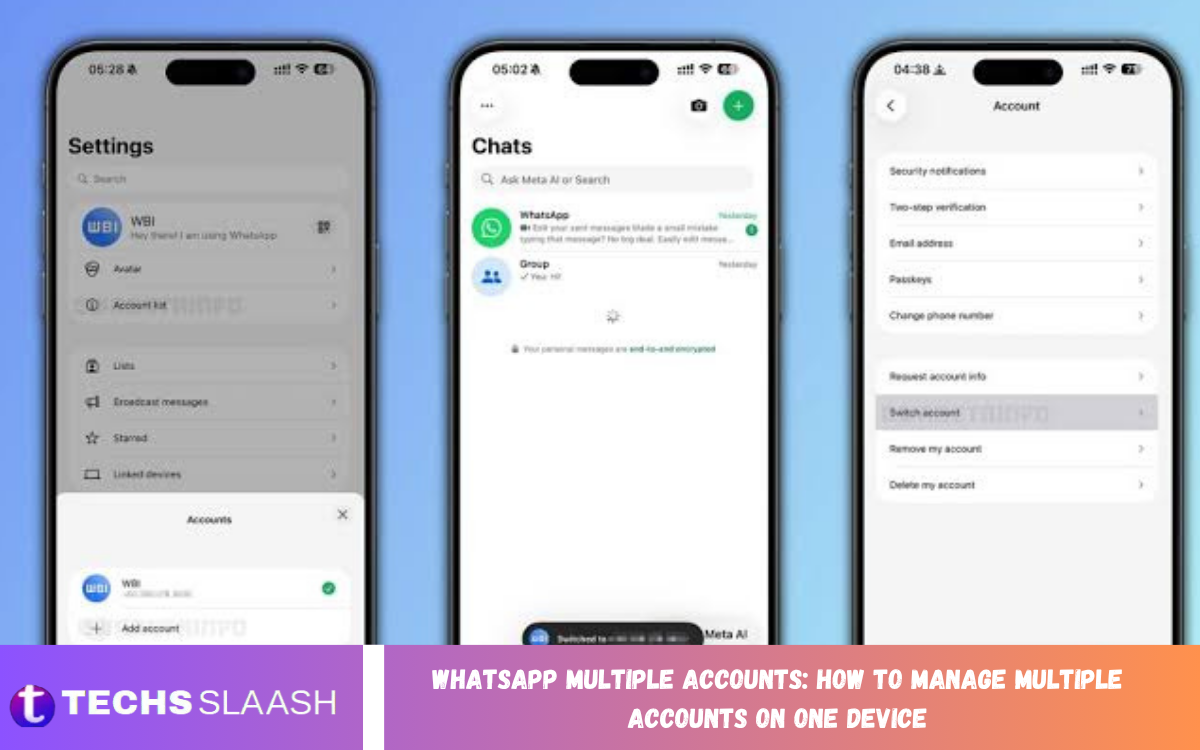
Managing personal and professional communication can become difficult when you need more than one WhatsApp account. WhatsApp Multiple Accounts makes it easier to keep separate conversations, contacts, and notifications on the same smartphone without constantly switching between devices.
With the multiple-account feature, users can add another WhatsApp account to a compatible device and move between accounts when needed. This provides a practical way to separate work, family, business, or other communication while keeping everything organized in one place.
What Are WhatsApp Multiple Accounts?
WhatsApp Multiple Accounts lets users maintain two WhatsApp accounts on a single supported smartphone. Each account can have its own phone number, chats, groups, profile information, privacy settings, and notification preferences.
The feature is particularly useful for people who use separate numbers for personal and professional communication. Instead of carrying two phones, users can manage both accounts in the same WhatsApp application and switch between them as needed.
How WhatsApp Multiple Accounts Work
WhatsApp Multiple Accounts works by connecting an additional phone number to the WhatsApp application. The second account requires a separate active phone number that can receive the verification code during the setup process.
After adding the second account, each account remains separate within the application. Messages, groups, contacts, media, and account settings are not automatically combined, allowing users to maintain a clear separation between different types of communication.
How to Add a Second WhatsApp Account
To add another account, open WhatsApp and access the account settings from your profile or menu area. Look for the option to add an account and follow the instructions provided by WhatsApp.
You will need a different phone number for the additional account. Enter the number, complete the verification process, and configure the new profile. Once the setup is finished, both accounts can be managed from the same device.
How to Switch Between WhatsApp Accounts
Switching between accounts is designed to be straightforward. After adding multiple accounts, users can access the account-switching option from the WhatsApp account menu and select the profile they want to use.
When you switch accounts, WhatsApp displays the chats and settings associated with that account. This makes it easier to respond to work messages without mixing them with personal conversations or other account activity.
Managing Personal and Professional WhatsApp Accounts
Using separate WhatsApp accounts can make professional communication more organized. A business account can be used for customers, colleagues, suppliers, or work groups, while a personal account can remain dedicated to family and friends.
Keeping these conversations separate can also reduce distractions. When you are handling professional tasks, you can focus on business messages without searching through personal conversations or accidentally responding from the wrong account.
WhatsApp Notifications for Multiple Accounts
Notifications are key to managing multiple accounts on one device. Each WhatsApp account can generate notifications for incoming messages, calls, groups, and other activity associated with that profile.
If notifications become overwhelming, review the notification settings for each account. Adjusting notification sounds, previews, and other preferences can help you identify which account received a message without opening the app.
Privacy and Security for Multiple Accounts
Security should remain a priority when managing more than one WhatsApp account. Each account should use strong security practices, including two-step verification where available and careful management of account recovery information.
Avoid sharing verification codes with other people, even if someone claims to represent WhatsApp. Keeping your phone protected with a secure screen lock also adds another layer of protection for your conversations and account information.
Managing Chats Across Multiple Accounts
One advantage of WhatsApp Multiple Accounts is that conversations remain associated with the appropriate account. Personal conversations can stay within the personal profile, while work-related conversations remain inside the professional profile.
Good chat organization can make the feature even more useful. Archive conversations that you do not need regularly, mute unnecessary group notifications, and keep important chats easy to find for faster communication.
Using Multiple Accounts for Business Communication
Multiple WhatsApp accounts can be useful for small businesses, freelancers, online sellers, and professionals who communicate with customers. A separate business number can create a clearer boundary between customer communication and personal conversations.
Businesses can also benefit from keeping customer chats separate from family and friends. This organization makes it easier to manage inquiries, orders, appointments, support requests, and other professional conversations from one device.
Managing WhatsApp Media Across Accounts
Photos, videos, documents, voice messages, and other media can accumulate quickly when multiple accounts are active. Regularly reviewing media storage can help prevent unnecessary files from consuming valuable device space.
It is useful to remove duplicate or unwanted files and review large media items periodically. Maintaining organized storage becomes especially important when both accounts are used frequently for photos, videos, documents, and other shared content.
WhatsApp Multiple Accounts and Device Storage
Using two accounts does not mean that every piece of information must be duplicated unnecessarily. However, active conversations and media from multiple accounts can still contribute to overall storage usage.
Check your WhatsApp storage management options regularly to identify large files and frequently forwarded media. Removing unneeded content can help maintain available storage and keep the app running smoothly.
Read Also: WhatsApp Last Seen Settings: A Complete Privacy Guide
Benefits of WhatsApp Multiple Accounts
The main benefit of WhatsApp Multiple Accounts is convenience. Users can manage different phone numbers from one device instead of carrying multiple smartphones throughout the day.
The feature can also improve communication organization and privacy. Separating personal and professional conversations reduces the chance of mixing messages and provides a more structured way to manage different areas of daily communication.
Common Problems With Multiple WhatsApp Accounts
Some users may have trouble adding or switching between accounts. These problems can relate to phone-number verification, app versions, device compatibility, network connectivity, or account configuration.
If an account does not work correctly, first make sure WhatsApp is updated and the device has a reliable internet connection. Users should also verify that the additional phone number is active and able to receive the required verification message or call.
Tips for Managing Multiple WhatsApp Accounts
Keeping account profiles visually distinct can make switching easier. Use different profile names or profile pictures where appropriate so you can quickly identify which account is currently active.
It is also useful to develop a simple routine for checking each account. Review important messages regularly, manage unnecessary notifications, maintain adequate storage, and avoid sending sensitive information from the wrong profile.
WhatsApp Multiple Accounts for Everyday Users
For everyday users, multiple accounts can simplify communication when different phone numbers are needed. One account may be used for family and friends, while another can handle online purchases, community groups, freelance work, or other activities.
The feature eliminates much of the inconvenience associated with maintaining separate devices. Instead of constantly carrying two phones, users can access both accounts from a compatible smartphone and switch between them when required.
Is WhatsApp Multiple Accounts Safe to Use?
Using multiple accounts through WhatsApp’s official account-management features can provide a convenient way to manage separate numbers. Users should still follow basic security practices and keep their application updated.
Account safety also depends on how users protect their verification codes, device, and account credentials. Enabling available security features and avoiding suspicious messages can help reduce the risk of unauthorized access.
How to Keep Multiple WhatsApp Accounts Organized
Organization becomes increasingly important as the number of messages and groups grows. Separate personal, professional, and other conversations according to their purpose and regularly remove unnecessary chats or media.
Users should also pay attention to which account is currently active before sending messages. Taking a moment to verify the account can prevent accidental messages from being sent through the wrong phone number.
Frequently Asked Questions
Can I use two WhatsApp accounts on one phone?
Yes, WhatsApp supports multiple accounts on compatible devices. Users can add another account using a separate phone number and switch between the accounts within the application.
Do I need two phone numbers for WhatsApp Multiple Accounts?
Yes, each WhatsApp account needs its own phone number. The additional number must be capable of completing WhatsApp’s account verification process.
Can I switch between WhatsApp accounts easily?
Yes, once multiple accounts are configured, users can switch between them through the account management options in WhatsApp.
Will my chats be mixed between accounts?
No. Each account keeps separate conversations, groups, profiles, and account information. This separation helps users keep different types of communication organized.
Can I use one phone for personal and business WhatsApp accounts?
Yes, multiple accounts can help separate personal and professional communication when each account has a different phone number.
Will I receive notifications from both WhatsApp accounts?
You can receive notifications from the accounts configured on the device. You can adjust available notification settings to make alerts easier to manage.
Can I use different privacy settings for each account?
Account settings can be managed separately, allowing users to configure privacy and other available options according to the needs of each account.
Does WhatsApp Multiple Accounts require two phones?
No. The purpose of the feature is to allow multiple WhatsApp accounts to be managed from one compatible device.
What should I do if I cannot add another WhatsApp account?
Make sure your WhatsApp application is updated and your device supports the feature. Check your internet connection and confirm that the additional phone number can receive the required verification code.
Is WhatsApp Multiple Accounts useful for businesses?
Yes, it can be useful for professionals and businesses that want to keep customer or work communication separate from personal conversations while using one smartphone.
Conclusion
WhatsApp Multiple Accounts provides a convenient way to manage separate phone numbers and conversations from one compatible device. By keeping personal, professional, and other communication profiles separate, users can reduce confusion and create a more organized messaging experience.
Effective account management involves more than simply adding another profile. Users should manage notifications, protect verification information, review storage, organize chats, and confirm the active account before sending important messages.
