

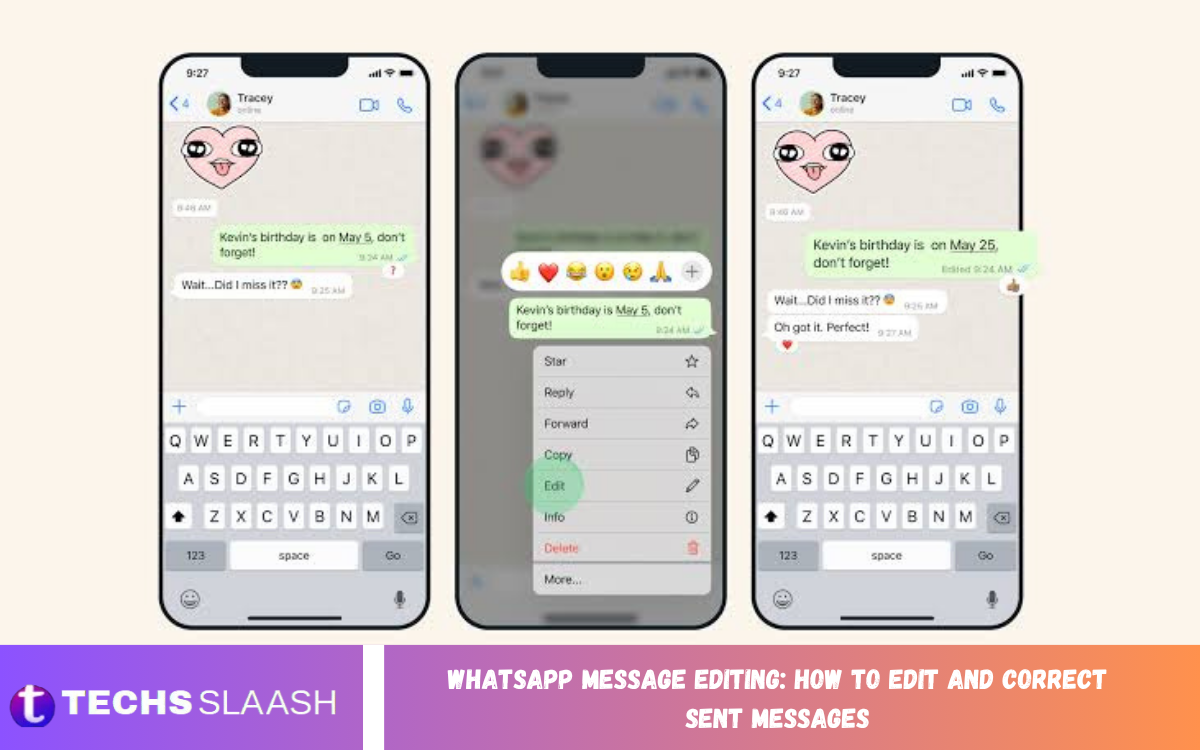
WhatsApp Message Editing makes it easier to correct mistakes after sending a message. Whether you entered the wrong word, made a spelling mistake, or want to add missing information, WhatsApp allows you to edit a sent message instead of deleting it and sending a new one.
The editing feature is useful for personal conversations, group chats, business communication, and everyday messaging. Knowing how to edit messages helps you communicate clearly, save time, and keep conversations organized.
What Is WhatsApp Message Editing?
WhatsApp Message Editing lets users modify a message after sending it. Instead of deleting an incorrect message and sending another, you can edit the original message and correct the content directly in the conversation.
Edited messages display an “edited” label so other participants can see that the message was changed. However, WhatsApp does not show the full editing history to other users, so they usually can’t see what the original message said after it’s been edited.
How to Edit a Sent WhatsApp Message
Editing a sent WhatsApp message is a simple process on supported devices. Open the individual or group chat where you sent the message, find the message you want to correct, and press and hold it to open the message options.
Choose the editing option, modify the text as needed, and confirm the change. The corrected message will remain in the conversation with an “edited” indication, allowing you to fix typing mistakes without sending another message.
WhatsApp Message Editing Time Limit
WhatsApp Message Editing is not available indefinitely. The feature is designed for corrections made shortly after a message is sent, so users must make changes within WhatsApp’s supported editing period.
If the editing option no longer appears, the available editing window may have expired. In that situation, you can usually delete the message if deletion is still available and then send a corrected version separately.
How to Edit Messages on Android
Android users can edit sent WhatsApp messages directly from their conversations. Open WhatsApp, open the required chat, locate the message, and press and hold it until the options appear.
Select the edit option and make the necessary changes to the text. After you confirm the correction, WhatsApp updates the message while keeping it in its original position in the conversation, making the chat easier to follow.
How to Edit Messages on iPhone
Editing messages on iPhone in WhatsApp is also straightforward. Open the conversation containing the message, press and hold the sent message, and look through the available message actions for the edit feature.
After selecting edit, correct the text and confirm the change. The updated message appears in the same conversation, while the edited indicator informs other participants that the message has been modified.
How to Correct Spelling Mistakes in WhatsApp Messages
Spelling mistakes are one of the most common reasons people use WhatsApp Message Editing. A small typing error can change a sentence’s meaning, especially when autocorrect replaces a word with something unintended.
Instead of sending a second message to explain the mistake, you can edit the original message when the feature is available. Correct the spelling, punctuation, or wording and save the updated version to keep the conversation clean and understandable.
How to Change Information in a Sent Message
Sometimes a message contains incomplete or outdated information right after you send it. For example, you might send the wrong time, forget an important detail, or enter the wrong name in a conversation.
WhatsApp editing lets you update a message without creating a new one. This can be especially helpful in group conversations, where multiple corrections can make important information harder to spot.
Can You Edit WhatsApp Messages in Group Chats?
You can also edit WhatsApp messages in group chats when the feature is available for your account and device. The editing process is generally the same as editing a message in an individual conversation.
When you change a group message, participants can see the updated version along with an edit indicator. This maintains transparency while letting you correct mistakes without removing the entire message from the conversation.
What Happens When You Edit a WhatsApp Message?
When you edit a WhatsApp message, the updated text replaces the previous version in the chat. The message remains in its original location rather than appearing as a completely new message.
An edited label is displayed alongside the modified message. This lets people know that the message was changed, although WhatsApp does not normally provide other participants with a visible history showing every version of the message.
Does WhatsApp Show the Original Edited Message
WhatsApp does not normally show the previous version of an edited message to other participants. Once you make an edit, the conversation displays the updated version together with an indication that the message was edited.
This means editing is useful for correcting ordinary mistakes without creating unnecessary messages. However, users should still check their messages carefully before sending them because editing does not provide unlimited control over the conversation history.
Why WhatsApp Message Editing Is Useful
WhatsApp Message Editing improves everyday communication by giving users an easy way to fix mistakes. A simple typo, incorrect number, missing word, or unclear sentence can be corrected without deleting the entire message and starting again.
The feature is also useful for professional conversations. When communicating with colleagues, customers, clients, or groups, accurate information matters. Being able to quickly correct a sent message can make conversations more organized and easier to understand.
WhatsApp Message Editing for Business Communication
Businesses frequently use WhatsApp to communicate with customers, employees, and partners. A message containing incorrect information can create confusion, especially when it involves appointment times, product details, prices, addresses, or instructions.
Editing can help correct minor mistakes quickly when the feature is available. However, always check important business information carefully before sending, because editing has a limited time window and may not replace the need for a clear follow-up message.
Read Also: WhatsApp Chat Lock: Enhanced Privacy and Secure Conversation Protection
WhatsApp Message Editing and Privacy
Edited messages are marked as edited, which provides transparency to people participating in the conversation. At the same time, the previous version of the message is not normally displayed as an editing history.
Users should remember that editing a message does not necessarily remove all traces of information that another person may have already seen. Someone could have read, copied, quoted, or captured the original message before it was edited.
What to Do If the Edit Option Is Missing?
If you cannot find the edit option, first check whether the message is still within the supported editing period. An older message may no longer qualify for editing, so the option may not appear in the message menu.
Also make sure WhatsApp is updated to the latest version. If the feature still doesn’t appear, close and reopen the app, then check again. Availability may also depend on your platform, account, and the current WhatsApp feature rollout.
WhatsApp Message Editing vs Deleting a Message
Editing and deleting serve different purposes. Editing changes the content of an existing sent message, while deleting removes the message from the conversation, depending on the available deletion options.
Editing is generally more convenient when the original message is useful but contains a mistake. Deleting may be more appropriate when you sent the entire message by accident or it contains information that shouldn’t remain in the conversation.
Tips for Editing WhatsApp Messages Correctly
Before confirming an edit, read the complete message again to make sure the correction is accurate. Fix spelling, punctuation, names, dates, numbers, and other important details instead of changing only the obvious mistake.
Avoid relying on editing as a replacement for careful communication. When a correction significantly changes a message’s meaning, make the updated information especially clear so other participants understand exactly what changed.
Common Problems With WhatsApp Message Editing
One common problem is trying to edit a message after the editing period has ended. In this situation, the edit option may disappear, leaving deletion and sending a new message as possible alternatives depending on the circumstances.
Another issue can occur when the WhatsApp application is outdated. Updating the app can help ensure that available features work properly. If editing remains unavailable, the feature may not currently be available in that particular situation or account.
Frequently Asked Questions
Can I edit a WhatsApp message after sending it?
Yes, WhatsApp allows users to edit eligible sent messages within its supported editing period. Press and hold the message, select Edit, make the correction, and confirm the change.
How long can I edit a WhatsApp message?
WhatsApp provides a limited period after you send a message during which you can edit it. The feature is meant for quick corrections, not for changing old conversations.
Can I edit WhatsApp messages in a group?
Yes, you can edit eligible messages in WhatsApp group chats. The process is similar to editing a message in an individual conversation.
Can I edit a WhatsApp message on Android?
Yes, WhatsApp supports message editing on compatible Android devices. Open the chat, press and hold the message, select the edit option, make your changes, and confirm them.
Can I edit a WhatsApp message on iPhone?
Yes, compatible iPhone users can edit eligible WhatsApp messages. Press and hold the sent message, choose Edit, update the text, and confirm the correction.
Can someone see my original WhatsApp message after I edit it?
WhatsApp does not normally show other participants a visible history of the original message after you edit it. They generally see the updated version and the edited indication.
Can I edit a WhatsApp message multiple times?
WhatsApp lets you edit eligible sent messages, but editing is still subject to the platform’s rules and time limits. If the editing option is available, you can use it to correct the message.
Why can’t I edit my WhatsApp message?
The most common reason is that the message is outside the available editing period. The edit option may also be unavailable because of app version, device, account, or feature availability.
Does editing a WhatsApp message notify everyone?
An edited message receives an edited indication in the conversation. This lets participants know the message content has changed.
Is WhatsApp Message Editing available for voice messages?
WhatsApp Message Editing is primarily designed for text messages. A sent voice message cannot be treated in the same way as an editable text message.
Conclusion
WhatsApp Message Editing: How to Edit and Correct Sent Messages is a useful feature for fixing spelling mistakes, correcting information, and improving conversation clarity. It offers a convenient alternative to deleting a message and sending another.
Whether you use WhatsApp for personal chats, group discussions, or business communication, understanding message editing can help you communicate more accurately.
