

Introduction
Mobile gaming continues to grow as players look for new ways to explore their favorite games, experiment with characters, and enjoy multiplayer battles. Brawler-based games are particularly popular because they combine quick matches, unique abilities, team coordination, and competitive challenges. Null’s Brawl is an unofficial private-server experience inspired by Brawl Stars that offers a different way to explore this style of gameplay.
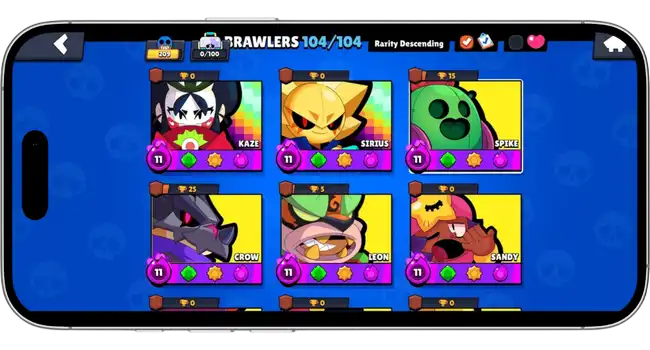
The experience focuses on accessible character selection, customization, combat experimentation, and a variety of game modes. Depending on the version, players may find expanded access to Brawlers, skins, resources, Gadgets, Star Powers, Hypercharges, and other gameplay features.
Whether someone is interested in Android gaming, iOS installation, playing on a PC, or exploring previous releases, understanding the platform requirements and available features can help them choose the right setup.
What Is Null’s Brawl?
Null’s Brawl is a fan-made private-server version inspired by the familiar Brawler combat of Brawl Stars. It operates separately from the official game, with its own server environment, progression, and available content.
One of its main attractions is the ability to experiment with different Brawlers and their abilities without following the same unlocking and upgrading process as the official game. Depending on the build, players can explore unlocked characters, cosmetic items, combat upgrades, and additional gameplay options.
The core experience still revolves around selecting a Brawler, understanding their strengths, using attacks effectively, and completing match objectives. Players must consider movement, attack range, positioning, and teamwork to perform well.
It is important to distinguish Null’s Brawl from the official Brawl Stars game. It is not an official Supercell product, and private-server accounts and progress are separate from official accounts.
Main Features of Null’s Brawl
Expanded Access to Brawlers and Resources
One of the biggest attractions of supported private-server builds is expanded access to playable characters and progression resources. Depending on the version, players may be able to test Brawlers, collect cosmetic items, and experiment with upgrades without spending the same amount of time unlocking everything.
This can be useful for comparing different character roles and learning how individual abilities affect combat.
Skins and Character Customization
Character appearance is an important part of the Brawl Stars experience. Null’s Brawl builds may provide access to different skins, profile cosmetics, Pins, and other visual items.
Customization allows players to explore different character styles while keeping their attention on the match itself. The exact collection depends on the version and the content supported by the private server.
Gadgets, Star Powers and Hypercharges
Brawlers become more interesting when players understand how their additional abilities work. Gadgets provide active effects, Star Powers add passive benefits or modify abilities, and Hypercharges temporarily enhance a Brawler’s combat potential.
Experimenting with these systems can help players discover different combinations for attacking, defending, controlling space, and supporting teammates. Availability and functionality may vary between private-server releases.
Multiplayer and Different Game Modes
Null’s Brawl focuses on fast-paced battles with familiar objectives. Depending on the available build, players may encounter modes such as Gem Grab, Brawl Ball, Showdown, Heist, Hot Zone, and Knockout, alongside special events or custom modes.
Each mode rewards a different approach. Gem Grab emphasizes controlling the center and protecting collected Gems, while Brawl Ball requires coordinated movement and opportunities to score. Showdown focuses on survival, positioning, and choosing the right fights.
Understanding the objective is often more important than simply chasing eliminations.
New Brawlers and Major Updates
Updates help keep Brawler-based games interesting by introducing characters, abilities, cosmetics, events, and gameplay adjustments. Null’s Brawl releases may incorporate new content inspired by different Brawl Stars updates, although the timing and completeness of private-server releases can differ from the official game.
Nori and Wendy
The v68.279 update coverage on Null’s Brawl highlights Nori and Wendy, two characters associated with the Ramen Rebellion content.
Nori is presented as a Legendary Assassin whose fishing-themed attack mechanics combine damage and movement. His gameplay rewards players who understand attack timing, positioning, and the relationship between his attacks and other abilities.
Wendy is presented as a Mythic Support Brawler associated with the NanoStar theme. Her character concept focuses on supporting combat through her distinctive abilities and interactions with the update’s Nano-themed mechanics.
The wider update coverage also discusses Nano Powers, Nano Drops, Fusion mechanics, new modes, seasonal content, and additional character upgrades. These features demonstrate how a major release can change both character selection and the way players approach battles.
Sirius and Najia
Earlier update coverage also features Sirius and Najia, two Brawlers with contrasting playstyles.
Sirius is described as an Ultra Legendary Controller who uses Brawler Shadows as part of his combat strategy. This design emphasizes battlefield control and planning rather than relying entirely on direct damage.
Najia is a Mythic damage-focused Brawler associated with long-range attacks and poisonous snakes. Her concept rewards players who can maintain distance and apply pressure over time.
These character examples show why learning individual abilities matters. Two Brawlers may have similar match objectives but require very different positioning, timing, and decision-making.
Players should check the specific release they intend to use because character availability and mechanics can differ across versions.
Playing Null’s Brawl on Android, iOS and PC
The preferred platform affects installation, controls, and overall convenience. Android, iOS, and PC each have different requirements.
Android Installation
The Android version is generally distributed as an APK rather than through the official Google Play Store. Installation typically involves obtaining the APK, opening the downloaded file, reviewing the requested permissions, and following the device’s installation prompts.
Because APK files can be modified by third parties, users should verify the source before installing anything. Avoid files from unknown download pages, and do not grant unnecessary permissions.
Compatibility, storage requirements, and installation steps may vary by release.
iOS Installation
The iOS version may be distributed as an IPA file and can require a compatible sideloading method instead of a standard App Store installation.
Depending on the method, users may need a computer, signing software, and additional device settings. Certificates can expire, and installation compatibility can change following iOS updates.
Before proceeding, check the requirements for the specific IPA and sideloading method. Do not assume that every release will work on every iPhone or iPad.
Players who prefer a larger screen may be able to run the Android version through a compatible Android emulator on Windows or another supported desktop platform.
A typical setup involves installing an emulator, checking its system requirements, importing the APK, and configuring keyboard and mouse controls where supported.
Performance depends on the computer’s hardware, emulator configuration, graphics settings, and the compatibility of the particular game build. Download emulators from their official sources and avoid unverified executable files claiming to be native versions of the game.
Exploring Older Versions
Some players prefer older releases because they want to revisit previous content, compare character mechanics, or explore earlier game modes.
The old-version guides available through Null’s Brawl-related resources cover the differences between releases and the potential benefits and limitations of using an older build.
Previous versions may offer a different selection of Brawlers, skins, events, or progression systems. However, older releases may also lack newer content, have compatibility problems, or experience connection issues if their supporting servers are no longer available.
Before installing an older version, check its compatibility and whether the corresponding private server remains functional. Back up any relevant information when the application provides a supported method for doing so.
For additional platform guides, version information, and Brawler articles, readers can explore NullsBrawlModAPK.com.
Tips for Getting More From Gameplay
A better match experience begins with understanding how each Brawler works. Instead of choosing a character only because of its rarity or appearance, consider its range, movement speed, attack pattern, and role.
Learn the objective first. Every mode requires a different strategy. Controlling an area, protecting a teammate, collecting Gems, and scoring goals are not interchangeable tasks.
Manage ammunition carefully. Firing every available attack immediately can leave a Brawler vulnerable. Wait for clear opportunities and keep enough ammunition for important engagements.
Use cover and positioning. Walls, bushes, and other map features can help players avoid attacks, approach opponents, and defend important areas.
Understand additional abilities. Gadgets, Star Powers, and Hypercharges can change how a character performs. Learn their effects and use them when they support the team’s objective.
Coordinate with teammates. In team modes, spreading out unnecessarily or pursuing individual eliminations can leave objectives unprotected. Communication and coordinated movement often make a difference.
Safety and Important Considerations
Because Null’s Brawl is an unofficial private-server experience, users should take additional care when choosing a download source. Modified applications can present security and compatibility risks, and third-party software does not receive the same official support as the original game.
Players should understand that private-server progress does not automatically transfer to official Brawl Stars accounts. They should also avoid sharing passwords, verification codes, or sensitive account information with untrusted services.
The safest approach is to review the source, check device compatibility, understand the installation process, and recognize that server availability and features can change.
Frequently Asked Questions
1. What is Null’s Brawl used for?
Null’s Brawl is an unofficial private-server experience inspired by Brawl Stars. Depending on the build, it provides expanded access to characters, cosmetic items, abilities, resources, and gameplay options for experimentation.
2. Can Null’s Brawl be played on PC?
It may be possible to run the Android version through a compatible Android emulator. Compatibility and performance depend on the game build, emulator, and computer hardware.
3. Is Null’s Brawl available for iPhone?
Some releases provide an iOS IPA version that may require sideloading. Compatibility, signing requirements, and installation methods depend on the release and the iOS version.
4. Are all Brawlers and skins available in every version?
No. Available Brawlers, skins, upgrades, and game modes can vary by private-server build. Check the details of the specific release rather than assuming every feature is included.
Conclusion
Null’s Brawl offers an alternative environment for players interested in Brawler-based combat, character customization, multiplayer matches, and experimentation with different abilities. Its appeal comes from expanded content access in supported builds and the opportunity to explore different characters and strategies.
From Android installation and iOS sideloading to emulator-based PC gameplay, each platform has its own requirements. Updates featuring characters such as Nori, Wendy, Sirius, and Najia also illustrate the variety of mechanics and content that players may encounter.
Before installing a release, users should verify its source, review compatibility, and understand the differences between private-server software and the official game. With those considerations in mind, players can make more informed decisions about which version and platform best suit their interests.
