

Artificial intelligence is transforming how people work, learn, communicate, and manage everyday responsibilities. Among the popular AI assistants, Claude AI has gained attention for its natural conversations, writing assistance, coding capabilities, and ability to analyze complex information. It helps individuals and businesses complete tasks more efficiently and improve overall productivity.
Anthropic, an artificial intelligence company focused on building helpful, reliable, and safety-conscious AI systems, developed Claude AI. It supports a wide range of activities, including content creation, document analysis, brainstorming, software development, and research. Understanding Claude AI features can help users find practical ways to integrate AI into their daily workflows.
What Is Claude AI?
Claude AI is an AI assistant that understands instructions, processes information, and generates useful responses in natural language. Users can interact with it through conversational prompts to ask questions, summarize documents, develop ideas, and solve different types of problems. Its straightforward interface makes it accessible to beginners and experienced professionals alike.
Claude can assist with both simple activities and complex projects that require careful reasoning. Depending on the model, plan, and available tools, users can work with lengthy documents, analyze code, process supported images, and develop structured solutions. However, its responses should be reviewed when accuracy, originality, or important decisions matter.
Claude AI Features and Core Capabilities
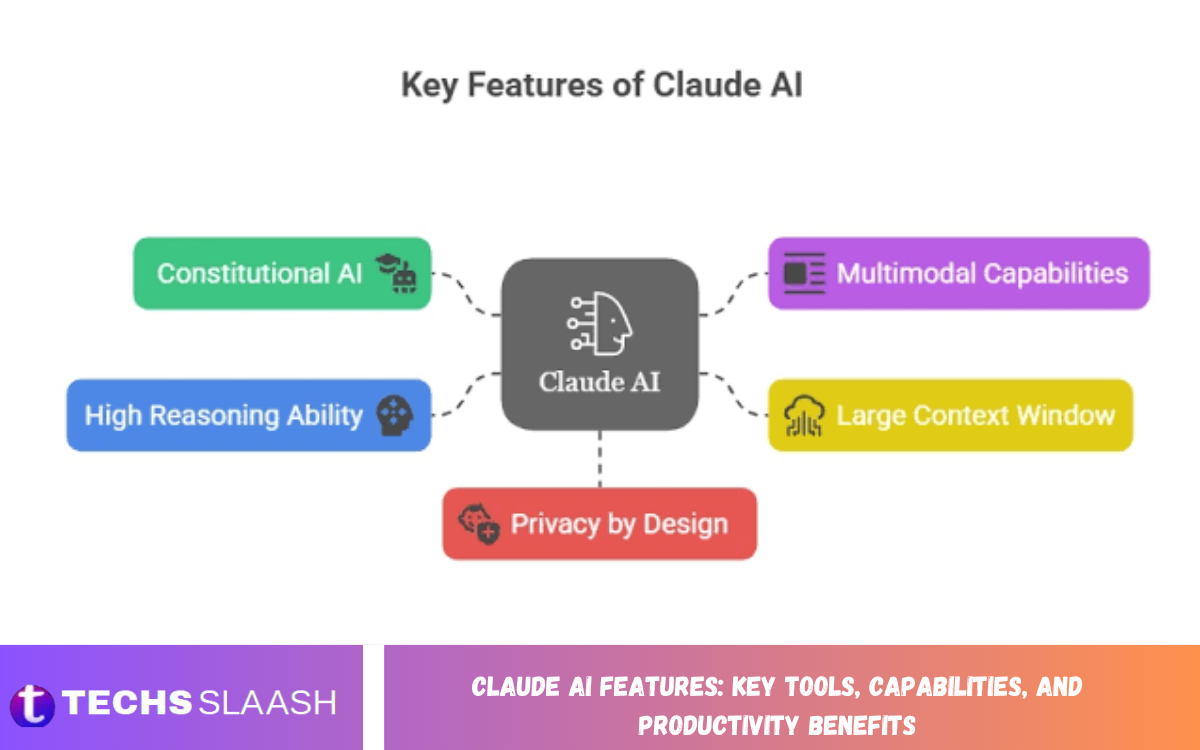
Claude AI offers a collection of features designed to support writing, reasoning, analysis, and problem-solving. These capabilities help students, content creators, developers, researchers, and business professionals reduce repetitive work and organize information more effectively.
The exact tools available can vary by subscription, model, region, and product updates. Nevertheless, Claude’s key strengths include conversational assistance, content generation, document understanding, coding support, and handling complex instructions. Learning how these features operate can help users choose the right approach for different tasks.
Natural Language Processing and Smart Conversations
One of the most important Claude AI features is its ability to understand and generate natural language. Users can communicate with Claude in everyday terms instead of learning complicated commands or technical programming languages. It can answer questions, explain unfamiliar concepts, rewrite sentences, and adjust its responses according to the requested audience or tone.
Claude also supports conversational follow-ups, allowing users to refine an answer without explaining the entire task again. For example, a user can request a blog introduction, ask for a more professional tone, and then shorten the result for a specific audience. This flexible interaction makes the assistant useful for communication, learning, and everyday problem-solving.
AI Writing and Content Creation Tools
Claude AI can help users create blog posts, website pages, product descriptions, emails, reports, social media captions, and other written materials. It can generate outlines, suggest headlines, improve grammar, reorganize paragraphs, and adapt content to different audiences. These capabilities can reduce the time required to move from an initial idea to a structured draft.
Content creators can also use Claude to brainstorm topics, identify content gaps, and develop editorial plans. For example, website owners can ask for article outlines based on a target keyword, then request clearer headings, FAQs, and a more engaging conclusion. Human editing remains essential for fact-checking, adding original insights, and maintaining a consistent brand voice.
Advanced Reasoning and Problem-Solving
Claude can help users tackle complex questions by identifying key details, comparing options, and organizing potential solutions. It helps with project planning, interpreting instructions, troubleshooting problems, and breaking large assignments into smaller steps. Depending on the model you select, its reasoning capabilities may be especially helpful for tasks with several connected requirements.
Professionals can use this capability to evaluate different approaches before making a decision. For instance, a project manager might ask Claude to compare two project timelines, identify possible risks, and recommend improvements based on supplied information. Treat its suggestions as analytical assistance rather than guaranteed answers, especially when decisions have significant consequences.
Claude AI for Coding and Software Development
Claude AI provides coding assistance for developers working with programming languages, software applications, websites, and technical projects. It can generate code examples, explain programming concepts, identify potential errors, suggest improvements, and help troubleshoot common development problems. Developers can also use it to understand unfamiliar codebases when sufficient relevant information is provided.
Another useful capability is code review and refactoring assistance. Users can request clearer function names, simpler logic, improved documentation, or explanations of how a particular section works. Claude can also assist with test generation and debugging strategies, although generated code should always be tested for correctness, security, performance, and compatibility before being deployed.
Document Analysis and Long-Context Understanding
Claude can analyze supported documents and help users extract important information from lengthy materials. Depending on the interface and supported file types, users may be able to upload documents, request summaries, compare sections, or locate specific details. This can be particularly helpful when reviewing business reports, study materials, technical documentation, and research papers.
Document analysis also helps transform large amounts of information into more manageable formats. A student might request a chapter summary, while a business professional could ask for key findings, action items, or differences between two supplied reports. Users should verify important quotations, figures, and interpretations against the original documents to avoid relying on inaccurate summaries.
Image Understanding and Multimodal Capabilities
Claude supports image understanding in compatible models and interfaces. Users can provide supported images, screenshots, diagrams, or other visual materials and ask questions about the information they contain. This feature can help explain charts, interpret interface screenshots, review visual layouts, and understand selected elements within an image.
These capabilities can also support educational and professional workflows. For example, a student can ask for an explanation of a diagram, while a website developer can provide a screenshot and request suggestions for improving the interface. Image interpretation is not always perfect, particularly with small text, complex charts, or unclear visuals, so critical details should be checked independently.
Claude AI Artifacts and Interactive Content
Claude’s Artifacts feature allows users to create and work with certain types of content in a dedicated interactive workspace. Depending on the available tools, this may include formatted documents, code snippets, visualizations, simple applications, and interactive prototypes. Rather than keeping every result inside a conversation, Artifacts can make selected outputs easier to view, refine, and use.
This capability is valuable for people who want to turn an idea into a practical demonstration. A user might request a simple calculator, a project dashboard, or an interactive learning resource and then refine the result through additional instructions. Complex applications still require appropriate testing, accessibility checks, security reviews, and deployment work before they are ready for production.
Claude AI Projects for Organized Workflows
Projects can help users organize related conversations, reference materials, and instructions around a particular subject. Depending on the available plan and interface, users may be able to create separate workspaces for content production, business planning, research, or software development. This organization makes it easier to keep related activities together instead of repeatedly starting from scratch.
For example, a website owner could create a project dedicated to search engine optimization and provide relevant brand guidelines, preferred writing styles, and reference documents. Claude can then use the available project context when responding to related requests. Users should keep instructions clear and reference materials current because outdated or conflicting information can affect the quality of the output.
Claude AI Integrations and Tool Use
Claude can work with supported tools and integrations that extend its capabilities beyond ordinary conversation. Depending on the product, configuration, and permissions, these features may help users access relevant information, interact with connected services, or complete parts of a broader workflow. Certain offerings also support developer integrations for building AI-powered applications.
Tool use can reduce the need to switch repeatedly between different applications. For example, a configured workflow might help a team retrieve project information, examine relevant documents, or prepare structured outputs from approved sources. The availability of these functions varies, and users should review permissions carefully before connecting services that contain confidential or sensitive information.
Read Also: Microsoft Copilot Features: Top AI Tools, Capabilities, and Productivity Benefits
Claude AI for Research and Learning
Students, teachers, and researchers can use Claude AI to understand difficult subjects, summarize supplied reading materials, generate practice questions, and organize research notes. It can explain technical concepts in simpler language and adjust explanations to suit different knowledge levels. These features make it a useful learning companion when users want additional guidance or alternative explanations.
Researchers can also use Claude to develop outlines, compare arguments, and organize findings from provided sources. AI-generated references and factual claims may contain errors, so users must check important information against reliable original sources. Students should follow their institution’s academic integrity policies and use AI to support genuine understanding rather than substitute for their own work.
Productivity Benefits of Claude AI
Claude AI can improve productivity by reducing the effort required for repetitive writing, summarization, brainstorming, and information organization. Instead of beginning every task with a blank page, users can request a first draft, outline, checklist, or structured analysis. This helps them focus on reviewing ideas, making decisions, and completing higher-value activities.
Another benefit is its flexibility across different professional roles. A marketer can develop campaign ideas, a developer can investigate errors, a student can review course materials, and a manager can prepare meeting summaries. Results depend on the quality of the instructions and available information, so users should measure productivity by the usefulness of the final work rather than the volume of generated content.
Claude AI Pricing and Availability
Claude is available through different access options, which may include free usage and paid subscriptions. The features, usage limits, model choices, and additional tools available to each user depend on the current plan and product configuration. Organizations may also have access to business-oriented options designed for team collaboration and administrative management.
Before choosing a subscription, users should compare the current plan details with their actual requirements. Someone who occasionally needs writing assistance may find basic access sufficient, while a developer or professional with heavier workloads may benefit from additional capacity or specialized tools. Pricing and feature availability can change, so users should verify current information through Claude’s official product interface.
Claude AI Limitations and Responsible Use
Although Claude AI can perform many useful tasks, it does not guarantee that every response is correct. It may misunderstand a request, overlook important context, produce outdated information, or generate plausible-sounding statements that are inaccurate. Users should verify critical facts, test generated code, and review recommendations before applying them in real-world situations.
Privacy and responsible use are equally important considerations. Users should avoid submitting confidential business records, passwords, sensitive personal information, or proprietary material unless the service and account settings are appropriate for that information. Clear instructions, human oversight, and careful evaluation can help users benefit from Claude while reducing the risks associated with AI-generated content.
Tips for Getting Better Results from Claude AI
The quality of Claude’s responses often depends on how clearly a task is described. Instead of asking for a general article, users can specify the topic, intended audience, preferred tone, approximate length, heading structure, and information that must be included. Relevant examples and context can further improve the response’s usefulness.
Users can also improve results through iterative refinement. Start with a clear request, review the first response, identify missing details, and ask for targeted changes. For research or technical work, provide reliable source material and request that uncertainty be identified rather than hidden. Reviewing the final output remains an important step in any professional workflow.
Frequently Asked Questions
What is Claude AI used for?
Claude AI is used for writing, coding, research, document analysis, brainstorming, learning, and problem-solving. It can assist with both everyday tasks and more complex professional workflows.
Is Claude AI free to use?
Claude offers free access in supported markets, along with paid plans that provide different usage limits and features. Availability and subscription details can change over time.
What are the main Claude AI features?
Its main capabilities include natural language conversations, writing assistance, coding support, document analysis, image understanding, Projects, and Artifacts. Additional tools depend on the model and account configuration.
Can Claude AI write SEO-friendly articles?
Yes, Claude can help create SEO-oriented outlines, blog posts, meta descriptions, FAQs, and keyword-focused content. Human review is important for factual accuracy, search intent, originality, and overall content quality.
Can Claude AI generate and debug code?
Claude can generate code examples, explain programming concepts, identify potential bugs, and suggest debugging strategies. Developers should test generated code and check its security before using it in production.
Does Claude AI support PDF documents?
Compatible Claude interfaces support document uploads, including PDFs in supported configurations. Users can request summaries, explanations, comparisons, and extraction of important information from uploaded files.
What is Claude AI Artifacts?
Artifacts is a feature that provides a dedicated workspace for viewing and developing certain outputs, such as code, documents, visualizations, and simple interactive applications. Available functionality depends on the current product.
Is Claude AI better than ChatGPT?
Claude and ChatGPT offer overlapping capabilities, but their strengths, available tools, usage limits, and workflows can differ. The best option depends on the user’s specific needs, preferred interface, budget, and required features.
Can Claude AI help students with their studies?
Yes, students can use Claude to explain concepts, summarize reading materials, create practice questions, and organize notes. They should verify factual claims and follow their school’s rules concerning AI assistance.
Is Claude AI safe for business use?
Claude can support business workflows, but appropriate use depends on the selected service, account settings, organizational policies, and information being processed. Businesses should evaluate privacy, access controls, data handling, and compliance requirements before adopting it.
Conclusion
Claude AI features provide practical assistance for writing, coding, research, document analysis, learning, and productivity. Its conversational interface, reasoning capabilities, organizational tools, and supported integrations can help individuals and businesses simplify complicated tasks and improve everyday workflows.
The best results come from combining AI assistance with human judgment. Clear instructions, reliable source materials, careful verification, and responsible data handling help users use Claude AI more effectively.

1 Comment
Pingback: Perplexity AI Features: Key Tools, Capabilities, and Benefits for Smarter Research - Techsslaash.com