

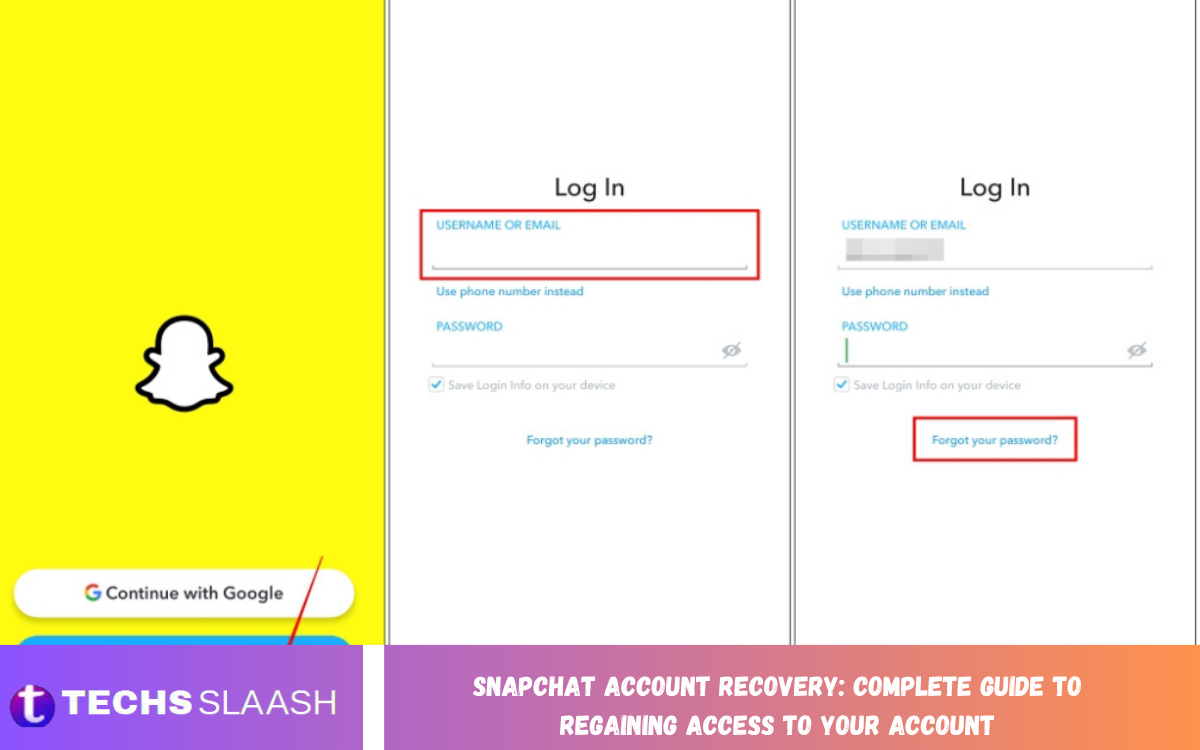
Snapchat is a popular social media platform where users can share photos, videos, messages, and stories with friends. Losing access to an account can be frustrating, especially when it contains important conversations, saved memories, personal information, and connections. Fortunately, Snapchat Account Recovery provides several options for users who cannot sign in or have forgotten their login credentials.
The recovery process depends on the reason you cannot access your account. You might have forgotten your password, lost access to your registered phone number, encountered a temporary lock, or suspected that someone has compromised your account. Understanding the available recovery methods can help you choose the right solution and avoid unnecessary delays.
Common Reasons for Losing Access to a Snapchat Account
Several reasons can cause Snapchat login problems. Forgetting a password is one of the most common issues, but changing phone numbers, losing access to an email address, or entering incorrect login information can also prevent you from signing in. In some cases, Snapchat may temporarily restrict access due to unusual activity or suspected rule violations.
Account security incidents can create additional difficulties. If someone changes your password, email address, or phone number without permission, you may find yourself unable to access your profile. Identifying the exact problem before beginning Snapchat Account Recovery is important because password resets, account unlocking, and compromised-account recovery follow different procedures.
How to Recover a Snapchat Account Using Your Password Reset Option
If you have forgotten your Snapchat password, resetting it is usually the simplest recovery method. Open the Snapchat application and select the login option, then choose the password recovery feature. Depending on your account information, Snapchat may allow you to receive a password reset code or link through your registered phone number or email address.
Follow the instructions provided by Snapchat and create a new password that you have not used elsewhere. Choose a strong combination of letters, numbers, and symbols, and avoid predictable details such as your birthday or name. After completing the reset, return to the application and sign in using your username or registered contact information and your new password.
Snapchat Account Recovery Without an Email Address
Recovering a Snapchat account without access to its registered email address may still be possible if your verified phone number remains available. On the login screen, select the password reset option and choose recovery through your phone number when offered. Enter the required information and follow the verification instructions sent to your device.
However, if you cannot access your email address and do not have access to the registered phone number, recovery becomes more difficult. Snapchat may be unable to verify that you own the account through alternative information. Contact Snapchat Support through its official support channels to review the available options, but remember that support cannot guarantee recovery when ownership cannot be established.
Snapchat Account Recovery Without a Phone Number
If you have changed your phone number or lost access to your previous SIM card, you may be able to recover your account using its registered email address. Select the email-based password reset option and check your inbox for the recovery message. Follow the instructions carefully and make sure you enter the correct email address associated with your Snapchat account.
When neither the registered email address nor the phone number is accessible, you should first try to restore access to one of those accounts through its respective provider. If that is not possible, contact Snapchat Support and explain your situation accurately. Avoid websites or individuals claiming they can bypass Snapchat verification because they may attempt to steal your personal information.
How to Unlock a Temporarily Locked Snapchat Account
Snapchat may temporarily lock an account when its systems detect suspicious activity, unauthorized third-party applications, or behavior that appears to violate platform rules. If you receive a temporary lock message, read the explanation displayed in the application and follow the recommended steps. In some cases, removing unauthorized applications or waiting for the restriction to expire may resolve the problem.
If Snapchat provides an official account-unlocking option, use it only after reviewing the reason for the restriction. Repeated login attempts, using unofficial Snapchat modifications, or creating additional accounts to avoid restrictions may complicate the situation. If the lock remains in place, consult Snapchat Support for guidance rather than relying on unofficial unlocking services.
How to Recover a Permanently Locked Snapchat Account
A permanently locked account requires a different approach from an account affected by a temporary restriction. First, review the message displayed by Snapchat to understand whether an appeal option is available. If Snapchat offers an appeal through the application, follow the instructions and provide accurate information about your situation.
Not every permanently locked account can be restored. Snapchat reviews account restrictions according to its policies, and the final decision depends on the circumstances. Avoid submitting false statements or paying third parties who promise guaranteed recovery. If an official appeal is unavailable or unsuccessful, you may need to accept that the account cannot be reinstated.
How to Recover a Hacked Snapchat Account
If you believe someone has accessed your Snapchat account without permission, act quickly to protect your information. If you can still sign in, immediately change your password, review your registered email address and phone number, and check for unfamiliar changes. Sign out of any sessions or devices you do not recognize when the relevant security options are available.
If you have been locked out because another person changed your credentials, use Snapchat’s official compromised-account support process. Explain what happened, provide the requested details, and follow any verification instructions. You should also secure the email account associated with Snapchat by changing its password and enabling additional security protection to reduce the risk of further unauthorized access.
Read Also: Snapchat Privacy Settings: How to Protect Your Account and Personal Information
Snapchat Account Recovery After Deactivation
Users who deactivate their Snapchat accounts may have an opportunity to reactivate them within the applicable recovery period. Snapchat generally allows eligible users to reactivate a deactivated account by logging in through the mobile application with their username and password. Reactivation may take some time to process, so avoid repeatedly submitting login requests while the account status updates.
Email-based login may not work for reactivation in some circumstances, so use the username as instructed by Snapchat. If the account has passed the applicable deletion or reactivation period, recovery may no longer be possible. Before deactivating an account in the future, review Snapchat’s current account deletion policy and consider saving any memories or information you want to keep.
How to Recover a Snapchat Account With a Forgotten Username
Forgetting your Snapchat username does not always mean you have lost access to your account. If you remember the email address or phone number connected to your profile, try using that information to sign in. You can also ask a trusted friend to check your profile and share the username displayed there.
Once you identify the correct username, store it in a secure location for future reference. Make sure you distinguish your username from your display name because they are not necessarily the same. If you cannot identify the account or verify your ownership, contact Snapchat Support and explain which details you still remember.
Troubleshooting Snapchat Account Recovery Problems
Sometimes the recovery process fails even when you provide the correct information. A reset message may arrive late, a verification code may not work, or the application may display an unexpected error. Check your internet connection, confirm that your contact details are correct, and inspect your spam or junk folder for missing emails.
If a verification code expires, request a new one and use the latest valid code. Avoid sharing verification codes with anyone, including people claiming to be Snapchat employees. If the application continues to fail, update Snapchat, restart your device, and try again after a reasonable interval. Persistent problems should be reported through official support channels.
How to Protect Your Snapchat Account After Recovery
After regaining access, take a few minutes to improve your account security. Create a unique password, verify that your registered email address and phone number are correct, and enable two-factor authentication if available. These steps can reduce the risk of unauthorized access and make future recovery easier.
You should also avoid third-party applications that request your Snapchat login credentials. Never share passwords or verification codes through messages, and be cautious of suspicious links claiming that your account will be deleted unless you respond immediately. Keeping your device updated and reviewing account security settings regularly can help protect your profile.
Frequently Asked Questions
Can I recover my Snapchat account without knowing my password?
Yes, if you can access the registered email address or phone number, you can usually request a password reset. Follow Snapchat’s verification instructions to create a new password and sign in again.
Can I recover my Snapchat account without email and phone access?
Recovery may be difficult if you cannot access either registered contact method. Contact Snapchat Support to review your options, but account restoration is not guaranteed without sufficient ownership verification.
How long does Snapchat Account Recovery take?
The time required depends on the recovery method and the issue affecting your account. A standard password reset may take only a few minutes, while a support request or account security investigation can take longer.
Can I unlock my Snapchat account myself?
Some temporarily locked accounts can be unlocked through Snapchat’s official process. Follow the instructions provided for your specific restriction, and remember that permanently locked accounts may require an appeal or may be ineligible for restoration.
What should I do if my Snapchat account has been hacked?
Change your password immediately if you still have access. If you are locked out, contact Snapchat Support through its compromised-account recovery process and secure the email account connected to your profile.
Can I recover a deleted Snapchat account?
An account that has been deactivated may be recoverable during Snapchat’s applicable reactivation period. Once the deletion process is complete, the account and its associated information may no longer be recoverable.
Why am I not receiving my Snapchat verification code?
Check whether your phone number or email address is correct, inspect your spam folder, and confirm that your device can receive messages. If necessary, request another code and use the newest valid one.
Can Snapchat Support recover my account without verification?
Snapchat may request information to establish account ownership. Support cannot guarantee recovery without sufficient verification, and you should avoid anyone claiming to bypass the platform’s security procedures.
Will I lose my Snapchat Memories during account recovery?
A password reset or successful account recovery does not automatically mean your saved Memories will be lost. However, availability depends on the account’s status and whether you previously backed up the content or permanently deleted it.
How can I prevent losing access to Snapchat again?
Use a unique password, maintain access to your registered email address and phone number, enable two-factor authentication, and avoid sharing login credentials. Keeping your recovery information up to date can make future account recovery easier.
Conclusion
Snapchat account recovery helps users regain access to their profiles after forgetting a password, losing a phone number, experiencing suspicious activity, or encountering an account restriction. The right recovery method depends on the specific problem, so identifying the cause before you act can save time and prevent unnecessary frustration.
For the best results, use Snapchat’s official recovery features, follow verification instructions carefully, and contact support when additional assistance is needed.

1 Comment
Pingback: Snapchat Streaks: How They Work, How to Maintain Them, and How to Restore Lost Streaks - Techsslaash.com