

Snapchat is a popular social media platform where users share photos, videos, messages, and everyday moments with friends. Its disappearing messages, Stories, Snap Map, and other interactive features make communication entertaining, but users should understand how their personal information is handled.
Learning about Snapchat privacy settings is an important step toward protecting your account and maintaining control over your online activity. By adjusting the right options, you can control who contacts you, who can view your Stories, whether others can see your location, and who can access the content you share.
Why Snapchat Privacy Settings Matter?
Privacy settings help you control how other people interact with your Snapchat account. Without reviewing these options, you may share information with a wider audience than intended, receive unwanted messages, or expose details about your daily activities.
Taking a few minutes to review your account settings can reduce these risks and improve your overall experience. Whether you use Snapchat to communicate with friends, share personal photos, or follow creators, maintaining strong privacy habits is essential.
Control Who Can Contact You on Snapchat
One of the most important Snapchat privacy settings determines who can contact you directly. Limiting contact to friends can reduce unwanted messages, suspicious requests, and interactions with unfamiliar accounts.
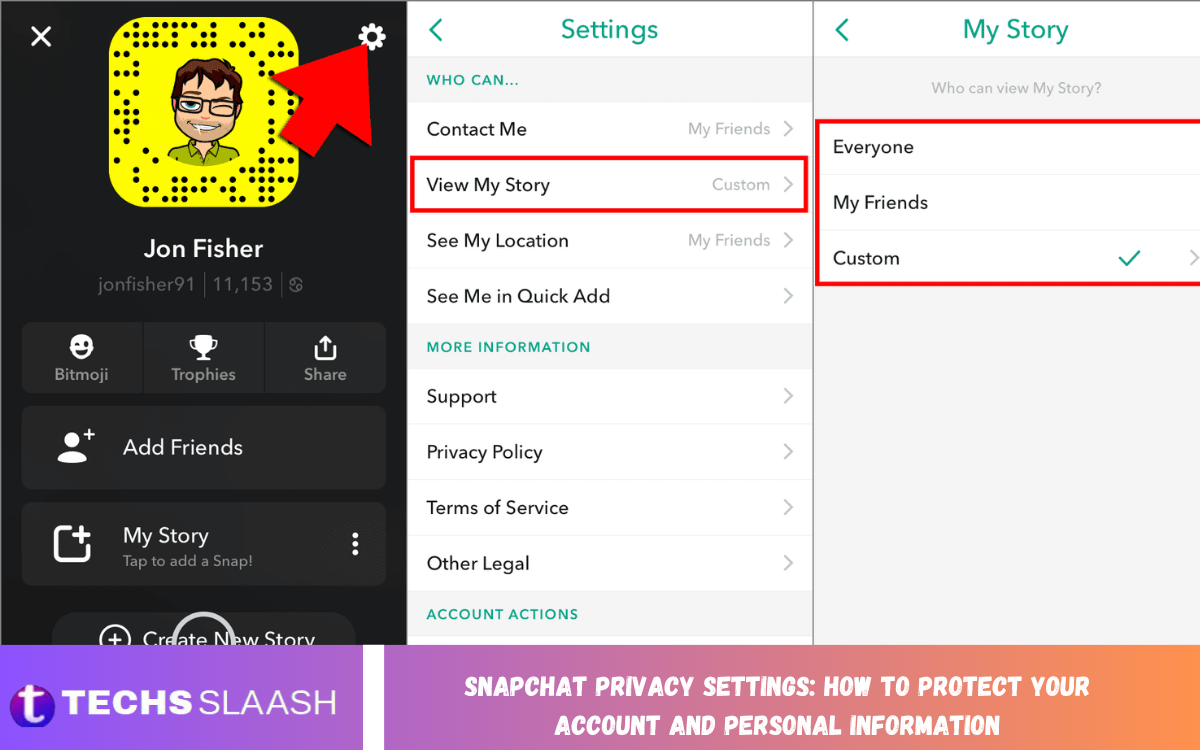
To review this option, open Snapchat, tap your profile icon, and select the settings menu. Look for the contact or privacy controls available in your version of the app, then choose the most restrictive suitable option, such as allowing contact from friends only.
Manage Who Can View Your Snapchat Stories
Snapchat Stories allow users to share photos and videos that remain available for a limited period. However, not every moment needs to be visible to everyone on your friends list, particularly when your posts contain personal details or information about your routine.
Review the Story privacy settings to decide who can view your content. Depending on the available options, you may share Stories with all friends, create a custom audience, or hide them from selected people. Check these settings regularly as your friends list changes.
Turn Off Your Location on Snap Map
Snap Map allows Snapchat users to share their location with selected people, making it easier to discover where friends are or explore nearby activities. However, location sharing can reveal sensitive details about your home, workplace, school, and daily movements.
To improve privacy, open Snap Map and access its location-sharing controls. Enable Ghost Mode if you do not want your location to appear to other Snapchat users. Review your device’s location permissions as well, because app-level and phone-level settings can work together to determine location access.
Enable Two-Factor Authentication for Account Security
Two-factor authentication adds an additional layer of protection to your Snapchat account. Even if someone obtains your password, this feature can make unauthorized access more difficult by requiring an additional verification step.
Open Snapchat settings and look for Two-Factor Authentication under the account security options. Follow the instructions to enable an available verification method. Keep your recovery information updated and never share verification codes with anyone who claims they need them to help secure your account.
Create a Strong and Unique Snapchat Password
A strong password is one of the simplest ways to protect your Snapchat account from unauthorized access. Avoid passwords based on your name, birthday, phone number, or other details that people might discover through your public profiles.
Use a long, unique password that you do not reuse on other websites or applications. A reputable password manager can help you create and store complex passwords securely. If you suspect that your password has been exposed, change it promptly and review your account for unfamiliar activity.
Review Friend Requests and Remove Unknown Users
Accepting friend requests from strangers can expose your Stories and personal content to people you do not know. Some suspicious accounts may attempt to collect information, send misleading links, or persuade users to reveal sensitive details.
Before accepting a request, consider whether you recognize the person and whether the account appears legitimate. Remove unfamiliar users from your friends list when necessary, and block accounts that repeatedly contact you in unwanted ways. Remember that privacy controls are most effective when combined with careful decisions about whom you trust.
Protect Your Personal Information on Your Profile
Your Snapchat profile should contain only the information you feel comfortable sharing. Avoid including sensitive details in your display name, public profile, posts, or messages, especially information that could help someone identify your home, school, workplace, or daily schedule.
Be cautious when sharing phone numbers, email addresses, financial information, or identification documents through chats. Even if a message disappears from the conversation, someone may save its contents through screenshots, another device, or other recording methods. Never assume that disappearing content guarantees complete privacy.
Understand Snapchat’s Disappearing Messages
Snapchat is known for disappearing messages and photos, but this feature should not be treated as a guarantee that your conversations will remain private. Recipients may save messages, take screenshots, use screen-recording features, or capture content using another device.
Review your chat settings to understand how messages are deleted and what options are available for individual conversations. Avoid sending sensitive material unless you trust the recipient and understand the potential consequences. Good digital privacy means considering what could happen to your content after it leaves your device.
Limit Data Access and Review Connected Apps
Snapchat may request access to device features such as your camera, microphone, contacts, and location to provide different services. Although some permissions are necessary for specific functions, you should review them periodically and disable access that you do not need.
Open your phone’s application permissions settings to manage Snapchat’s access to sensitive features. You can also review Snapchat’s account settings for connected services, authorized applications, and available data management options. Remove unfamiliar connections and avoid granting permissions without understanding why they are required.
Be Careful With Public Profiles and Spotlight
Public profiles and Spotlight can help users share content with a larger audience. However, public posts may reach people outside your friends list, making it important to think carefully about the information contained in every photo or video.
Before posting publicly, check the background for addresses, school logos, workplace details, vehicle registration numbers, or other identifying information. Review your public profile and content-sharing preferences regularly. If you prefer a more private experience, limit public posting and share personal updates only with people you trust.
Recognize Snapchat Scams and Phishing Attempts
Scammers may use fake Snapchat support messages, suspicious links, impersonation, and misleading offers to gain access to accounts. Some messages create urgency by claiming that your account will be deleted unless you provide your password or verification code.
Never share your password or authentication codes with another person. Avoid opening unfamiliar links, even when they appear to come from someone you know, because their account may have been compromised. If you receive a suspicious message, block or report the account and use Snapchat’s official in-app settings to review your security options.
Read Also: Snapchat AI Features: Smart Tools, Creative Enhancements, and What’s New
Review Active Sessions and Secure Your Account
Checking your account access is another useful way to strengthen Snapchat security. If the application provides session or device management options, review the devices connected to your account and remove any session you do not recognize.
If you notice suspicious activity, change your password immediately and enable two-factor authentication if it is not already active. Check your account email and phone number for unexpected changes, and follow Snapchat’s official account recovery process if you lose access. Acting quickly can help reduce the risk of further unauthorized activity.
Manage Memories and Saved Content
Snapchat Memories allows users to save photos and videos for later viewing. Although this feature is convenient, saved content may contain private information that you would not want others to access if your account or device were compromised.
Review your saved Memories periodically and delete anything you no longer need. Protect your phone with a strong screen lock and avoid leaving your account open on shared devices. Before selling, lending, or giving away a device, sign out of your accounts and securely remove personal data where appropriate.
Keep Snapchat Updated for Better Protection
Application updates can introduce security improvements, privacy controls, bug fixes, and changes to existing features. Using an outdated version may prevent you from accessing the latest available protections or may leave known issues unresolved.
Enable automatic updates through your device’s official app store or check for updates manually. Also keep your phone’s operating system updated and install applications only from trusted sources. After major Snapchat updates, review the settings menu because privacy controls and feature names may change over time.
Best Practices for Maintaining Snapchat Privacy
Maintaining privacy requires more than changing a few settings once. Make it a habit to review your friends list, Story audience, location-sharing preferences, account security, and application permissions whenever your circumstances change.
Think carefully before sharing personal information, avoid suspicious links, and use unique passwords with additional authentication. These everyday habits can reduce privacy risks while letting you keep enjoying Snapchat’s communication and entertainment features.
Frequently Asked Questions
How Can I Make My Snapchat Account More Private?
Review your contact settings, limit Story visibility to trusted friends, disable location sharing when unnecessary, and avoid posting sensitive information publicly. Use a strong password and enable two-factor authentication for extra account protection.
Can I Hide My Location on Snapchat?
Yes, you can enable Ghost Mode through Snap Map’s location-sharing controls. You can also review your phone’s location permissions to restrict Snapchat’s access to your location when it is not needed.
Can Strangers See My Snapchat Stories?
Who can see your Stories depends on your audience settings and whether you publish content publicly. Review your Story privacy options and select a limited audience if you want to share personal updates only with trusted people.
Does Snapchat Notify Users About Screenshots?
Snapchat can notify users about screenshots in certain situations, including supported chat and content interactions. However, notifications are not a guarantee that content cannot be copied, so avoid sharing anything you would not want saved or redistributed.
How Do I Stop Strangers From Messaging Me on Snapchat?
Open your privacy settings and, where available, restrict contact to friends. You can also block or report unwanted accounts and avoid accepting friend requests from people you do not recognize.
Is Snapchat Safe for Sharing Personal Photos?
Snapchat provides privacy and security features, but no online platform can guarantee that shared photos will remain private. Recipients may save or capture content, so share personal photos only when you understand and accept the associated risks.
How Can I Secure My Snapchat Account From Hackers?
Use a unique password, enable two-factor authentication, keep your recovery information current, and avoid suspicious links. Review available account access controls and respond quickly if you notice unfamiliar activity.
Can I Delete My Snapchat Data?
Snapchat provides certain account data management and deletion options, although available choices and retention periods vary by data type. Review the privacy and account settings to learn how to request or delete eligible information.
Should I Allow Snapchat to Access My Contacts?
Contact access may help you find friends, but it is not essential for every user. Review your phone’s permissions and disable contact access if you don’t want to share your address book with the app.
How Often Should I Check My Snapchat Privacy Settings?
Review your privacy settings every few months and whenever you notice a significant application update, an unfamiliar account interaction, or a change in your sharing preferences. Regular checks help you maintain control over your content and personal information.
Conclusion
Snapchat privacy settings offer tools to control who can contact you, view your Stories, access your location, and interact with your account. By enabling two-factor authentication, using a strong password, limiting unnecessary permissions, and avoiding suspicious messages, you can improve your account’s overall security.
Privacy also depends on how you use the platform and what you choose to share. Review your settings regularly, choose your friends carefully, and remember that disappearing messages aren’t completely private.

1 Comment
Pingback: Snapchat Account Recovery: Complete Guide to Regaining Access to Your Account - Techsslaash.com