

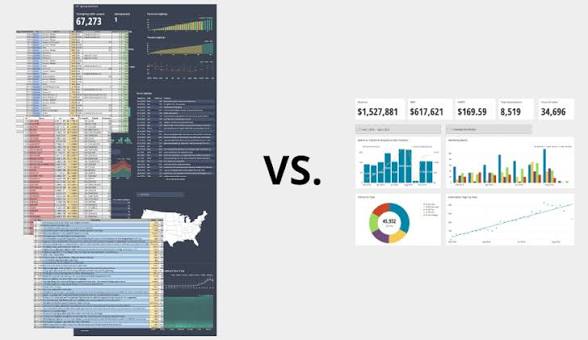
Imagine you are driving a car on a long journey. The windshield view gives you a real-time sense of speed, fuel, and traffic—a dynamic visual snapshot that helps you make immediate decisions. This is your dashboard. But inside your glove compartment lies a detailed booklet: mileage logs, past service schedules, trip histories, and long-term performance summaries. This is your report.
Both are indispensable, but they serve profoundly different purposes. Learners beginning a data analyst course in bangalore often feel confused about when to use dashboards and when to use reports. The key lies in understanding how these tools complement one another and how they shape decision-making within an organisation.
Dashboards: The Real-Time Cockpit of Decision-Makers
Dashboards act like a pilot’s cockpit—full of gauges, indicators, and live metrics that respond by the second. They are built for speed, clarity, and instant awareness.
A dashboard is not designed to tell a long story—it is designed to show the current moment.
It highlights:
- Trends unfolding in real time
- Performance metrics that need continuous tracking
- Alerts for sudden changes
- KPIs that guide daily operational decisions
Marketing teams use dashboards to monitor campaign performance hour by hour.
Operations teams track supply chain fluctuations.
Executives rely on dashboards to gauge revenue or customer activity at a glance.
The goal is simple: visibility without delay.
Professionals developing skills through a data analytics course in bangalore quickly learn that dashboards thrive on simplicity. Too many visuals create noise. The beauty of a dashboard lies in its ability to condense complexity into a quick, intuitive pulse check.
Reports: The Detailed Chronicle Behind the Metrics
Reports are where the deeper story lives.
If dashboards are a cockpit, reports are the flight logs that document every detail of the journey.
Reports answer questions dashboards cannot:
- What happened last quarter and why?
- How did performance change year over year?
- What insights emerge from deep data exploration?
- Where are the risks, causes, and long-term opportunities?
Reports are:
- Comprehensive
- Narrative-driven
- Analytical
- Historical
- Often text-heavy with explanations
A finance team may use a monthly performance report to understand profitability drivers.
A customer success team may analyse detailed churn reports to uncover behavioural patterns.
Reports help leaders look backwards to make better long-range decisions.
Students trained through a data analyst course in bangalore learn that reports capture nuance—something dashboards avoid to maintain clarity.
Speed vs Depth: The Core Difference
Dashboards prioritise speed.
Reports prioritise depth.
Dashboards excel when you need:
- Instant awareness
- Quick operational decisions
- Real-time monitoring
- Immediate response to spikes or dips
Reports excel when you need:
- Root-cause analysis
- Strategic planning
- Long-term comparison
- Comprehensive detail
Using a dashboard to perform detailed investigation is like using binoculars to read a book.
Using a report to monitor sudden changes is like waiting for tomorrow’s newspaper to understand today’s weather.
Professionals advancing through a data analytics course in bangalore are taught that both tools must coexist to support an organisation’s analytical maturity.
Choosing the Right Tool for the Right Problem
Many beginners mistakenly use dashboards for everything, leading to cluttered visuals and overwhelming interfaces. Others rely solely on reports, slowing down urgent decisions.
The key is understanding the question being asked.
Use Dashboards When:
- Managers need daily or hourly performance checks
- Teams monitor KPIs
- Live operational metrics matter
- Instant alerts are required
Use Reports When:
- Analysts need to investigate causes
- Leadership needs quarterly or annual reviews
- Strategic planning requires detailed evidence
- Compliance and audit documentation is needed
An organisation that uses both effectively becomes faster, clearer, and more confident in its decisions.
How Dashboards and Reports Work Together
The most successful teams combine dashboards and reports like two halves of a single engine.
The Process Often Looks Like This:
- A dashboard highlights an unusual pattern—a sudden dip in sales or spike in website traffic.
- A report investigates the cause—examining historical data, demographics, user behaviour, and external factors.
- A dashboard displays the updated KPI after corrective actions.
- A report evaluates long-term impact and guides next strategic move.
Together, they create a cycle of awareness, understanding, and improvement.
Students in a data analytics course in bangalore often practise this cycle during assignments—learning how dashboards raise questions and reports answer them.
The Visual Nature of Dashboards vs the Narrative Nature of Reports
Dashboards rely heavily on visualisation—charts, gauges, maps, and colour-coded indicators. Visual tools allow users to understand complex information within seconds.
Reports rely on narrative—summaries, explanations, tables, and recommendations. They focus on the why, not just the what.
This difference is crucial:
Dashboards communicate with the eyes.
Reports communicate with the mind.
Both forms are essential because business decisions require visibility and understanding.
Conclusion: Knowing When to Look and When to Study
Understanding the difference between dashboards and reports is a foundational skill for anyone stepping into analytics. One provides the pulse; the other provides the diagnosis. One guides immediate action; the other guides long-term strategy.
Beginners exploring analytics through a data analyst course in bangalore often assume both tools serve the same purpose. With experience, they learn that dashboards help organisations move fast, while reports help them move wisely. Learners advancing in a data analytics course in bangalore discover that using both together elevates decision-making to a powerful, insight-driven level.
In the end, success in analytics doesn’t come from choosing dashboards or reports—
it comes from knowing when to glance at the dashboard and when to open the report.
Business name: ExcelR – Data Science, Data Analytics Course Training in Bangalore
Address: 49, 1st Cross, 27th Main, BTM Layout stage 1, Behind Tata Motors, Bengaluru, Karnataka 560068
Phone: 9632156744
