

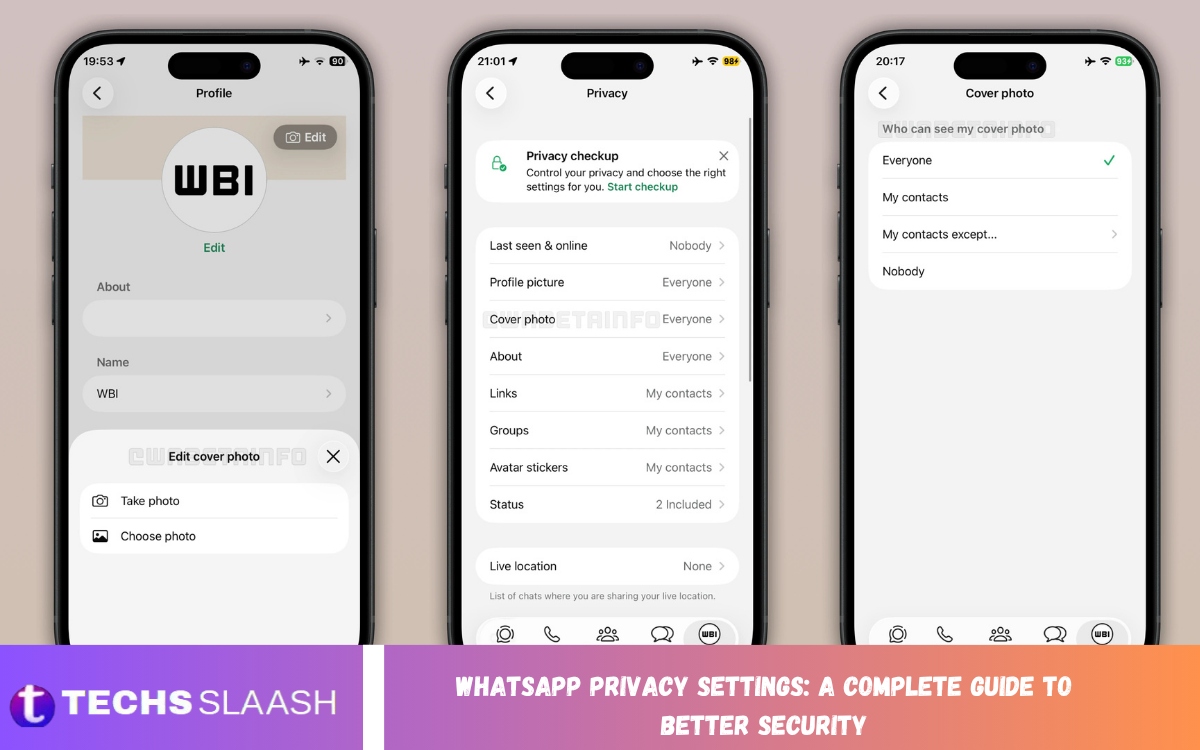
WhatsApp has become one of the most widely used messaging platforms for personal conversations, business communication, media sharing, and daily interactions. Because so much private information passes through the app, understanding its privacy controls is essential for maintaining better digital security.
WhatsApp Privacy Settings: A Complete Guide to Better Security explains the most important options available inside WhatsApp and how they can help you control who sees your information and contacts you. WhatsApp provides end-to-end encryption for personal messages and calls by default, but privacy settings still matter because they control information such as your profile photo, status, online activity, and group access.
Understanding WhatsApp Privacy Settings
WhatsApp Privacy Settings are designed to give users greater control over their personal information and interactions. From the Privacy section, you can manage who can see your last seen status, online presence, profile photo, About information, status updates, and other profile details.
The available choices generally include Everyone, My Contacts, My Contacts Except…, and Nobody, although some settings have specific limitations. WhatsApp also provides Privacy Checkup to guide users through important privacy controls in one place.
Control Your Last Seen and Online Status
Your Last Seen and Online information can reveal when you are active or when you last used WhatsApp. If you prefer greater privacy, you can limit this information to your contacts, exclude specific people, or prevent others from seeing it completely.
A useful approach is to select My Contacts or Nobody, depending on how private you want your account to be. Keep in mind that privacy works both ways: when you restrict your own Last Seen or Online information, you may also lose the ability to see similar information from other users.
Protect Your WhatsApp Profile Photo
Your profile picture can reveal personal information to people who have your phone number, especially when you use a recognizable photograph. Limiting profile photo visibility can reduce unnecessary exposure and make your account more private.
For better security, consider using My Contacts or My Contacts Except… instead of Everyone. WhatsApp allows users to control profile photo visibility through its Privacy settings, giving you more control over who can access this part of your profile.
Manage Your About Information
The About section is another small but important privacy consideration. People can sometimes use information in this area to learn about your workplace, interests, location, or personal activities.
If your About information contains anything sensitive, limit its visibility to trusted contacts or remove unnecessary details. WhatsApp provides the same general privacy choices for About information, allowing you to decide who can view it.
Improve WhatsApp Status Privacy
WhatsApp Status is useful for sharing photos, videos, text, and updates, but not every status needs to be visible to everyone in your contacts. You can choose a specific audience instead of automatically sharing everything with all contacts.
The Status Privacy controls include My Contacts, My Contacts Except…, and Only Share With…. Remember that status mentions can have additional visibility, and changes to privacy settings do not retroactively change a status that has already been shared.
Control Who Can Add You to Groups
Unwanted group additions can expose your phone number and profile information to people you do not know. This can also lead to spam, scams, promotional messages, or other unwanted communication.
Review your group privacy settings and restrict who can add you directly. WhatsApp provides controls that allow users to manage group invitations and limit unwanted additions, helping create a more controlled messaging experience.
Turn Off Read Receipts When Needed
Read receipts can tell another person that you have opened a message. Although this feature is convenient, some users prefer not to reveal when they have read messages.
You can turn off read receipts through Privacy settings. However, there is an important limitation: read receipts continue to work in group chats, and disabling the feature also means you generally cannot see other users’ read receipts.
Use Disappearing Messages for Sensitive Conversations
Disappearing Messages can automatically remove messages after a selected period, making them useful for conversations where you do not want information to remain in the chat indefinitely. They can be particularly useful for temporary plans, private discussions, or information that does not need permanent storage.
WhatsApp also allows users to set a default disappearing-message timer for new chats. This provides an additional layer of privacy, although users should remember that disappearing messages do not guarantee that information cannot be copied or recorded elsewhere.
Protect Your Account With Two-Step Verification
Privacy settings protect what other people can see, while account security protects access to your WhatsApp account. Two-step verification adds an additional security layer by requiring a PIN during certain account verification actions.
Choose a PIN that is difficult for others to guess and avoid sharing it with anyone. Strong account security is especially important because scammers may attempt to convince users to reveal verification codes or other sensitive account information.
Read Also: WhatsApp Account Recovery: How to Regain Access Safely
Enable WhatsApp App Lock
App Lock provides another layer of protection when someone has physical access to your phone. Depending on the device, WhatsApp can use fingerprint, Face ID, Touch ID, or another supported authentication method before allowing access to the application.
This is particularly useful when you frequently leave your phone around other people. WhatsApp states that App Lock may require device authentication to open WhatsApp, though certain notification and calling features may still be available.
Secure Your Chat Backups
End-to-end encryption protects personal WhatsApp messages during exchange, but backups require additional consideration. WhatsApp offers end-to-end encrypted backups as an extra privacy option for messages and media stored through supported cloud backup services.
When enabled, encrypted backups are protected using a password or a 64-digit encryption key. Because WhatsApp cannot recover your password or key, it is important to store the recovery information securely.
Silence Unknown Callers
Calls from unknown numbers can become annoying and may sometimes be associated with spam or scams. WhatsApp provides a feature that allows unknown callers to be silenced, helping reduce unwanted interruptions.
Silencing unknown calls does not necessarily mean the calls disappear completely. Instead, the calls can be prevented from ringing your phone while still appearing in your call list, allowing you to review them when appropriate. WhatsApp includes this control among its privacy options.
Use Advanced Privacy and Security Features
WhatsApp continues to add more advanced privacy controls for users who want stronger protection. Options can include protecting your IP address during calls, disabling link previews, and blocking large volumes of messages from unknown accounts.
For users who may face sophisticated cyber threats, WhatsApp also provides Strict Account Settings. This is designed as a more restrictive security mode that can automatically enforce several privacy and security protections, including two-step verification and stricter profile and group controls.
Be Careful With Unknown Messages
Even the strongest privacy settings cannot protect you from every social-engineering attempt. If someone you do not recognize sends an unexpected message, avoid immediately clicking links, downloading files, or providing personal information.
WhatsApp may provide additional context when you receive or initiate a message from someone you do not know. You can also block or report suspicious contacts and messages when necessary.
Understand End-to-End Encryption
End-to-end encryption is one of WhatsApp’s most important security features. Personal messages, calls, status updates, and location sharing in chats are protected so that the content remains accessible only to the participants.
However, encryption does not mean every piece of account information is invisible. WhatsApp explains that certain information, such as your phone number, profile name, settings, contacts, and some technical information, is handled separately from the content protected by end-to-end encryption.
Review Your Privacy Settings Regularly
Privacy preferences should not be treated as a one-time task. As you add contacts, join groups, update your profile, or start using new WhatsApp features, your privacy needs may change.
Open the Privacy section regularly and review your Last Seen, Online status, Profile Photo, About information, Status, Groups, Read Receipts, Calls, and other available controls. WhatsApp’s Privacy Checkup can also help you review important settings step by step.
Best WhatsApp Privacy Settings for Better Security
For users who want a strong balance between convenience and privacy, My Contacts is a practical choice for profile information, while My Contacts Except… can be useful when certain individuals should not have access.
You can also consider disabling Read Receipts, limiting Status visibility, restricting group additions, enabling App Lock, turning on two-step verification, using encrypted backups, and silencing unknown callers. The best configuration depends on how much information you want to share and how frequently you use WhatsApp.
Common WhatsApp Privacy Mistakes to Avoid
One common mistake is assuming that end-to-end encryption automatically prevents every privacy problem. While encrypted chats provide strong protection for message content, recipients can still take screenshots, photograph, forward, or otherwise share the information you send them.
Another mistake is sharing verification codes, PINs, passwords, or sensitive personal information with people claiming to represent WhatsApp. Good privacy depends on both technical controls and careful user behavior. Reviewing settings and recognizing suspicious requests can significantly improve your overall security.
Frequently Asked Questions
What are WhatsApp Privacy Settings?
WhatsApp Privacy Settings allow you to control who can see information such as your Last Seen, Online status, Profile Photo, About information, and Status. They also include controls related to groups, calls, read receipts, disappearing messages, and other privacy features.
How can I make my WhatsApp more private?
Start by limiting your Profile Photo, About information, Last Seen, Online status, and Status to trusted people. You can also enable App Lock, two-step verification, encrypted backups, and other available security controls.
Can I hide my WhatsApp Last Seen?
Yes. WhatsApp allows you to choose who can see your Last Seen information. Depending on your selected settings, you can restrict it to contacts, exclude particular contacts, or prevent others from seeing it.
Can I hide my WhatsApp Profile Photo?
Yes. You can control Profile Photo visibility through WhatsApp Privacy settings. Available choices include Everyone, My Contacts, My Contacts Except…, and Nobody.
Can I choose who sees my WhatsApp Status?
Yes. WhatsApp allows you to share Status updates with all contacts, exclude specific contacts, or select only particular contacts.
Does turning off Read Receipts improve privacy?
Turning off Read Receipts gives you more control over whether people receive standard read confirmations. However, the setting has limitations, including behavior in group chats.
Are WhatsApp messages private?
Personal WhatsApp messages and calls are protected by end-to-end encryption by default. This means the content is designed to remain accessible only to the communicating participants, rather than WhatsApp itself.
Should I enable disappearing messages?
Disappearing messages can be useful when you do not want conversations to remain permanently available in a chat. They should be considered an additional privacy feature rather than complete protection against someone copying or recording information.
How do I protect my WhatsApp account from hackers?
Use two-step verification, keep WhatsApp updated, enable App Lock where available, protect your phone with a strong device lock, and never share verification codes or security credentials with others.
What is WhatsApp Strict Account Settings?
Strict Account Settings is an optional advanced security feature designed for users who may be targets of sophisticated cyberattacks. It applies stronger privacy and security restrictions, including two-step verification and additional limitations on messages, profile visibility, and groups.
Conclusion
WhatsApp Privacy Settings: A Complete Guide to Better Security shows that protecting your WhatsApp account involves more than simply relying on encryption. By controlling profile visibility, Status audiences, Last Seen information, group access, calls, read receipts, backups, and account authentication, you can significantly improve your privacy.
The most effective approach is to review your WhatsApp settings regularly and choose options that match your personal security needs.

1 Comment
Pingback: Latest TikTok Trends, Challenges, and Content Ideas - Techsslaash.com