

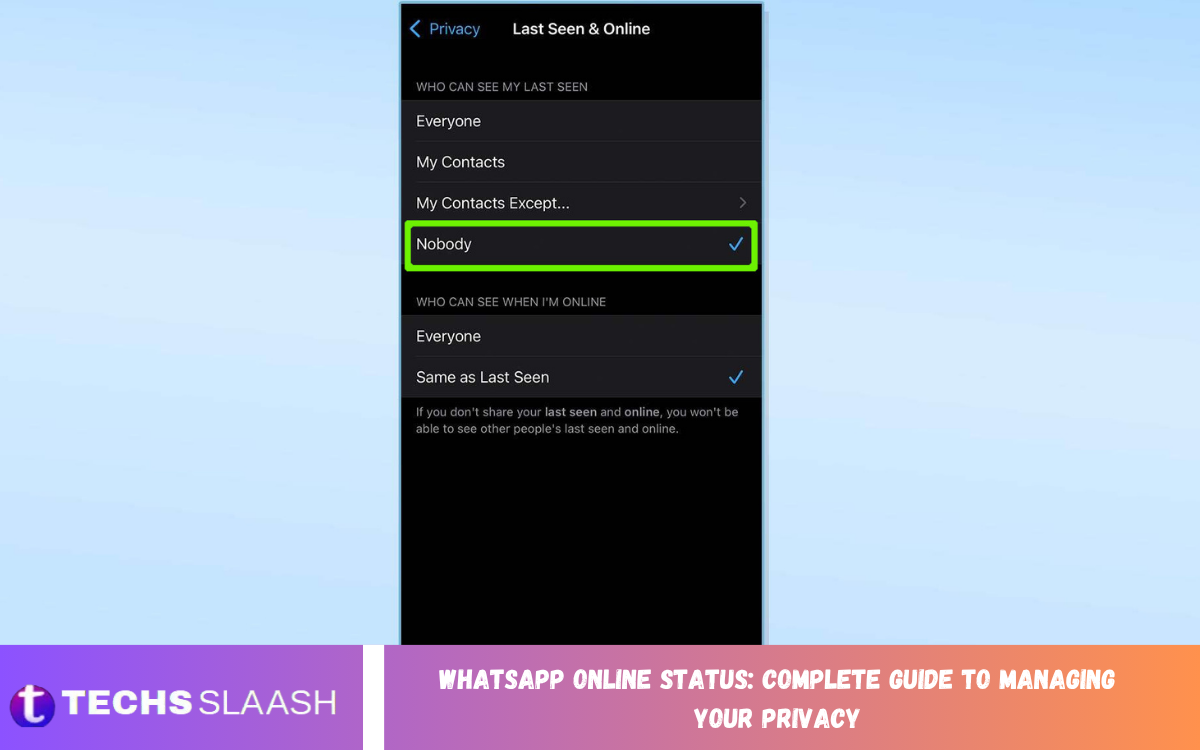
WhatsApp Online Status lets contacts know when you are actively using the app. While this feature can be useful for communication, some users prefer more privacy and don’t want others to know when they are online.
WhatsApp offers privacy settings that let you control who can see your online status. Understanding these options can help you use WhatsApp more comfortably while maintaining better control over your digital presence.
What Does WhatsApp Online Status Mean?
WhatsApp Online Status generally indicates that WhatsApp is open and connected to the internet on your device. It does not necessarily mean that you have read a particular message or are actively chatting with someone.
Your online status is different from your Last Seen information. Last Seen shows when you were last using WhatsApp, while Online indicates that you are currently active according to WhatsApp’s status system.
Why Manage WhatsApp Online Status?
Managing your WhatsApp Online Status can provide an additional layer of privacy. You may not want contacts, coworkers, acquaintances, or other people to know when you are using the application.
Privacy controls can also reduce unwanted expectations around immediate replies. When people cannot easily determine when you are online, you have more freedom to respond to messages according to your own schedule.
How WhatsApp Online Status Privacy Works
WhatsApp connects your online visibility with privacy controls for Last Seen and Online status. The available settings allow you to decide which people can see certain activity information.
Depending on your privacy settings, you can make your online presence visible to everyone, limit it based on your Last Seen setting, or choose a more private configuration.
How to Hide WhatsApp Online Status
To manage your Online Status, open WhatsApp and go to Settings. Select Privacy, then open the section related to Last Seen and Online to view the available controls.
You can adjust the Online visibility setting according to your privacy preferences. Choosing a more restrictive option prevents selected people from easily seeing when you’re online.
How to Hide Last Seen and Online Together
WhatsApp allows you to configure Last Seen and Online settings together. This is useful when you want to reduce the amount of activity information visible to other users.
Open the privacy settings and select Last Seen and Online. You can choose who can see your Last Seen and then configure who can see when you are online based on the available options.
WhatsApp Online Status and Last Seen Difference
Online Status and Last Seen are related but represent different information. Online generally indicates that you are currently connected to WhatsApp, while Last Seen refers to the most recent time you used the service.
Changing one privacy setting does not necessarily mean every activity indicator will behave identically. Reviewing both options helps you create a privacy setup that matches your preferences.
Can You Hide WhatsApp Online Status From Everyone?
WhatsApp provides privacy controls designed to limit who can see your Online Status. Selecting the most restrictive available option can significantly reduce your online visibility.
However, privacy settings don’t make WhatsApp completely invisible. Other indicators, such as message delivery or read receipts, may provide different information depending on your settings and interactions.
WhatsApp Read Receipts and Online Status
Read Receipts and Online Status are separate privacy features. Read Receipts can indicate that a message has been opened, while Online Status concerns whether you are currently active on WhatsApp.
You can review Read Receipts separately within WhatsApp’s privacy settings. Managing both features gives you more control over how your activity is communicated to other users.
How to Improve WhatsApp Privacy
WhatsApp Online Status is only one part of your overall privacy. You should also review profile photo visibility, About information, status updates, group permissions, and other privacy controls.
Regularly checking these settings is useful because your communication habits and privacy preferences can change over time. A privacy review helps ensure your account shares only the information you are comfortable making available.
WhatsApp Privacy Settings for Different Contacts
Different people may require different levels of access to your WhatsApp information. For example, you may be comfortable sharing activity information with close contacts while preferring greater privacy from unfamiliar people.
WhatsApp’s privacy options can help you customize visibility where supported. Reviewing each setting carefully lets you balance convenient communication with personal privacy.
Read Also: WhatsApp Transfer to a New Phone: Complete Guide for Moving Your Account and Chats
How to Check Your WhatsApp Privacy Settings
Open WhatsApp, then go to Settings, then Privacy. Review the options related to Last Seen and Online, Profile Photo, About, Status, Groups, and other available privacy controls.
After making changes, take a moment to review the selected options. This helps prevent accidentally sharing information with a wider audience than intended.
Does Hiding Online Status Affect Messaging?
Changing your Online Status privacy does not stop you from sending or receiving WhatsApp messages. You can continue chatting, making calls, sharing media, and using other WhatsApp features normally.
The primary difference is the visibility of your activity information. Your contacts may have less information about when you are using WhatsApp, depending on the privacy options you select.
Common WhatsApp Online Status Privacy Mistakes
One common mistake is changing the Online Status setting without reviewing Last Seen. These features are connected through WhatsApp’s privacy controls, so understanding both options is important.
Another mistake is assuming that hiding Online Status makes every aspect of your account private. Profile information, Status updates, group membership, read receipts, and other features have their own privacy considerations.
WhatsApp Online Status on Android
On Android devices, you can generally access WhatsApp privacy controls through the app’s Settings menu. Open WhatsApp, select Settings, choose Privacy, and review the Last Seen and Online section.
Menu layouts can change as WhatsApp releases updates. If your interface looks different, find the Privacy section and locate the settings for Last Seen and Online visibility.
WhatsApp Online Status on iPhone
iPhone users can also manage WhatsApp Online Status through the application’s privacy settings. Open WhatsApp, access Settings, choose Privacy, and review the relevant Last Seen and Online controls.
WhatsApp periodically updates its interface, so menu names or locations can change. The privacy section remains the primary place to review and manage these account visibility options.
Benefits of Managing WhatsApp Online Status
Managing Online Status can give you greater control over your digital presence. It can be especially useful when you want to communicate without constantly displaying your availability to contacts.
Privacy management can also help create healthier communication boundaries. You can use WhatsApp when convenient without making your activity information unnecessarily visible.
Things to Know Before Hiding Online Status
Privacy settings can affect what information you see from other users as well. Depending on the selected configuration and WhatsApp’s current privacy rules, limiting your own visibility may also limit access to certain activity information from others.
For this reason, it is helpful to understand the effect of each option before changing it. Review the descriptions shown inside WhatsApp’s privacy settings before confirming your choices.
Frequently Asked Questions About WhatsApp Online Status
Can I hide my WhatsApp Online Status?
Yes. WhatsApp provides privacy settings that allow you to control who can see your Online Status. Open WhatsApp Settings, go to Privacy, and review the Last Seen and Online options.
What is the difference between Online and Last Seen?
Online generally indicates that you are currently active on WhatsApp. Last Seen indicates the most recent time WhatsApp recorded your activity, subject to your privacy settings.
Can I hide Online Status from specific people?
WhatsApp provides privacy controls that can restrict Online visibility, depending on your settings. Review the Last Seen and Online section to see which options are currently offered in your version of WhatsApp.
Does hiding Online Status hide my messages?
No. Hiding your Online Status does not prevent you from sending or receiving messages. It primarily changes the visibility of your activity information.
Can people still message me if I hide my Online Status?
Yes. Contacts can still send you WhatsApp messages unless you have blocked them or another account restriction applies. Hiding Online Status does not disable normal messaging.
Does hiding Last Seen automatically hide Online Status?
Not necessarily. WhatsApp provides separate controls for Last Seen and Online visibility. You should review both options to understand exactly what information other people can see.
Does WhatsApp Online Status show when I am reading a message?
Online Status indicates activity on WhatsApp rather than specifically confirming that you are reading a particular message. Read Receipts are a separate privacy feature.
Can I change WhatsApp Online Status settings anytime?
Yes. You can return to WhatsApp’s Privacy settings and change your visibility preferences whenever you want. The available options may vary as WhatsApp updates its features.
Will hiding Online Status affect WhatsApp calls?
Hiding Online Status does not normally prevent you from making or receiving WhatsApp calls. Your Online Status privacy preference primarily controls the visibility of your activity.
Why should I manage WhatsApp Online Status?
Managing Online Status can provide greater control over your digital privacy. It can help reduce unnecessary visibility into your availability and give you more freedom over when and how you respond to messages.
Conclusion
WhatsApp Online Status is a useful feature, but not everyone wants their activity visible to others. WhatsApp provides privacy controls that allow users to manage Online and Last Seen visibility according to their preferences.
By reviewing the Privacy settings regularly and understanding the difference between Online Status, Last Seen, and Read Receipts, you can create a more private WhatsApp experience.

1 Comment
Pingback: WhatsApp Last Seen Settings: A Complete Privacy Guide - Techsslaash.com