

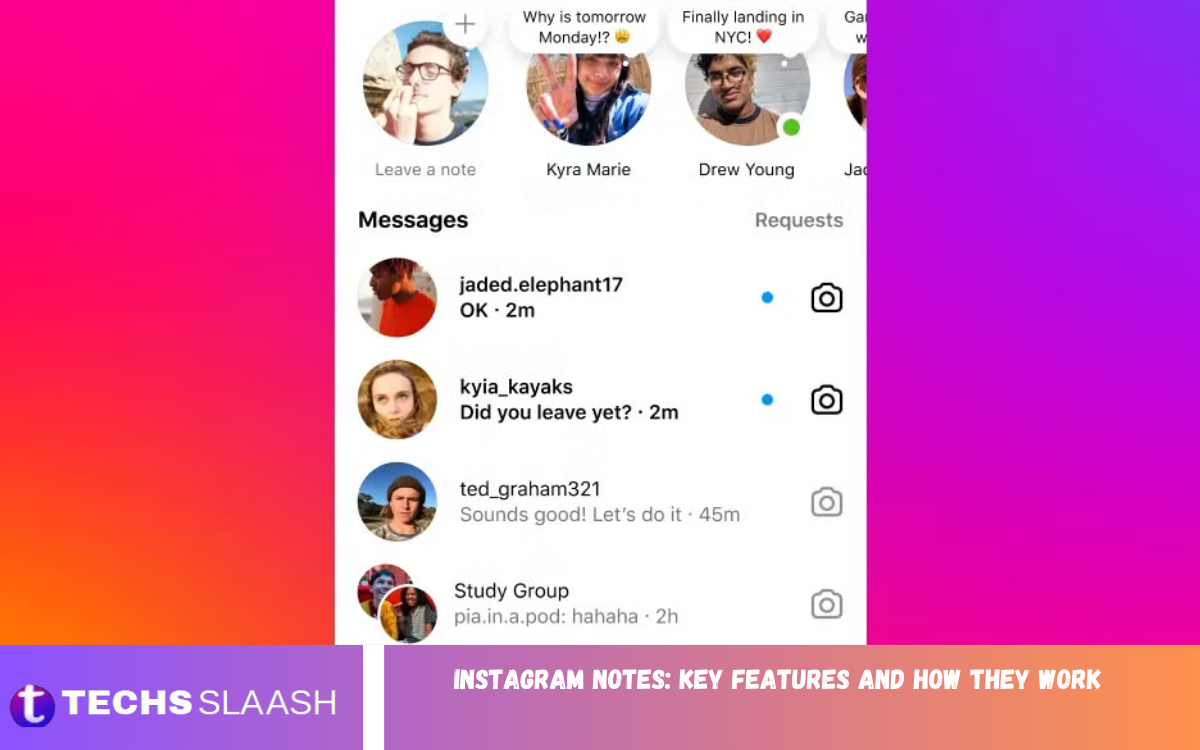
Instagram Notes are a lightweight communication feature that allows users to share short text updates with selected people on Instagram. Notes appear at the top of the Instagram Direct Messages inbox and provide a simple way to post thoughts, updates, questions, or quick messages without creating a traditional feed post or Story.
The feature is designed for casual communication and short-form sharing. Instead of publishing a full post, users can write a brief message and choose who can see it. Instagram Notes can help users stay connected with friends and followers while keeping everyday conversations simple and less formal.
How Instagram Notes Work
Instagram Notes work through the Direct Messages section of Instagram. When a user creates a Note, it can appear above conversations in the inbox of the selected audience. The Note remains visible for a limited period before it automatically disappears.
Users can create a Note by opening Instagram and going to their Direct Messages. From the Notes area, they can select the option to create a new Note, write a short message, choose an audience, and share it. People who can view the Note may respond to it, starting a private conversation.
Key Features of Instagram Notes
One of the main features of Instagram Notes is short-form text sharing. Users can communicate quick thoughts, announcements, questions, or status updates without creating a permanent post. This makes Notes useful for everyday conversations and casual communication.
Instagram Notes can also support different types of expressions depending on the features available to an account. Users may be able to add music or other supported elements to make Notes more engaging. Availability can vary according to Instagram updates, account type, region, and device.
Instagram Notes Audience Options
Instagram provides audience controls that allow users to decide who can see their Notes. Depending on the available settings, users can generally share Notes with followers they follow back or with selected people through Close Friends.
This audience selection makes Instagram Notes different from public posts. Users can communicate with a smaller group without showing the update to everyone who visits their profile. Choosing the appropriate audience is important when sharing personal or casual information.
How to Create an Instagram Note
Creating an Instagram Note is straightforward. Open Instagram, enter the Direct Messages section, and look for the Notes area above your conversations. Select the option to create a new Note and enter the message you want to share.
After writing the Note, choose the available audience option and publish it. Once shared, the Note can appear in the inboxes of people included in the selected audience. If someone responds, their reply can continue as a normal Instagram conversation.
Instagram Notes and Direct Messages
Instagram Notes are closely connected with Direct Messages because they appear within the messaging experience. However, a Note is not the same as sending a private message to one person. Instead, it provides a temporary update that can be visible to a selected group.
When someone responds to a Note, Instagram can open a conversation between the users. This creates a natural connection between public-style short updates and private messaging. Users can therefore use Notes to start conversations without sending an individual message first.
Instagram Notes Privacy
Privacy is an important part of Instagram Notes. The audience selected when publishing a Note determines which people can view it. Users should review the available audience options before sharing information, especially when the message contains personal details.
Instagram Notes are designed for temporary communication, but users should still avoid treating temporary content as completely private. People who can view a Note may remember, copy, or otherwise preserve information from it. Responsible sharing remains important even when content disappears automatically.
How Long Instagram Notes Stay Visible
Instagram Notes are temporary rather than permanent profile content. A shared Note normally remains available for a limited period and then disappears automatically. This temporary design encourages users to share quick updates without creating long-term content.
Because Notes are temporary, they can be useful for time-sensitive conversations and casual updates. Users can share what they are currently doing, ask a question, recommend something, or start a conversation without maintaining the content on their profile.
Instagram Notes With Music
Instagram has introduced music-related options for Notes in supported experiences. Music can add personality to a short update and allow users to communicate a mood or preference through a song. The availability of music features can depend on Instagram’s current feature rollout and licensing availability.
When music options are available, users can select a supported track while creating a Note. This provides another way to make short updates more expressive. Users should check the music options displayed in their own Instagram app because available songs and features may change.
Instagram Notes for Friends
Instagram Notes can be particularly useful for communicating with friends. Instead of sending the same message individually, users can share a quick update with a relevant group. Friends can then respond if they want to continue the conversation.
The informal nature of Notes makes them suitable for questions, plans, recommendations, jokes, and everyday thoughts. They can provide a simple communication layer between traditional Stories and one-to-one Direct Messages.
Instagram Notes for Creators
Creators can use Instagram Notes as another way to maintain communication with their audience. A short update can be useful for sharing reminders, asking followers a question, or encouraging conversations without publishing a full piece of content.
For creators, Notes can complement posts, Reels, and Stories rather than replace them. Their temporary nature makes them suitable for quick communication, while larger content formats remain more appropriate for detailed information and long-term visibility.
Benefits of Using Instagram Notes
Instagram Notes provide a simple way to share short updates without creating a full post. They require less effort than traditional content and can encourage direct interaction between users. The temporary format also makes them suitable for thoughts that do not need to remain permanently visible.
Another benefit is audience flexibility. Users can select an available audience rather than automatically sharing an update with everyone. This can make conversations feel more personal and relevant while reducing unnecessary exposure.
Read Also: Instagram Broadcast Channels: Features, Benefits, and How to Use Them
Common Uses of Instagram Notes
People use Instagram Notes for many everyday purposes. A user might share a quick thought, ask friends a question, mention plans, recommend music, or post a short status update. The format works particularly well when a message does not require a photograph, video, or lengthy explanation.
Notes can also be used to start conversations. A simple question or interesting statement can encourage someone to reply, turning a short update into a Direct Message conversation. This makes Notes useful for maintaining social connections on Instagram.
Instagram Notes vs Stories
Instagram Notes and Stories are both temporary content formats, but they serve different communication purposes. Notes are primarily integrated into the Direct Messages experience, while Stories appear in the dedicated Stories area and can include photos, videos, text, stickers, and other interactive elements.
Notes are generally better suited to brief messaging and conversation starters. Stories provide a broader visual storytelling format and can reach a wider audience depending on privacy settings. Choosing between them depends on the type of content and audience a user wants to reach.
Instagram Notes vs Direct Messages
Direct Messages are designed for private conversations between individual users or groups. Instagram Notes, on the other hand, allow users to publish a short temporary update to a selected audience and let interested people respond.
The two features work together effectively. A Note can act as an invitation for conversation, while Direct Messages provide the space for a longer discussion. This makes Notes useful for initiating interactions without composing separate messages.
Troubleshooting Instagram Notes
If Instagram Notes are not appearing, users should first make sure their Instagram application is updated. Closing and reopening the app can also help refresh features. Users can additionally check whether the Notes feature is available on their account.
Feature availability may change because Instagram regularly updates its platform. Some features can also be introduced gradually or vary between accounts and regions. If Notes are unavailable, checking Instagram’s current application version and account settings can help identify the issue.
Tips for Using Instagram Notes Effectively
Keep Notes short, clear, and relevant to the audience. A concise message is easier to understand and more likely to encourage a response. Questions, simple updates, recommendations, and conversation starters can work particularly well.
Users should also consider privacy before publishing a Note. Select the intended audience carefully and avoid sharing sensitive personal information. Since digital content can be captured or remembered by others, temporary visibility should not be considered a guarantee of complete privacy.
Instagram Notes: Key Features and How They Work
Instagram Notes provide a convenient way to communicate short messages through the Direct Messages experience. Their temporary format, audience controls, and conversational design make them useful for everyday communication.
Understanding Instagram Notes helps users choose the right format for different situations. Whether sharing a quick thought with friends, starting a conversation, or communicating a short update, Notes offer a simple alternative to traditional posts and Stories.
Frequently Asked Questions
What Are Instagram Notes?
Instagram Notes are short temporary updates that users can share with a selected Instagram audience. They appear within the Direct Messages area rather than as traditional feed posts.
Where Do Instagram Notes Appear?
Instagram Notes generally appear at the top of the Direct Messages inbox for people included in the selected audience. Their placement makes them easy to notice while checking messages.
How Long Do Instagram Notes Last?
Instagram Notes are designed to be temporary and normally disappear automatically after a limited period. Users should check the current Instagram experience because platform features can change.
Can Everyone See My Instagram Note?
No. Instagram Notes are shared with a selected audience based on the options available when creating the Note. Users should review the audience before publishing.
Can I Reply to an Instagram Note?
Yes. People who can view a Note can generally respond to it, which can start or continue a private conversation through Instagram Direct Messages.
Can Instagram Notes Include Music?
Music features may be available for Instagram Notes depending on Instagram’s current features, account, region, and licensing availability. Users can check the Note creation screen for available options.
Can I Delete an Instagram Note?
Users can manage their active Notes through Instagram’s Notes interface. If a Note is no longer needed, the available management options can be used to remove it.
Why Can’t I See Instagram Notes?
Notes may not appear because of app version, account availability, regional rollout, or temporary platform changes. Updating Instagram and checking again may help.
Are Instagram Notes Private?
Instagram Notes are shared with a selected audience, but they should not be considered completely private. People who can see the content may capture or share it.
Are Instagram Notes Available on Every Account?
Feature availability can vary because Instagram introduces and changes features over time. If Notes are missing, users should check for application updates and the features available on their account.
Conclusion
Instagram Notes are a convenient communication feature designed for short, temporary updates within the Instagram messaging experience. They provide a simple way to share thoughts, questions, music, and everyday updates with a selected audience.
By understanding Instagram Notes, audience settings, replies, privacy considerations, and available features, users can make better use of this communication format.

1 Comment
Pingback: How to Delete Your Instagram Account Safely and Permanently - Techsslaash.com