

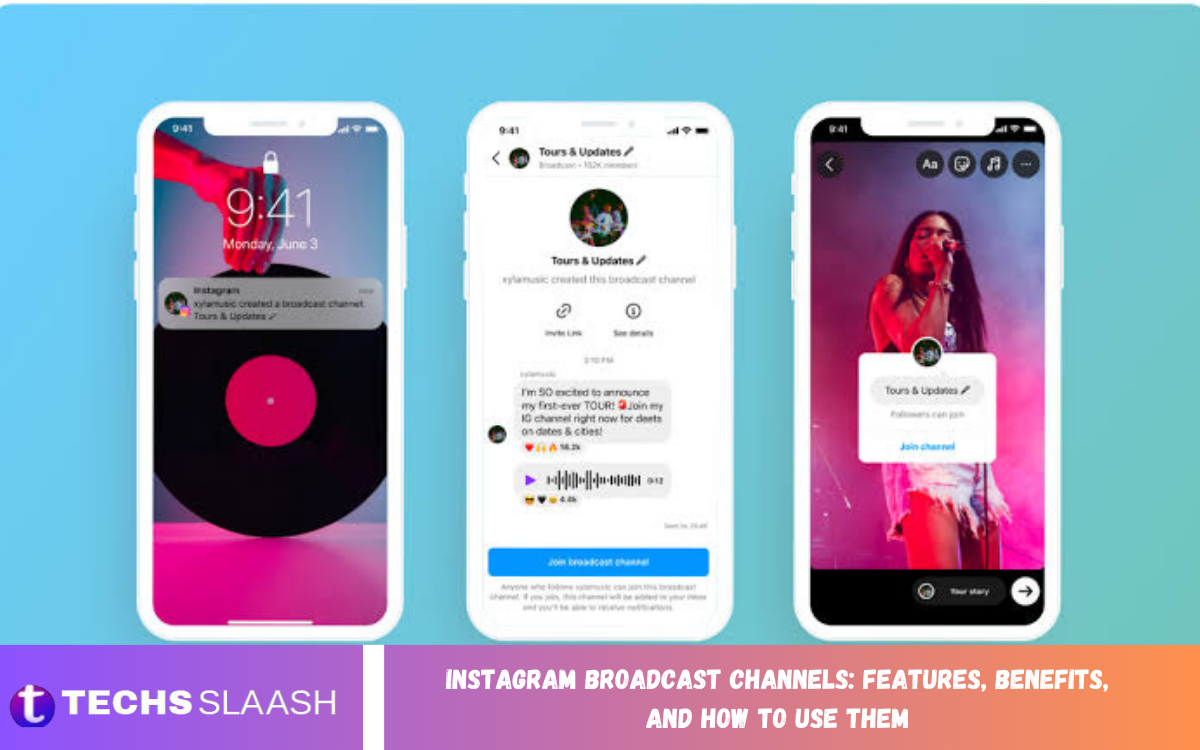
Instagram Broadcast Channels are a communication feature designed to help creators share updates directly with their followers. They provide a dedicated space where creators can send messages, announcements, photos, videos, polls, and other content to interested followers.
Unlike traditional Instagram posts and Stories, Broadcast Channels offer a more direct communication experience. Creators can use them to share exclusive updates, announce new content, communicate important information, and build stronger connections with their audience.
What Are Instagram Broadcast Channels?
An Instagram Broadcast Channel is a one-to-many messaging space where creators can communicate with followers through direct updates. Followers can join a channel and receive notifications when the creator publishes new content.
The format allows creators to communicate without relying entirely on the Instagram feed or Stories. It can be useful for sharing quick announcements, behind-the-scenes content, reminders, opinions, and community updates in a dedicated environment.
How Instagram Broadcast Channels Work
Creators can start a Broadcast Channel from Instagram and choose a suitable name for their audience. Once the channel is available, followers can discover or join it through invitations, Stories, profiles, or other promotional methods.
After joining, followers can receive channel updates and interact with available features such as reactions and polls. The creator controls the main communication flow, making the channel suitable for focused audience updates.
Key Features of Instagram Broadcast Channels
Instagram Broadcast Channels include several features that make creator-to-follower communication easier. Depending on the account and Instagram’s available features, creators can share text updates, images, videos, voice messages, polls, and other forms of content.
Interactive options can also help creators understand audience preferences. Polls and reactions allow followers to participate without turning the channel into a traditional group chat where everyone communicates equally.
Messaging and Content Sharing
One of the main advantages of Broadcast Channels is direct content distribution. Creators can send short announcements, important reminders, new-content alerts, personal updates, and exclusive information to channel members.
Photos and videos can make channel communication more engaging. Creators can also use different content formats to maintain variety and prevent the channel from becoming repetitive for followers.
Polls and Audience Interaction
Polls provide creators with a simple way to collect feedback from their audience. A creator can ask followers about upcoming content, preferred topics, product ideas, or other community-related questions.
Audience reactions can also provide quick feedback on shared updates. These lightweight interactions help creators understand what followers find interesting without requiring lengthy conversations or detailed surveys.
Benefits of Instagram Broadcast Channels
Instagram Broadcast Channels can help creators establish a more direct relationship with their audience. Instead of waiting for followers to discover a post or Story, creators can send updates through a dedicated communication channel.
The feature can also support community building by creating a space for people who are particularly interested in a creator’s content. Regular, valuable updates can encourage followers to remain engaged with the channel over time.
Better Audience Engagement
A Broadcast Channel gives creators another way to communicate beyond traditional Instagram content. Regular announcements and exclusive updates can encourage followers to check the channel and stay connected.
Creators can use the channel to complement their existing content strategy. For example, a creator can publish a video on Instagram and then use the Broadcast Channel to share additional context, reminders, or behind-the-scenes information.
Read Also: Managing Instagram Privacy Settings for Better Account Protection
Exclusive Content and Updates
Creators can use Broadcast Channels to provide content that feels more direct and personal. Exclusive announcements, early information, special updates, and behind-the-scenes moments can give followers additional reasons to join.
The content does not always need to be highly produced. Short messages, quick photographs, voice updates, and simple polls can create a more informal communication experience and make followers feel closer to the creator.
How to Create an Instagram Broadcast Channel
To create a Broadcast Channel, eligible creators can open Instagram and access the messaging area. From there, the available option for creating a Broadcast Channel can be selected, followed by entering a channel name and configuring the available settings.
After creating the channel, creators can invite followers to join it. Promoting the channel through Instagram Stories, profile content, or other audience touchpoints can help increase membership.
How to Join an Instagram Broadcast Channel
Followers can join a Broadcast Channel when they receive an invitation or discover a channel through Instagram. The creator may promote the channel through Stories, posts, profiles, or direct invitations.
After joining, followers can receive updates from the channel and use the interaction features that Instagram provides. Users can also manage their notification preferences based on how frequently they want to receive channel alerts.
How Creators Can Use Broadcast Channels
Creators can use Broadcast Channels for many different purposes. A content creator may share publishing schedules, upcoming videos, behind-the-scenes moments, personal announcements, or reminders about important events.
Businesses and professional creators can also use channels to communicate product announcements, educational information, campaign updates, or community news. The most effective approach is to provide useful content rather than sending excessive messages.
Instagram Broadcast Channels for Businesses
Businesses can use Broadcast Channels as an additional communication method for maintaining relationships with their Instagram audiences. Companies can share product updates, new launches, promotional announcements, educational content, and important brand news.
A consistent communication strategy can make the channel more useful for followers. Businesses should focus on providing relevant information and maintaining a reasonable publishing frequency instead of overwhelming members with repeated promotional messages.
Instagram Broadcast Channels for Influencers
Influencers can use Broadcast Channels to create a closer connection with their followers. They can share personal updates, content previews, event information, daily thoughts, and exclusive behind-the-scenes material.
The informal nature of channel communication can complement public posts and Stories. Influencers can also use polls and reactions to understand what their audience wants to see next.
Best Practices for Instagram Broadcast Channels
Successful Broadcast Channels usually focus on relevance, consistency, and value. Creators should understand their audience and share updates that match the reason followers joined the channel.
Messages should also remain clear and easy to understand. Excessive posting can reduce the value of notifications, while thoughtful and useful updates can encourage followers to remain active members of the channel.
How to Increase Broadcast Channel Engagement
Creators can encourage engagement by asking direct questions and using interactive features when appropriate. Polls can make followers feel involved in decisions about future content and community activities.
Promoting the channel regularly can also help attract new members. Creators should explain what followers can expect after joining, such as exclusive updates, early announcements, useful information, or special content.
Common Mistakes to Avoid
One common mistake is sending too many updates without providing meaningful value. Followers may become less interested if every notification contains repetitive or purely promotional information.
Another mistake is ignoring audience interests. Creators should pay attention to reactions, poll responses, and general engagement patterns to understand which types of updates are useful and which content may need improvement.
Instagram Broadcast Channels and Privacy
Broadcast Channels are designed around one-to-many communication rather than traditional group messaging. Creators publish updates while followers receive and interact with the available content features.
Users should still review Instagram’s current privacy and notification settings and understand how channel participation works. Features and controls can change as Instagram updates its platform, so available options may vary between accounts.
Why Instagram Broadcast Channels Matter
Instagram Broadcast Channels provide creators with another method for reaching interested followers directly. They can complement posts, Reels, Stories, and other Instagram features by providing a dedicated communication space.
For creators who regularly publish content, the channel can become an important part of their audience strategy. The focus should remain on useful communication, authentic interaction, and consistent value.
Frequently Asked Questions
What Are Instagram Broadcast Channels?
Instagram Broadcast Channels are dedicated communication spaces that allow creators to send updates directly to followers. Members can receive messages and use available interactive features such as reactions and polls.
Who Can Create an Instagram Broadcast Channel?
Eligibility and available features can depend on Instagram’s current account requirements and platform updates. Creators should check the options available within their Instagram account to determine whether the feature is accessible.
Can Followers Reply in Instagram Broadcast Channels?
Broadcast Channels are primarily designed for creator-to-audience communication rather than traditional group conversations. Instagram may provide interactive options such as reactions, polls, and other engagement features.
Can Instagram Broadcast Channels Be Used for Businesses?
Yes, businesses can use Broadcast Channels to share announcements, product information, educational updates, and community content. They can provide another communication method alongside regular Instagram content.
Are Instagram Broadcast Channels Free?
Creating and joining a Broadcast Channel does not generally require a separate subscription fee. However, specific monetization or premium features may depend on Instagram’s current offerings and account eligibility.
How Do I Join an Instagram Broadcast Channel?
You can join a channel through an invitation or by discovering the channel through Instagram content. Selecting the available join option allows you to become a channel member and receive its updates.
Can I Leave an Instagram Broadcast Channel?
Users can generally manage their participation in channels through Instagram’s available controls. If you no longer want updates, you can use the relevant channel options to leave or manage notifications.
Can Creators Share Videos in Broadcast Channels?
Creators can share different types of content through Broadcast Channels, including supported visual and media formats. Available content options may vary depending on Instagram’s current features and account type.
How Can Creators Grow a Broadcast Channel?
Creators can promote their channel through Stories, posts, profiles, and other audience interactions. Clearly explaining the benefits of joining and consistently providing useful updates can encourage more followers to participate.
Are Instagram Broadcast Channels Useful for Content Creators?
Broadcast Channels can provide creators with another direct communication method for reaching interested followers. They are particularly useful for announcements, exclusive updates, audience interaction, reminders, and behind-the-scenes content.
Conclusion
Instagram Broadcast Channels provide creators, influencers, and businesses with a dedicated way to communicate with interested followers. Features such as direct updates, media sharing, polls, and audience reactions can support stronger communication and community engagement.
The best results come from using Broadcast Channels strategically and consistently. By sharing useful information, maintaining an appropriate posting frequency, encouraging interaction, and understanding audience interests, creators can make their channels a valuable part of their Instagram content strategy.

1 Comment
Pingback: Instagram Notes: Key Features and How They Work - Techsslaash.com